
If your team's app work feels a bit like a shed full of half-labelled boxes, you're not alone. One release is waiting on QA, another is stuck in a spreadsheet, and someone's asking which version is live. Application lifecycle management software is the bit that brings order to that mess, so founders, developers, and operators can see what's happening, what's blocked, and what needs a decision.
That matters in New Zealand and Australia because so many teams are shipping software while also juggling cloud changes, security checks, and limited specialist time. You might not need a giant enterprise suite, but you do need a sensible way to track the journey from idea to retirement without losing the thread. That's where ALM starts to earn its keep.
A founder rings up the team on a Thursday afternoon. The release is due, but testing notes live in one tool, code changes sit in another, and no one is quite sure whether the latest approval has landed. The app still ships, maybe, but everyone's crossing their fingers a bit.
That kind of drift is exactly why application lifecycle management software has moved from a back-office nice-to-have into a practical coordination layer. It gives teams one place to trace work from request to release, and then on to support and retirement. If you're building SaaS, custom apps, or internal tools, that joined-up view saves a lot of head scratching.
Small teams usually feel the cracks earliest. There isn't room for much hand waving when a release needs sign-off, a bug needs fixing, and a customer is already asking what changed. A clean lifecycle view helps everyone answer the same basic questions, like what's in progress, what's blocked, and what's already gone live.
The local software market gives that problem a clear shape. New Zealand's software-sector data collection framework has been built around the Statistics New Zealand ICT Supply: Services and Software Survey, which was used to measure domestic and export software activity before it ended in 2023 and moved into the Annual Enterprise Survey. That official backbone matters because software work in NZ is tracked as part of a wider enterprise picture, not always as a neat standalone ALM category. Stats NZ survey context and sector framing
A good ALM setup doesn't just store tasks, it keeps the story of the app intact.
That's why teams looking for practical workflow guidance often pair ALM thinking with broader delivery advice, such as tips for the software development lifecycle. If your current process feels fuzzy, a simple workflow map like the one at NZ Apps' app development workflow overview can help you spot where the gaps start.
Think of ALM as the production control room for your app. Not the workshop floor, not the finance desk, and not just the ticket board. It sits above the moving parts and keeps the whole run of show visible.
That's the useful distinction. Project management tells people what to do next. Version control records code changes. DevOps toolchains help ships sail faster. ALM software pulls those pieces together so the team can trace requirements, changes, tests, approvals, and releases as one connected thread.
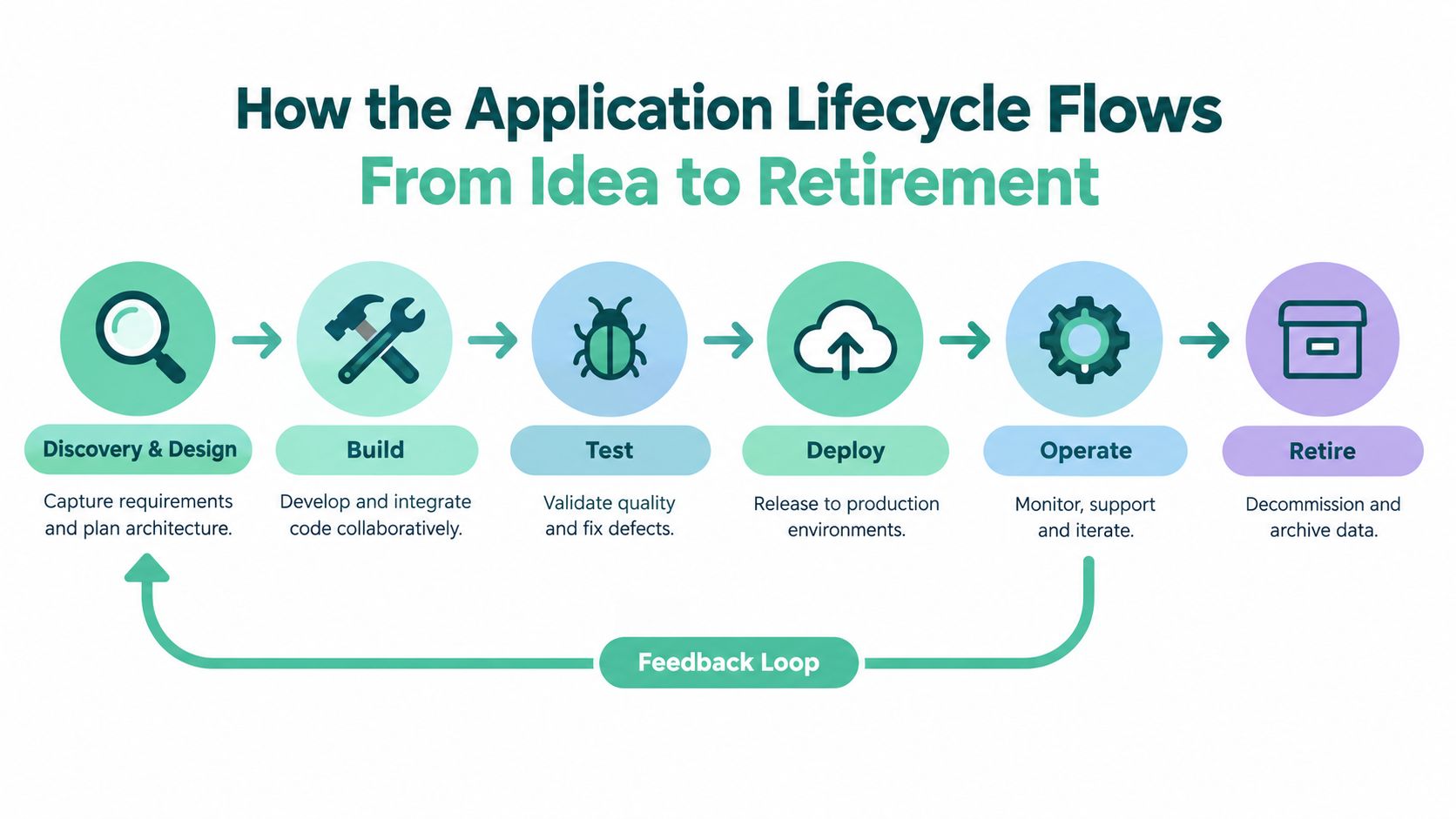
Key concept: if you can't trace a change from request to production, you've got software delivery with blind spots.
That traceability matters because it helps people answer awkward questions quickly. Who asked for this feature? Which test covered it? Which environment was it released into? If a bug shows up, you don't want a scavenger hunt.
The lifecycle idea itself isn't new, but ALM makes it practical. A feature starts with discovery, moves into design, gets built, tested, released, monitored, and eventually retired. The software should keep that path visible without forcing the team to live in six different systems.
For a plain-language view of how development work usually gets broken up, Figr's stages of product development is a handy companion read. It sits nicely alongside the lifecycle flow shown here, because both treat software as a series of linked decisions rather than one big launch day.
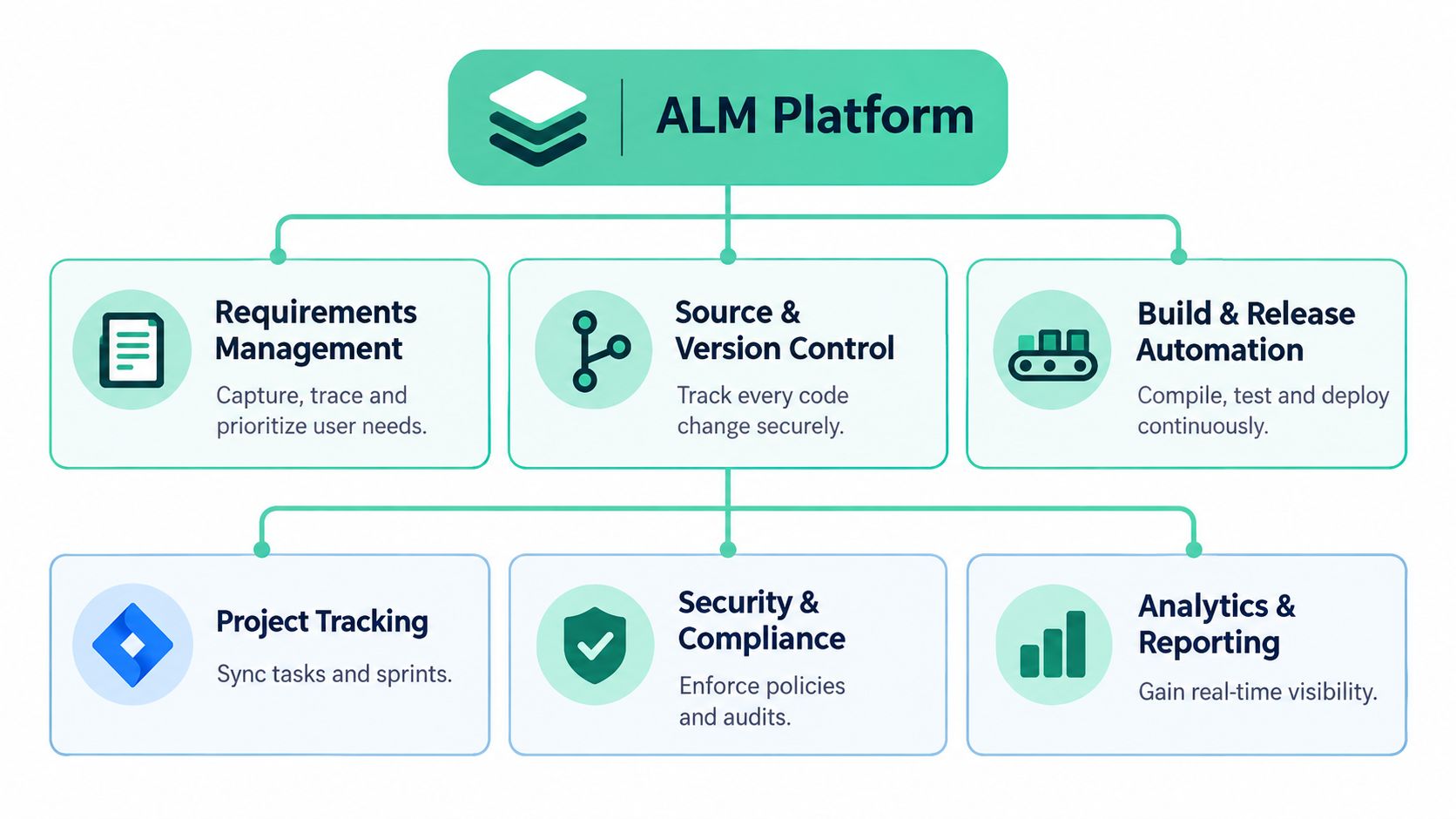
ALM isn't just planning, and it isn't just deployment either. It usually reaches into requirements management, source control, testing, release control, and governance reporting. In practice, that means less copying and pasting between tools, fewer “which version is this?” moments, and a cleaner trail for audits or customer support.
For teams working across design, development, and operations, that trail is the point. It's the difference between a tidy process and a pile of crossed wires.
New ideas usually arrive as half-formed requests. A customer wants a feature, a compliance change lands, or someone spots a process that's chewing up too much time. ALM software turns that rough starting point into a sequence the team can manage.
Discovery is where the team writes down what's needed and why. That can include user needs, business rules, privacy checks, and technical constraints. Then design turns those needs into a workable shape, before build starts turning the plan into code.
This is also where many teams get tripped up. If requirements are vague, development ends up guessing. If design skips security or accessibility thinking, those gaps come back later as rework. The New Zealand public-sector digital lifecycle makes that plain, because it breaks delivery into Discovery, Alpha, Beta, Live, and Decommission and asks teams to bake in security, privacy, accessibility, and information/data management at the right point, not after the fact. New Zealand digital lifecycle framing
Testing is where the software gets embarrassed a little, which is healthy. Teams check whether the thing really does what it promised, and whether it behaves properly when it meets other systems. Deployment then moves the approved version into production with the right controls around promotion and change.
After that comes operation, which is the part many people underestimate. Users need support, bugs need fixes, and the system needs monitoring. A well-run ALM platform keeps the handoff from build to live to support from turning into a shrug.
A useful way to think about this is that operate is not the end of the story. It feeds the next round of discovery, because real-world use always shows something the team didn't know before.
Decommissioning sounds tidy on paper, but in real life it's where a lot of risk hides. Old systems linger, data sits around, and people keep using a tool because no one had the time to switch it off properly. That's why lifecycle control has to include retirement, not just launch.
The bigger point is simple. If ALM software tracks the whole arc, teams can manage change without leaving ghost systems behind.
The best ALM tools don't try to be clever for the sake of it. They handle the boring bits that keep software delivery sane. Requirements, code, tests, releases, and reporting all need to sit close enough together that people aren't chasing updates across five tabs.
Requirements management is the starting block. It captures what users or stakeholders asked for, then keeps that request tied to the work that follows. Source and version control do the record-keeping on the code side, so teams know what changed and when.
Build and release automation matters too, because manual promotion is where mistakes creep in. Test management gives QA teams and developers a shared place to see what was checked, what failed, and what still needs attention. Governance reporting rounds it out by showing who approved what, and whether the release path stayed clean.
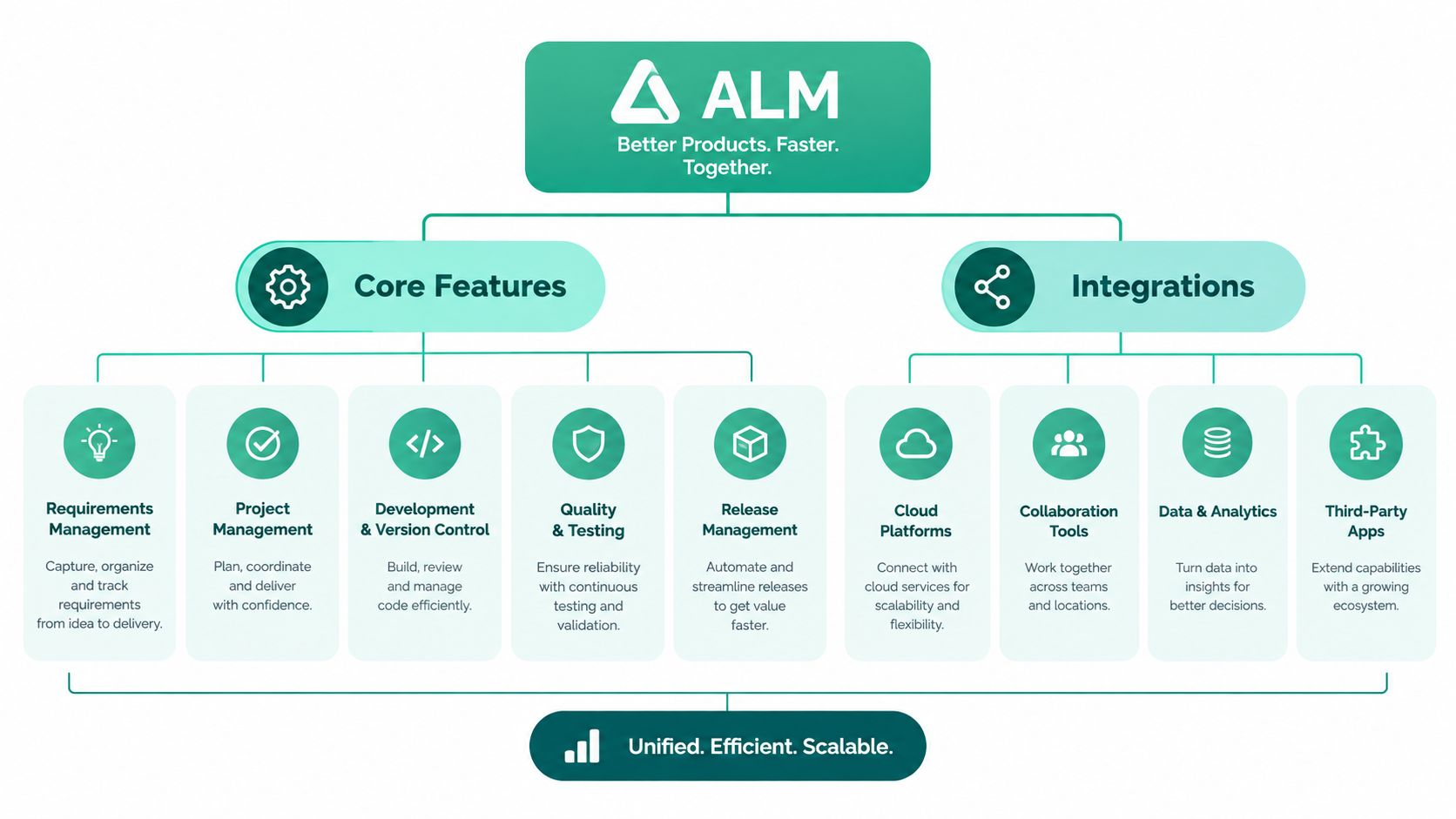
Here's where the tool either earns its spot or becomes shelfware. If it plugs neatly into IDEs, CI/CD pipelines, issue trackers, and security tools, people can keep working in their normal flow while ALM keeps the record straight. If it can't, someone ends up doing duplicate admin, and that gets old fast.
For teams comparing software options, what API integration means in practice is a useful companion piece, because integrations are where a lot of the daily value shows up. And if your team is also weighing governance tooling, a guide on how to find the best SOC 2 software can help frame what audit-ready evidence looks like.
Practical rule: if a tool forces people to retype the same change in multiple places, it's creating work, not removing it.
A lightweight ecosystem can be enough for a small team, but the pieces need to talk to each other. That's the test. Not how many logos sit on the vendor page, but whether the product reduces handoffs, confusion, and release-day stress.
A lot of vendor comparisons fail because they start with feature lists and end with more feature lists. That's noisy. Founders usually need a clearer question, which is whether the platform fits how their team ships software, especially if some of that work stays local while some moves to cloud.
| Evaluation Criteria | Why It Matters in NZ | What to Ask Vendors |
|---|---|---|
| Hybrid fit | Many teams work across local systems and cloud services | Can the platform handle mixed environments cleanly? |
| Traceability | Useful for release control and governance | Can we trace a requirement from request to deployment? |
| Compliance support | Helps with security, audit, and internal controls | What reporting and approval logs are included? |
| Small-team fit | Lean teams need less admin, not more | How much setup and upkeep does it need? |
| Deployment model | SaaS, on-prem, and hybrid each have trade-offs | What data stays where, and who manages updates? |
| Support quality | Time zones and response times matter | Do you support NZ and AU customers directly? |
That matrix keeps the chat grounded. It's especially relevant in a market where cloud is growing but not in a neat straight line. TUANZ says New Zealand sits in a cloud-smart reality rather than a pure cloud-first one, and the broader ANZ picture includes active hybrid use and cloud repatriation, so the deployment model is not a side note. That context matters when software data or workloads have to stay under tighter control. TUANZ digital priorities context
A polished demo can hide weak bones. Ask how the tool handles partial cloud, environment promotion, and approvals across teams. Then ask what happens when one group wants speed and another needs stricter control.
ALM content often talks about enterprise suites versus lighter stacks, but the smarter question is simpler. Does this tool make release governance easier for your team, or does it just look impressive in a sales call? That's where the truth usually lands.
Switching ALM software is a bit like moving house while still living in the old place. If you try to shift everything in one go, the risk of breakage goes up fast. A phased move is steadier, and it gives the team space to notice what's missing.
Pick a pilot team that already feels the pain. Bring in their current requirements, release notes, and test history first, then wire up the minimum flow needed to prove the system works. That keeps the migration real without turning it into a giant theatre production.
After that, map the current promotion path. Who can move code between environments? Who signs off on production? What evidence is needed if a change gets reviewed later? Those questions sound dull, but they're the bits that save your skin when something goes sideways.
If old tickets, test records, or release approvals matter, carry them over with care. The new tool should preserve traceability, not wash it away. That's especially true if your team works with customer data, regulated systems, or services that need a tidy audit trail.
A simple rollout sequence helps:
Don't bolt on security at the end. If you leave it too late, the team will treat it like paperwork instead of part of the build.
For NZ and AU teams, the win is when migration makes delivery calmer, not fancier. If people can find the right release history, see approval status, and trust the environment controls, the switch has done its job. If not, it's just another platform with a shinier coat.
Local teams don't buy software in a vacuum. They buy it in a market shaped by data sovereignty concerns, hybrid cloud reality, and a growing need to do more with fewer specialist hands. That's why the buying question here is rarely “does it have enough features?” It's more “can this fit our mix of cloud, control, and headcount?”
The public sector gives a useful signal. New Zealand's lifecycle thinking ties software delivery to security, privacy, accessibility, and decommissioning, which is a good reminder that lifecycle control is not only a developer concern. The Reserve Bank of New Zealand also says IT asset management needs a lifecycle view because components can change multiple times over an asset's life, and end-of-life or end-of-support items need active management before they become unsafe or unsupportable. RBNZ technology management policy NCSC asset lifecycle guidance
A New Zealand example from Apps Run the World says IAG New Zealand implemented Sparx Enterprise Architect as its application lifecycle management platform in 2007 and used it across its NZ operations. It created a single point of truth for applications, databases, and infrastructure, while also supporting requirements traceability, impact analysis, and change control through a central model-based repository. That's a solid reminder that ALM isn't just about tickets and timelines, it can also support architecture and governance. IAG New Zealand ALM case example
For teams exploring local options, the NZ Apps mobile app development directory is a useful place to scan regional vendors and get a feel for the market. If you're comparing tools for your own team, start small, map your lifecycle phases, and test whether the platform handles hybrid traceability without turning your process into a maze.
One more thing. AI, DevSecOps, and low-code are changing expectations, but they don't magically fix poor process. For lean NZ teams, the right ALM setup is the one that cuts manual coordination, keeps evidence tidy, and still works when part of your stack stays local. That's a pretty good yardstick, really.
If you're trying to sort through ALM options for a NZ or AU team, NZ Apps can help you compare local software companies, app developers, and related tools in one place. Visit NZ Apps to find regional options, check case studies, and get a clearer view of who fits your setup.
Add your NZ or Australian app or tech company to the NZ Apps directory and get discovered by founders and operators across the region.
Get ListedReach tech decision-makers across New Zealand and Australia. Sponsored and dofollow editorial links, permanent featured listings, and sponsored articles on a DA30+ .co.nz domain.
See Options