
Let's be honest, "ecommerce web design" sounds a bit technical, maybe even a little dry. But what is it, really? At its heart, it's the art of building a digital storefront that works its socks off for your business, 24/7. It never sleeps.
Think of it like designing the perfect retail shop. Does it feel welcoming? Is it easy to walk around? Can you find what you need and get to the checkout without a fuss? That’s all we’re doing, just online. Simple, right?
It’s the complete blueprint for your online business. Imagine walking into a physical store. Is it bright and inviting? Are the aisles clearly marked? Can you find the tills easily? You know the feeling when it’s done well.
That’s exactly what good ecommerce web design does in the digital world. It’s the craft of guiding a visitor—a real person—from the moment they land on your site to that final, satisfying "thank you for your order" page. The whole journey should feel smooth. And enjoyable.
You'll often hear two terms thrown around: User Experience (UX) and User Interface (UI). They sound similar, but they do very different jobs. You absolutely need both.
A beautiful site (great UI) that’s a nightmare to use (bad UX) will never sell a thing. It just won't. Likewise, a super functional site (great UX) that looks dated and untrustworthy (bad UI) will just scare people away. They have to work together perfectly, like a well-oiled machine.
Good design is like a refrigerator—when it works, no one notices, but when it doesn’t, it sure stinks.
Here’s the thing: getting this right is non-negotiable, especially for Kiwi businesses. In New Zealand's booming e-commerce sector, a professional website isn't a 'nice-to-have' anymore; it's how you compete and win. The online shopping market here is projected to hit a massive $6.8 billion in 2025. That's not small change.
With over 11,500 businesses now operating online, just having a website isn't enough. Not by a long shot. You need to stand out. For businesses in Auckland, Christchurch, or anywhere in between, a custom site that focuses on speed and a brilliant user experience can be the single biggest difference-maker. If you want to dive deeper, you can read the full research about the NZ online shopping industry to get the whole picture.
Alright, now let's get into the nuts and bolts of it all. A winning ecommerce site isn’t just one thing; it’s a machine with several crucial parts all working together perfectly. Think of it like a great recipe—if you miss one key ingredient, the whole thing just falls flat. A bit of a disaster, really.
So, what are those essential ingredients? A top-tier ecommerce web design focuses on several key areas that need to be absolutely spot on.
We’ve touched on this duo before, but honestly, it’s worth repeating. User Experience (UX) is all about the feel of your store. It’s the invisible logic that makes a customer’s journey from the homepage to the final purchase feel natural and completely effortless. Can they find the ‘menswear’ section in a second? Can they filter by size without getting a headache? That’s good UX.
Then you have the User Interface (UI), which is everything your customers actually see and touch—the look of your store. This covers your brand’s colours, the fonts you’ve chosen, and the style of your buttons. It’s the visual handshake that says, “Hey, you can trust us. We’re professional, and this is a great place to shop.”
One without the other is a recipe for disaster. A beautiful store that’s confusing to navigate is useless. A functional store that looks like it was built in 1999 won’t inspire any confidence. You need both. Period.
Let's be clear—your product pages are where the real magic happens. This is your digital sales floor, the exact spot where a casual browser decides to become a paying customer. If you mess this part up, you’ve lost the sale. It’s that simple.
So, how do you make them compelling? It really comes down to a few non-negotiables:
Think of your product page as your best salesperson. It needs to be persuasive, informative, and trustworthy, working 24/7 to close deals for you.
Seriously, this is where so many online businesses drop the ball. A clunky, confusing, or long checkout process is the number one killer of sales. Have you ever abandoned a shopping cart yourself out of pure frustration? Your customers will do the same thing.
The goal here is a frictionless checkout. This just means stripping away any unnecessary steps, fields, and distractions that get in the way of the sale.
To better understand how all these pieces fit together, it’s worth exploring a strategic guide to store design and layout.
Finally, let's talk about two things that operate in the background but are mission-critical: performance and security.
Site speed isn’t just a nice-to-have; it's an absolute must. Today's shoppers are impatient. If your pages take more than a few seconds to load, a huge chunk of your visitors will simply leave before they even see what you’re selling. Google also gives a nod to faster sites in its search rankings, so a slow site is actively hurting your visibility.
And then there's security. Customers are handing over their personal and financial information, and they need to feel completely safe doing so. A secure site (look for the little padlock icon in the browser) isn't just a technical detail—it's a massive trust signal. Without it, you’re basically telling customers you don’t take their privacy seriously, and they’ll take their business somewhere that does.
Okay, we've walked through the essential parts that make an online store actually work. Now for the big question: what engine will you build this machine on? Choosing your ecommerce platform is a massive decision, one that will ripple through everything from your day-to-day admin headaches to your grand five-year growth plans.
Frankly, it feels like a monumental choice because it is. Think of it like deciding between leasing a ready-made retail space in a busy mall versus building your own custom shop from the ground up. Both have serious advantages, but they cater to very different needs, budgets, and ambitions.
Do you go for an out-of-the-box solution like Shopify, famous for its sheer ease of use? Or is a more flexible, open-source option like WooCommerce, which plays nicely with WordPress, a better fit for you? Then there’s the custom-built route, which is a whole different ball game entirely.
Let's get one thing straight: there is no single "best" platform. The right choice depends entirely on your business—your budget, your technical comfort level, and where you see yourself in a few years. It's about finding the right tool for the job you need to do right now, but with a careful eye on the future.
This handy infographic helps break down the core decision between focusing on aesthetics versus functionality to guide your thinking.
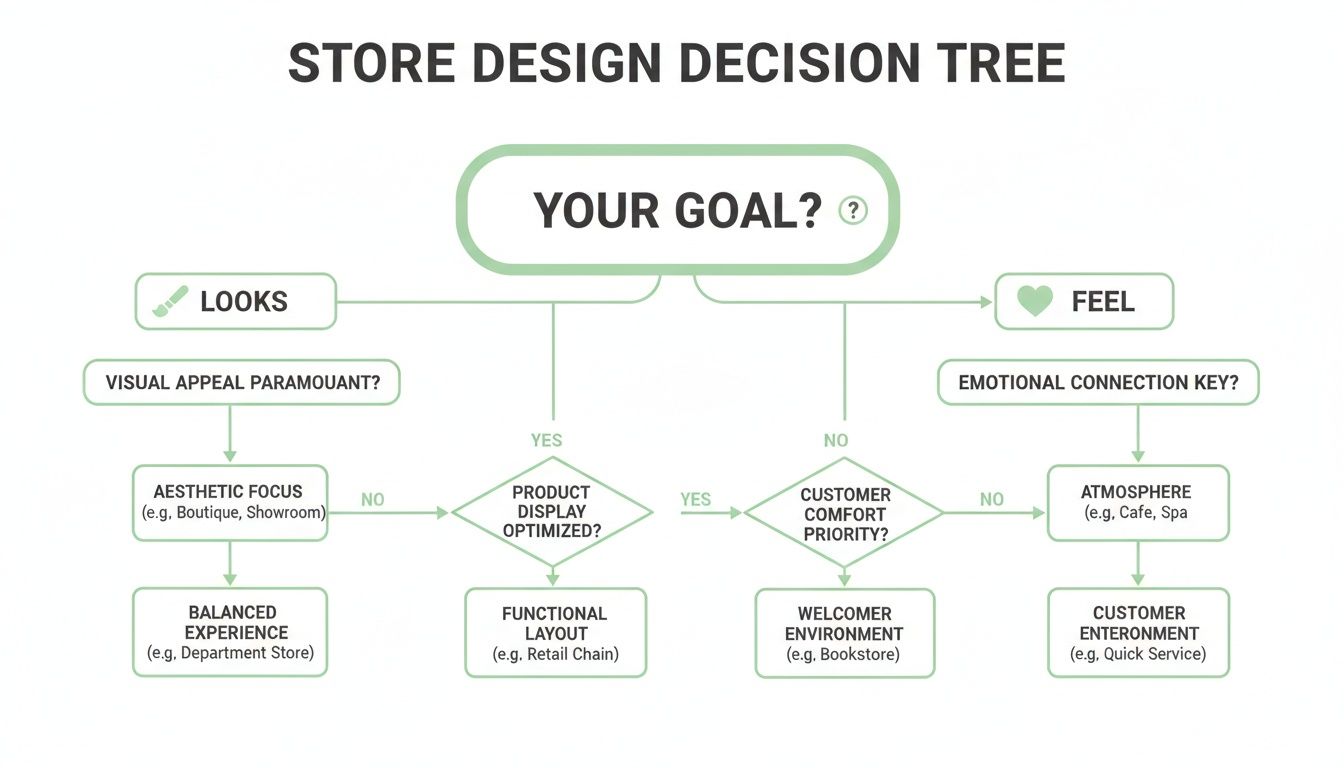
As the visual shows, your main goal—whether it's nailing the look or perfecting the user journey—pushes you down completely different design paths from the very beginning.
For most New Zealand businesses, the debate often boils down to two heavyweights: Shopify and WooCommerce. Each has a passionate following, and for good reason. Shopify is the undisputed king of simplicity; you can get a good-looking store up and running incredibly fast without needing to touch a line of code. It just works.
WooCommerce, on the other hand, is a plugin built on top of WordPress, the world's most popular website builder. This foundation gives it almost limitless flexibility. If you can dream it, you can probably build it with WooCommerce. For many aspiring Kiwi entrepreneurs, the combination of WordPress and a powerful theme is the perfect starting point. In fact, there are fantastic guides out there showing how you can create an online store with Divi and WooCommerce for a truly powerful and customisable setup.
Choosing a platform isn't about picking a winner. It's about asking the right questions. What can you afford? What can you manage? And what will you need next year?
So, how do you actually make the call? Let’s lay out the options in a more structured way to see how they stack up for a typical NZ business.
This table offers a quick-glance comparison of popular ecommerce platforms to help you decide which option best fits your needs, budget, and technical comfort level.
| Platform | Best For | Key Pros | Key Cons | Typical NZ Cost |
|---|---|---|---|---|
| Shopify | Startups, small businesses, and anyone wanting simplicity. | Incredibly user-friendly, excellent support, all-in-one solution. | Transaction fees on top of monthly fees, less customisation freedom. | $40 - $450+ per month |
| WooCommerce | Businesses already using WordPress, those wanting full control. | Totally customisable, huge community, no monthly platform fees. | Steeper learning curve, you manage your own hosting and security. | Varies (Hosting + Plugins) |
| Custom Build | Established businesses with unique needs or complex systems. | Built exactly to your specifications, complete ownership and control. | Significant upfront investment, longer development time. | Project-based (thousands) |
As you can see, the choice isn't exactly straightforward. A platform like Shopify gets you to market fast, but a custom build offers unparalleled control for businesses with very specific needs—like unique product configurators or complex backend integrations. We've actually put together a deep dive that helps you compare the specifics of Shopify vs WordPress for NZ businesses to weigh these pros and cons in more detail.
Ultimately, this decision shapes the future of your online operations. It’s worth taking your time, doing your research, and maybe even chatting with a professional to map out the best path forward. A little planning now can save a world of pain later on.
You could build the most beautiful, user-friendly online store in the world. But if nobody can find it, does it even really exist? It’s a bit of a philosophical question, but in business, the answer is a hard no. It just doesn't.
This is where Search Engine Optimisation (SEO) stomps onto the stage. SEO is simply the craft of making your website more attractive to search engines like Google. When someone in Auckland searches for "handmade leather boots," you want your shop to be one of the very first things they see. A great ecommerce web design builds SEO right into its DNA from day one.
It’s not some dark art; it’s just about speaking Google’s language. This means using the right keywords on your product pages, making sure your site is technically sound, and creating content that shows you’re an expert in what you sell.
Yep, that's a good way to put it. Good SEO is what gets potential customers to your digital doorstep. It’s a mix of a few key things that all need to work in sync:
Getting a flood of traffic feels great, but it’s only half the battle. What’s the point if nobody actually buys anything? That’s where the other half of our dynamic duo comes in: Conversion Rate Optimisation (CRO).
If SEO brings people to your door, CRO is the art of convincing them to come inside, look around, and make a purchase. It’s all about turning those casual visitors into paying customers. Honestly, this is where the money is really made.
A tiny increase in your conversion rate can have a massive impact on your bottom line. Think about it—doubling your traffic is hard work, but getting just a few more sales from the traffic you already have is often much, much easier.
SEO gets you found. CRO gets you paid. You can’t have a successful online store without focusing on both.
The growth potential here in New Zealand is enormous. The local ecommerce sector is on a serious upward trajectory, predicted to hit NZ$17.6 billion by 2028. Standing out requires more than just existing online; it demands a design that captures attention and effortlessly converts browsers into buyers. You can discover more about New Zealand's ecommerce expansion to see just how big the opportunity is.
For Kiwi brands, this means pairing a solid site structure with focused SEO. To get started, you might be interested in our guide that breaks down the essentials of effective search engine optimisation in New Zealand. It’s the perfect next step. A beautiful design with a clear path to purchase is what turns a click into a customer and builds a business that thrives in our competitive local market.
Running an online store in Aotearoa has its own unique flavour, doesn't it? What works wonders for a massive American retailer might just fall flat with Kiwi customers. Honestly, understanding the local landscape isn’t a bonus feature; it’s the home-ground advantage that can make or break your success.
You’re not just selling to a generic audience; you’re connecting with people from Northland to Invercargill. This means thinking about how Kiwis prefer to pay, how you’ll get your products to them, and what your legal obligations are as a local business.
It’s about more than just a .co.nz domain.
When a customer gets to your checkout, the last thing you want is for them to pause and think, "Hmm, I'm not sure about this." Building trust is huge, and offering familiar, secure payment options is a massive part of that.
While Visa and Mastercard are the global standards, many Kiwis look for local favourites. Offering a mix of payment gateways shows you understand their preferences:
Giving customers choice isn’t just good service; it’s a powerful way to reduce cart abandonment and show that you’re a legitimate, Kiwi-focused operation.
Let’s talk logistics. Shipping across New Zealand presents a unique set of challenges. It’s not just about cost; it’s about reliability and setting clear expectations for your customers. A customer in rural Southland has very different delivery expectations from someone in central Auckland.
Getting this right involves a clear strategy. Navigating NZ Post and local couriers means being upfront about your shipping times and costs. Nothing frustrates a customer more than a surprise shipping fee tacked on at the very end of the checkout process. Transparency is your best friend here.
Think of shipping as the final handshake of the customer experience. A messy, delayed delivery can ruin an otherwise perfect shopping journey.
And this all ties back to the mobile experience. A mobile-first mindset is critical for New Zealand businesses, especially as smartphones are expected to power 65.7% of the $3.25 billion ecommerce transaction value in 2025. With 72% of Kiwi online spending staying with local businesses, only those with a seamless mobile journey—from browsing to shipping calculation—will thrive.
Finally, there’s the legal stuff. It sounds boring, I know, but it’s non-negotiable for building a sustainable business. In New Zealand, you need to be familiar with a few key pieces of legislation.
The Consumer Guarantees Act (CGA) ensures the products you sell are of acceptable quality, and the Privacy Act dictates how you must handle your customers' personal data. Operating by the book isn’t just about avoiding fines; it’s about proving to your customers that you’re a professional and trustworthy business. For a closer look at the local landscape, our overview of ecommerce in New Zealand offers more practical advice.
So, let's get to the two questions on everyone's mind: how much is this going to cost, and how long will it take? Honestly, asking "how much for a website?" is a bit like asking "how much for a house?" The answer is always going to be, "Well, it depends."
Are you building a modest starter home, or are you commissioning an architectural masterpiece with a pool and a home cinema? The same logic applies here. A straightforward online store is a totally different beast from a custom-built ecommerce platform with all the bells and whistles.
The final quote you see isn't just a number pulled from thin air. It’s a direct reflection of the time, skill, and complexity needed to build exactly what your business requires. Think of it like a recipe – the more ingredients you add, and the more complex they are, the more it's going to cost.
A few key factors will always move the needle on your investment:
Building an ecommerce site is a serious investment, but a well-planned project isn't an expense—it's a powerful asset that generates a strong return for your business.
Alright, let's get down to some real numbers to give you a clearer picture. While every project has its own unique flavour, these general ranges should help you set some expectations. Just remember, these are guides, not guarantees.
A simple starter store built on a platform like Shopify, using a quality pre-made theme with some light customisation, could be up and running in about 4 to 8 weeks.
A more advanced Shopify or WooCommerce site with a custom-designed theme, several key app integrations, and a bigger product catalogue will likely take somewhere between 2 to 4 months. This is the sweet spot for most growing Kiwi businesses.
For a fully bespoke web application built from the ground up, you’re looking at a much bigger commitment—often 6 months or more. This is typically for established businesses with very specific, complex needs that off-the-shelf solutions just can't handle.
The project itself usually flows through a few key stages: we start with discovery and strategy, move into design mockups and feedback, then the core development and coding, followed by rigorous testing, and finally, the big launch day. Every single step is crucial for making sure the final result not only looks amazing but works flawlessly.
It's natural to have questions when you're looking at setting up an online store. It’s a big step! So let's run through some of the most common ones we hear from Kiwi business owners just like you.
This is always the first question, and the honest answer is: it depends. Think of it like building a house. A simple pre-fab design will cost a lot less than an architecturally designed home with all the bells and whistles.
A straightforward store using a platform like Shopify might start from a few thousand dollars. For a completely custom-built solution with complex integrations, you could be looking at tens of thousands. The final price tag really comes down to the complexity of the design, the number of unique features you need, and the platform you choose.
Another classic "how long is a piece of string?" question. A simple, template-based store can be up and running in as little as 4 to 8 weeks. It's a well-trodden path, and the process is pretty streamlined.
But for a more custom project that needs unique design work or specialised features, you should plan for a longer timeline, usually around 2 to 4 months. Good work takes time, you know? A proper discovery and planning phase, followed by design, development, and thorough testing, is the only way to ensure you don't run into nasty surprises later on.
Absolutely! Tools like Shopify and Squarespace have done a fantastic job of making it possible for anyone to get a basic shop online without needing to be a tech whiz. They are a great choice if you're just starting out and need to get selling quickly on a tight budget.
The catch is that you might eventually hit a wall as your business grows. That’s where a professional team comes in. You get access to deeper customisation, better performance, and expert advice on critical things like SEO and conversion optimisation—the stuff that really moves the needle when you’re trying to scale.
DIY is great for starting, but professional design is built for growing.
There's no single "best" platform, only the best one for your specific needs. For many startups, Shopify is the go-to. It’s user-friendly, reliable, and has everything you need in one package.
On the other hand, if you’re already using WordPress and need total flexibility, WooCommerce is an incredibly powerful option. The right choice hinges on your budget, your technical confidence, and what you want your business to look like in a few years.
Ready to build an online store that truly performs? The team at NZ Apps specialises in creating custom ecommerce websites that help New Zealand businesses grow. Let's talk about your project today.