
Monday morning. Long weekend just ended. Your Wellington team logs in and the queue is ugly.
Three support people. A product roadmap already slipping. US customers were awake while NZ was off the clock, so the backlog kept stacking up. The same questions are sitting there again: password resets, billing proration, API limits, account access, setup steps someone already explained last week.
A lot of founders realise something mildly infuriating. They're paying smart humans to retype the same answer over and over, while the work that grows the product waits. Then a new hire joins, and everyone discovers half the team's know-how lives in Slack threads, old tickets, and one cursed Google Doc no one wants to touch.
That's usually the moment knowledge base software stops sounding like admin fluff and starts looking like oxygen.
You don't notice the problem when support volume is still manageable. You notice it when the queue starts teaching you a lesson.
A small NZ SaaS team can handle a lot of chaos for a while. Founders answer tickets. Engineers jump into Zendesk or Intercom when something gets hairy. Someone writes a macro. Someone else saves a canned reply. It works, until it really doesn't.

Then you get the classic founder headache. A long weekend lands. Offshore customers keep using the product. Monday opens with 180 unanswered tickets. Not theoretical. Just sitting there. The queue feels like wet concrete.
It's the repetition.
Five questions account for a weirdly large share of the queue. A support lead knows the answers by heart. A founder knows the policy nuance behind billing. An engineer knows the answer on API rate limits. But none of that knowledge is packaged. It's trapped in people.
Practical rule: If your team answers the same question every week, that answer should become an asset, not a conversation.
That's also why onboarding drags. A new support hire doesn't just need product knowledge. They need exceptions, caveats, screenshots, workarounds, and the “if they say X, check Y” bits. The tribal stuff. The stuff no one wrote down.
A good knowledge base doesn't have to be grand or fancy. It just has to take repeat load off the humans who should be building, selling, or fixing the product.
That means three things, fast:
NZ teams feel this earlier because headcount is usually lean. You can't hide sloppy documentation behind a giant support org. One person being stuck in repetitive support work hurts. Two people hurts more. By the third, you're hiring around a process problem.
Most buyers treat knowledge base software like one category. It isn't. It's three layers wearing the same outfit.
At the base, it's a library. In the middle, it's a search engine. On top, it's a concierge that can turn stored knowledge into answers. If you don't split the category that way, you'll buy the wrong tool and wonder why the rollout feels lopsided.
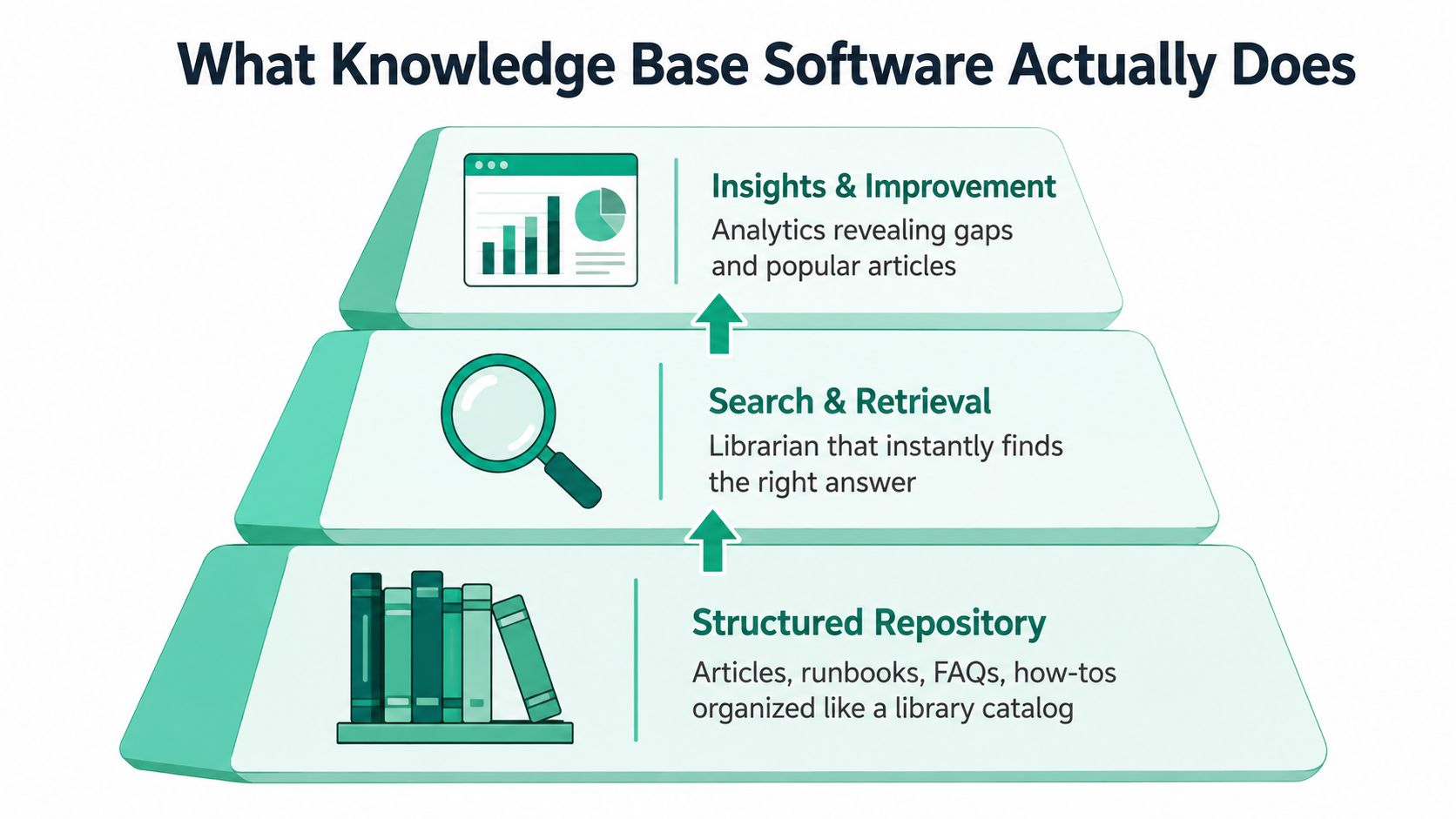
This is the part users picture first. Articles, FAQs, onboarding notes, troubleshooting steps, product docs, policy pages, internal SOPs.
In practical terms, knowledge management software is usually evaluated as a centralised, searchable repository for digital documents in NZ software directories, and those repositories need to handle mixed content types like PDFs, docs, spreadsheets, presentations, audio, and video while keeping permission control and search intact across one indexed corpus (Capterra NZ knowledge management software).
That matters more than it sounds. If your answers live in Google Drive, Slack, inboxes, and one forgotten Confluence space, you don't have a knowledge base. You have a scavenger hunt.
A decent internal wiki, a public help centre, or a shared company handbook can all serve this layer. If you want a simple example of the idea, Donely's take on a company knowledge base is a good reference point because it frames the problem as shared team memory, not just support content.
Now the awkward truth. Publishing content is the easy bit. Retrieval is the hard bit.
If users and staff can't find the right answer quickly, your shiny library becomes digital attic space. That's why search matters more than visual polish. Typo tolerance, synonym matching, metadata, filters, permissions, and article recommendations are not “advanced extras”. They're the machinery.
For NZ teams writing internal SOPs and support material at the same time, this usually overlaps with disciplined process documentation systems. Same principle. Good structure beats hero memory.
A knowledge base without strong search is like a tidy storeroom with the lights off.
This is the AI bit, and yes, it's useful. Sometimes.
Recent NZ tech coverage shows the category moving this way. Talkdesk launched Knowledge Creator, an AI-driven feature designed to help create and maintain customer service knowledge bases (IT Brief NZ on Talkdesk). That's a signal, not hype. The product category is shifting from static publishing towards assisted creation and answer generation.
You'll see this layer as help widgets, agent assist panels, AI search bars, or chat-style answers grounded in your docs. It can sit inside Zendesk, inside your app, or across internal systems. But it only works if the lower layers are solid.
So when you buy knowledge base software, don't ask “Which tool has the most features?” Ask three separate questions:
That framing clears up half the category confusion straight away.
NZ teams usually don't get the luxury of waste. That's why weak documentation hurts faster here.
The local software industry is not tiny or fringe. New Zealand's software sector had 11,067 firms and 29,700 employees in 2016, with the wider ICT sector contributing NZ$3.6 billion that year. By 2020, the software industry had grown to over 12,000 firms, with about 2,500 employing staff and around 500 having more than 10 employees. The same Treasury case study says software industry revenue reached NZ$10 billion in 2019, up from NZ$6 billion in 2013, while exports exceeded NZ$1.2 billion and value-added reached NZ$5.3 billion, equal to 1.7% of GDP in 2019 (Stats NZ tools reference).
That's the backdrop. Knowledge base software sits inside a serious domestic software economy, not a side niche.
NZ customer-service expectations are tighter than many teams assume. Zendesk data cited for NZ reported 7,890,995 customer tickets in 2019, and framed 1 hour 40 minutes as a good first reply while 3.5 hours counted as bad service (IT Brief on NZ customer expectations).
That gap matters. If agents spend too long hunting for answers, the customer feels it within hours, not days. A useful knowledge base shortens the gap between “I know we answered this before” and “here's the right response”.
The software workforce in New Zealand reached 35,000 employees in 2020, up from 11,000 in 2000, and average earnings were about NZ$105,000 per year, roughly double the national median wage. The Treasury study also notes that roughly half of digital-sector growth between 2001 and 2016 came from software firms (Treasury software case study).
That wage premium tells you something blunt. These are expensive knowledge workers. If they spend time re-explaining old answers or waiting for context from someone senior, you're burning high-value time on low-value retrieval.
| Benefit | Metric That Moves | NZ Workflow Example |
|---|---|---|
| Faster first reply | First response time | A support rep in Auckland uses an article-backed macro instead of writing a fresh answer for billing questions |
| Quicker onboarding | Time to answer tickets independently | A new hire in Christchurch searches one internal runbook instead of asking the senior rep beside them |
| Lower repeat volume | Ticket deflection or repeat-ticket share | A public help centre resolves common setup questions before users open a ticket overnight |
| Better internal handoffs | Time spent chasing context | Product, support, and customer success use the same incident notes and release explanations |
| Less founder interruption | Escalation frequency | The founder stops being the default answer machine for pricing edge cases and account exceptions |
The first win is rarely “knowledge management”. It's fewer interruptions before lunch.
That's why NZ SaaS teams feel the pain earlier. Lean teams, expensive staff, awkward time zones, and offshore customers don't leave much room for fuzzy systems.
Most buyers compare tools too early. Start with the job instead.
The NZ market is especially messy here because directories lump help centres, enterprise search tools, and broader knowledge management systems into the same bucket. That's not helpful. One category page can put a classic customer support product beside an internal AI search tool and pretend they solve the same problem. They don't.
This is the obvious use case. You need a public help centre where customers can solve common issues on their own.
The signal is easy to spot. Your queue keeps filling with repeat “how do I” questions, and your team already has stable answers. Retail SaaS, ecommerce tooling, booking systems, and product-led apps often land here first. Software Advice's NZ directory even groups knowledge base tools with customer service products, and describes Zendesk as offering a customer service portal, a knowledge base, and online communities in one cloud-based help desk package (Software Advice NZ knowledge base category).
Buy this category when customers need answers in public, not hidden behind your inbox.
This is a different problem. The customer may never see the system.
Your support team, engineers, onboarding staff, and account managers need one place to find SOPs, edge-case decisions, release notes, and “how we handle this here” logic. If Slack has become your accidental wiki, you're in this bucket.
A lot of teams hit this point while sorting out broader team collaboration software for distributed work. The overlap is real, but the buying logic isn't identical. Collaboration tools help people talk. Knowledge tools help them stop asking the same thing again.
This is the newest layer, and it's where category confusion gets worst.
In NZ-facing directories, the market is clearly expanding toward AI-powered search, answer systems, and internal agents. SourceForge's New Zealand category includes tools for custom AI agents on internal knowledge, flat-rate help-centre software, and customer self-service platforms in the same broad space (SourceForge NZ knowledge management listings).
That means the question has shifted. Not “Which knowledge base tool is best?” More like:
| Use case | Primary audience | Signal you need it | Tool category |
|---|---|---|---|
| Customer self-service | End users | Repeated inbound questions with stable answers | Help centre or support KB |
| Internal knowledge discovery | Staff | Important know-how buried in chats, inboxes, and heads | Internal wiki or knowledge management platform |
| AI-ready enterprise search | Staff and digital assistants | Knowledge spread across many systems, with demand for natural-language answers | Enterprise search or AI answer layer |
Pick the use case first. Then shortlist tools. Doing it the other way round is how teams end up with a lovely editor that no one can search, or a flashy AI bot sitting on top of rubbish content.
Buyers often get seduced by demo glitter.
For a 5 to 20 person NZ SaaS team, the best knowledge base software is usually the one that helps ordinary staff publish decent content fast, then helps everyone find it without fuss. Not the one with the biggest enterprise checklist.
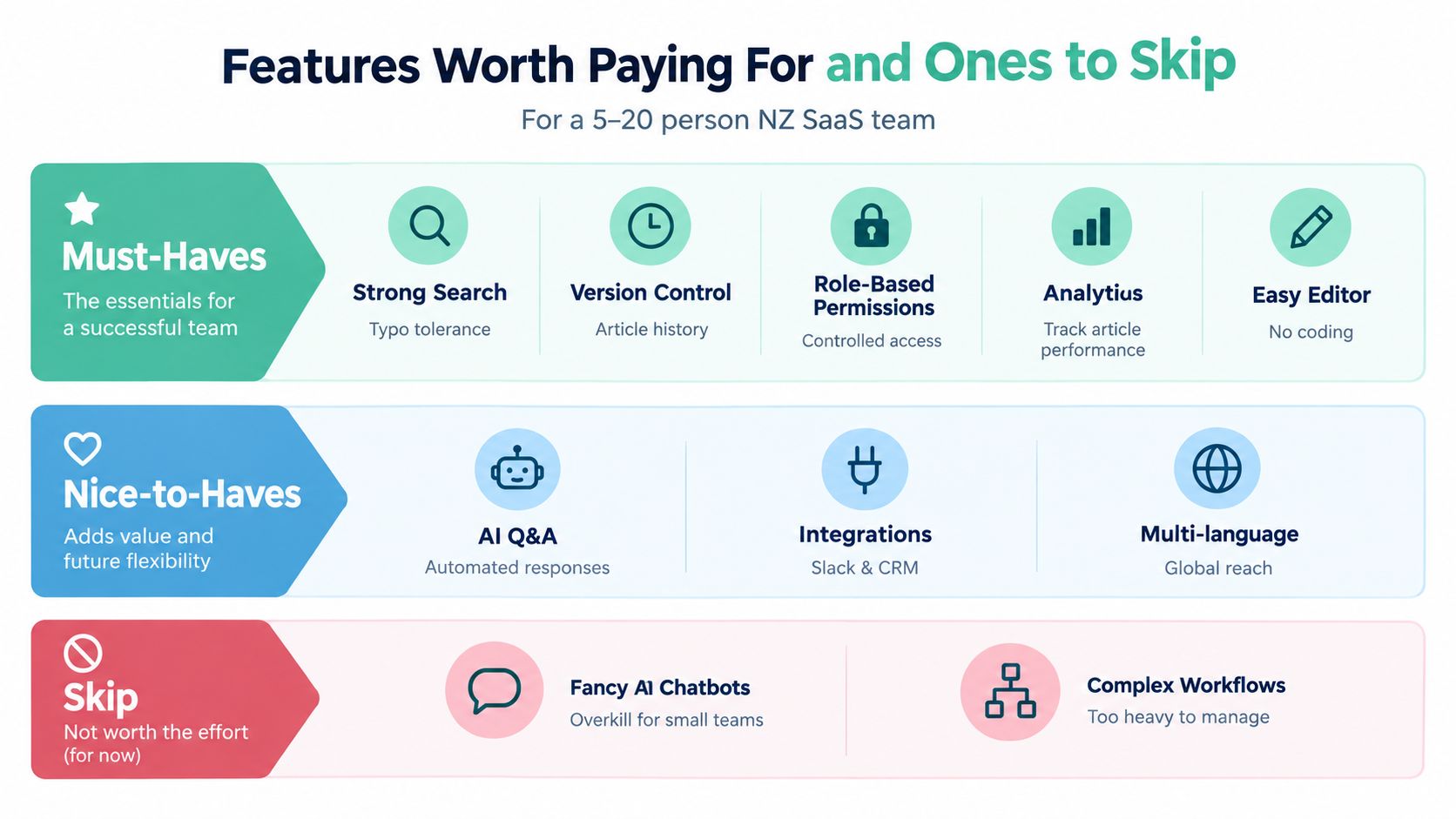
Search comes first. Not branding. Not custom themes. Search.
You want typo tolerance, sensible ranking, and decent filtering. If your team has to guess the exact article title, the system is already annoying enough to be ignored.
Then look for the quiet essentials:
A lot of this sounds boring. Good. Boring features run the operation.
Multilingual support is useful if you serve several language groups. Customer feedback widgets can help. Basic conditional content is handy when one article serves different user types.
Integrations matter too, but only the ones your team will use. If you're stitching support, docs, and campaign operations together, looking at adjacent stacks like top marketing workflow software picks can sharpen your eye for where handoffs and approvals become too heavy for a small team.
Reality check: The best feature is the one your support lead uses every day without needing a training session.
Here's the mild contradiction. AI features are worth paying for. AI features are also easy to overbuy.
If your documentation is already organised and reasonably clean, AI can help with drafting, summarising, suggested tags, and answer retrieval. Those are practical uses. They reduce blank-page pain and speed up lookup.
If your documentation is stale, duplicated, contradictory, or patchy, AI answer generation becomes a governance mess. It will produce polished nonsense with a straight face. Small teams then inherit a new job: checking robot confidence against reality.
Skip, for now:
That's why I usually tell founders to buy the plumbing before the magic. Strong repository. Strong search. Controlled AI after that.
The cheapest tool often loses. The most popular tool often loses too.
NZ and AU buyers deal with a cluster of annoyances that US comparison pages barely mention: pricing in USD, support teams asleep during our workday, fuzzy GST treatment, offshore implementation help, and awkward questions around data location. Those details don't show up well in glossy demos, but they absolutely show up after the contract is signed.
Use a simple weighted sheet. Seven criteria. No drama.
| Criterion | Weight | What to check | Red flag |
|---|---|---|---|
| Pricing in USD with GST clarity | 25% | Is pricing transparent, predictable, and clear on tax treatment? | Add-ons, quote-only basics, vague billing mechanics |
| Time-zone support overlap | 20% | Can you get live help during NZ or AU business hours? | Support only available while your team is asleep |
| Data residency options | 15% | Are AU or nearby region options available if your buyers care? | No clear answer on hosting or residency |
| Integration depth | 15% | Does it connect cleanly with your help desk, chat, and internal tools? | “Zapier can probably do it” instead of native fit |
| AI maturity versus risk | 10% | Are AI features useful, controlled, and grounded in your content? | Auto-answer features with weak governance |
| Onboarding quality and templates | 10% | Will the vendor help you launch without a consulting saga? | Empty template library, vague migration support |
| Three-year cost | 5% | What will renewal, extra seats, and add-ons look like? | Cheap entry, ugly expansion pricing |
Take a global incumbent like Zendesk and compare it with a leaner specialist. Don't ask which brand feels safer. Ask where your team will feel friction first.
Zendesk is a valid option if you already live in that stack. It also comes with a broader support package. But if your team mostly needs a straightforward help centre with predictable pricing and less admin sprawl, a lighter tool can win the weighted score even if the logo carries less prestige.
Pricing mechanics matter here too. One NZ software listing for Helpfruit shows a subscription model that starts at US$149 per month, offers a free trial, and has listed plans at US$149, US$499, and US$679 per month (GetApp NZ listing for Helpfruit). That doesn't tell you it's the right product. It does show why founders need to compare billing shape, not just homepage claims.
Be a little difficult. It helps.
Ask these directly:
Buy for the Tuesday after launch, not the demo call itself.
And yes, ask the question every NZ operator eventually learns to ask: what happens when our internet flakes out, a customer is shouting, and your support team is asleep? If the answer is vague, keep shopping.
The first version of your knowledge base does not need to be beautiful. It needs to be useful by week two.
That's where teams overcomplicate things. They wait for perfect structure, fancy taxonomy, or a full migration plan. Meanwhile the same repeat tickets keep chewing up support time. Start smaller. Much smaller.
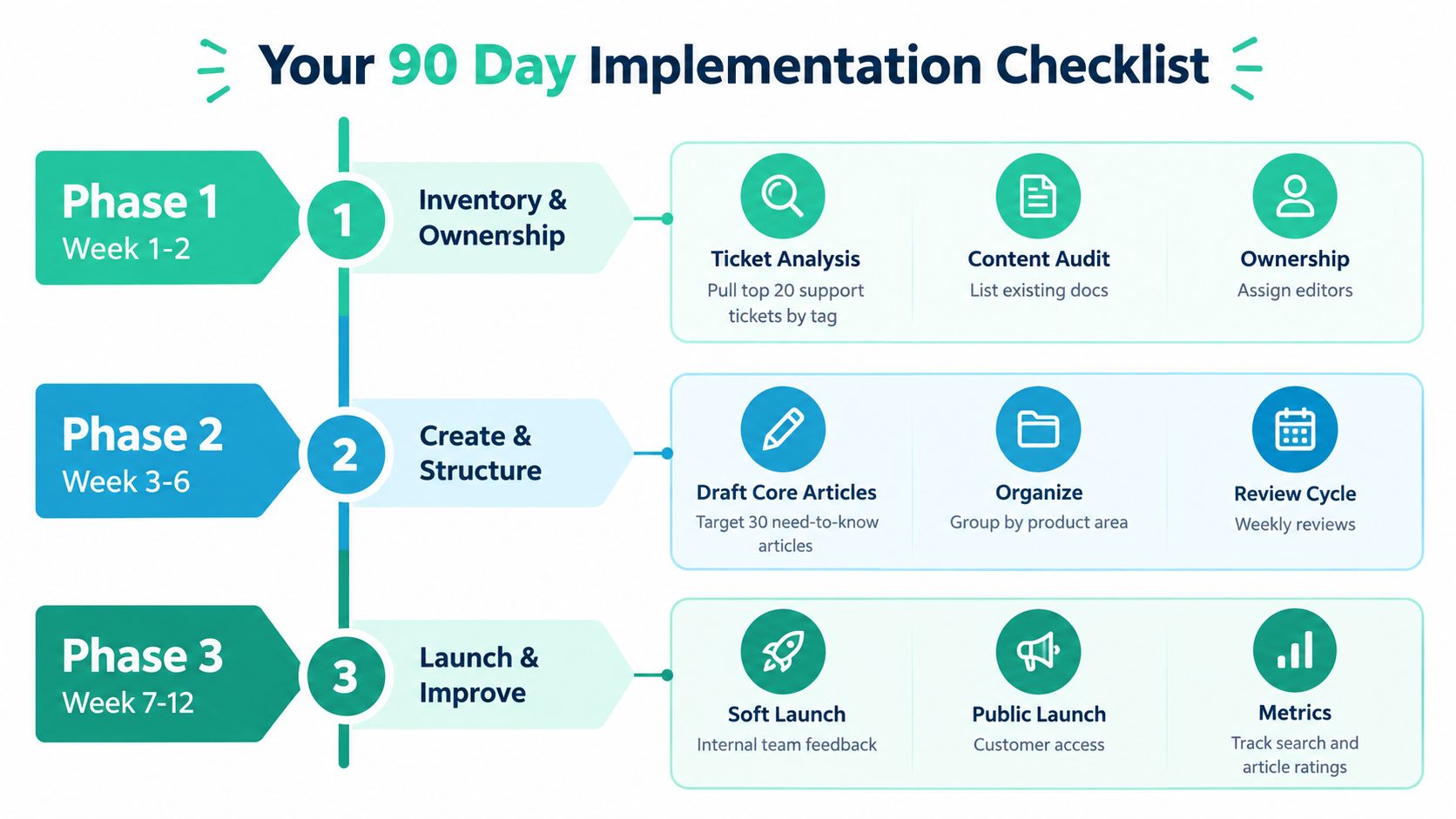
Inventory first. Ownership second.
Pull your top support topics by tag from the help desk. You don't need a full content audit on day one. You need the questions your team answers constantly. Then assign one owner. Not a committee. One owner.
Do this in the first fortnight:
If your onboarding is also messy, this work pairs neatly with a stronger SaaS onboarding process. Support docs and onboarding docs often share more than teams expect.
Now publish the core set. Not everything. The core set.
Write the small stack of articles that answers the questions you're tired of answering. Keep the template dead simple: title, who it's for, steps, edge cases, related links. That's enough.
A few notes matter here:
The internal layer gets added.
Create runbooks for common support actions, decision logs for policy calls, and SOPs for repetitive workflows. Keep them short. Internal docs die when they sound like legal prose.
Operator move: Watch what people ask in Slack after you launch the knowledge base. Those questions reveal what your docs still don't explain well.
Trim hard.
Remove duplicates. Merge thin pages. Archive dead content. Check what people searched for and didn't find. Look at article usefulness signals. Then decide whether you need to add AI search or a chat layer.
That sequence matters. If your base content is shaky, adding AI early just hides the mess behind a chat box.
Use this final review to answer four blunt questions:
| Phase | Main job | Metric to watch |
|---|---|---|
| Weeks 1 to 2 | Find repeat issues and assign ownership | First reply time |
| Weeks 3 to 6 | Publish high-value public answers | Deflection or article reuse |
| Weeks 7 to 10 | Add internal runbooks and SOPs | Internal search success |
| Weeks 11 to 12 | Clean up, merge, archive, and assess AI | Content coverage and failed searches |
And one last opinion. 25 to 40 solid articles beat 200 stale ones every single time. Small libraries with clean retrieval usually outperform bloated graveyards. Boring, but true.
NZ Apps covers the software and operating decisions founders in this region have to make, from support tooling to internal systems and vendor selection across NZ and AU. If you're comparing platforms, checking who matters locally, or trying to build a sharper shortlist without wading through generic US content, visit NZ Apps.
Add your NZ or Australian app or tech company to the NZ Apps directory and get discovered by founders and operators across the region.
Get ListedReach tech decision-makers across New Zealand and Australia. Sponsored and dofollow editorial links, permanent featured listings, and sponsored articles on a DA30+ .co.nz domain.
See Options