
Having a great website is no longer a 'nice-to-have' for Kiwi small businesses—it's your digital front door, your 24/7 salesperson, and often the first real chance you get to make an impression. It’s all about being seen the moment a potential customer in New Zealand pulls out their phone to search for what you offer. What could be more important than that?
Let's be blunt. If your business isn't online, you're practically invisible. The days of relying solely on word-of-mouth or a faded ad in the local paper are long gone. Honestly, your customers are online, and you absolutely need to be there to meet them.
Think of it this way: your website is always on the clock. It's answering questions, showcasing your amazing projects, and gathering leads while you're busy running the business, out on a job, or even fast asleep. It’s the hardest-working employee you'll ever have, and it won't ever ask for a day off. Not bad, right?
Ever Googled a business before you decide to use them? Of course you have. We all do it. That first click is your digital handshake, and what people find—or don't find—instantly frames their opinion of you.
A clunky, slow, or non-existent website can scream "unprofessional" or "out of touch." On the flip side, a clean, modern site that's easy to get around builds instant trust. It shows you take your business seriously and, by extension, that you'll take good care of your customers. This isn't just about looking good; it's about credibility.
Your website isn’t just an online brochure. It's the central hub for all your marketing and the very foundation of your digital credibility. It makes your business legitimate in a way no social media page ever can.
The move to digital isn't some passing trend; it's just how we do business now, especially here in NZ. The numbers speak for themselves. With internet access reaching 96.2% of the population, Kiwis are online all the time. In fact, a recent analysis showed that over 90% of NZ consumers now research online before they even consider making a purchase. This has created a huge need for professional web design among small businesses. You can read a bit more about these NZ web design trends over at Modur.co.nz.
What this really means is if you’re not showing up on Google when someone searches for "plumber in Christchurch" or "best coffee in Auckland," you're effectively handing that customer over to your competition. A well-built website is your ticket to getting seen.
Before we get lost in colours and fonts, let's talk strategy. A website without a clear goal is like a ship without a rudder. It might look nice floating there, but it’s not going anywhere useful.
So, what is its primary job? Be honest with yourself.
Getting this part right is the bedrock for everything else. It will dictate the site's layout, the words on the page, and the features you need. This isn't about getting bogged down in jargon; it's about building a strategic tool that works just as hard as you do.
Right, let’s talk money. It’s the one question every single business owner asks, and honestly, it's the trickiest to answer. How much should a website for your small business actually cost? The real answer is, "it depends," but that’s not very helpful, is it?
Let's cut through the vagueness. The cost of a website is a bit like buying a vehicle. You could get a reliable secondhand ute for a few grand to get you from A to B, or you could invest in a brand-new, fully kitted-out truck with all the bells and whistles. Both will get the job done, but they're built for completely different purposes and budgets.
Your website is no different. The price tag is directly tied to what you need it to accomplish for your business.
So, what are the big variables? The main factors influencing the final figure are complexity, customisation, and the creator. A simple, five-page "digital brochure" site will cost a fraction of a full-blown e-commerce store with hundreds of products and payment integrations.
Based on recent industry data, the average cost for a standard 5-10 page small business website in New Zealand ranges from $3,000 to $8,000. Of course, the spectrum is much wider; basic sites can start around $1,000, while complex custom builds can easily soar past $35,000.
This diagram helps you start thinking about where your needs fit into the bigger picture.
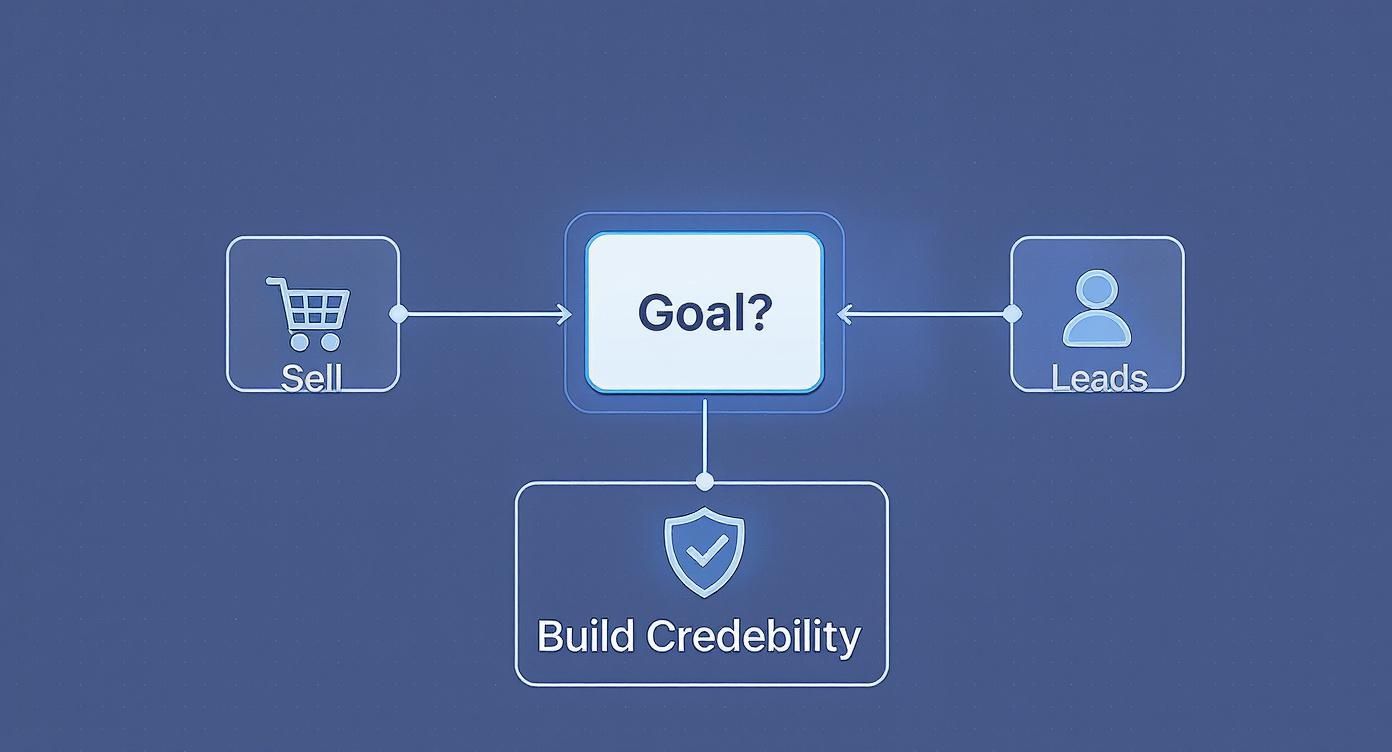
As you can see, the primary goal—whether it's direct sales, lead generation, or establishing authority—is the first major fork in the road for your website's scope and, ultimately, your budget.
You’ve essentially got three main paths you can take, each with its own price point and level of involvement.
Here’s a quick rundown of what you can expect from each approach.
| Approach | Estimated Cost (NZD) | Best For | Pros | Cons |
|---|---|---|---|---|
| DIY Website Builders | $30 - $70 / month | Startups, freelancers, or anyone on a very tight budget needing a simple online presence. | Very low upfront cost, fast to launch, full control. | Limited customisation, can look generic, you do all the work (design, writing, SEO). |
| Hiring a Freelancer | $2,500 - $10,000+ | Small businesses wanting a professional, custom look without the agency price tag. | Personalised service, professional result, good value for money. | Quality varies, may have limited capacity, reliant on one person. |
| Partnering with an Agency | $8,000 - $35,000+ | Established businesses ready for serious growth who need a team of specialists. | Access to experts (design, dev, SEO, copy), strategic approach, ongoing support. | Highest cost, projects can take longer, may feel less personal than a freelancer. |
Choosing the right path depends entirely on your business goals, your budget, and how much time you're willing to invest yourself.
Building the site is just one part of the equation. You know what catches a lot of people by surprise? The ongoing costs. It's crucial to factor these into your budget from day one so there are no nasty surprises down the track.
These aren't "nice-to-haves"; they are essentials for keeping your website live, secure, and functional. You can explore some detailed breakdowns of small business website costs to get a clearer picture.
Here are the big ones to plan for:
Putting money into your website is an investment, not just an expense. For a more detailed look at the numbers here in New Zealand, check out our guide on how much a website costs in NZ. Getting the budget right from the start means you can build a powerful tool that genuinely helps you grow.
So, we've talked budgets. Now for the fun part—designing a website that doesn't just look pretty but actually works for your business. This is where the magic really happens, but it’s so much more than picking nice colours and fonts.
Great web design for small businesses is all about creating an experience so smooth and intuitive that your visitors don't even have to think. It just feels effortless.

Think of it like building a house. You wouldn't just start throwing up walls and painting them your favourite colour, would you? Of course not. You’d start with a solid blueprint that maps out where every room, hallway, and window goes to make the house liveable.
In our world, that blueprint is called User Experience (UX).
Let's quickly demystify two terms you'll hear thrown around a lot: UX and UI. They sound similar, but they have very different jobs.
You absolutely need both, but great UI can't save bad UX. A beautiful button that leads nowhere is just a source of frustration. That’s why we always, always start with the blueprint.
Here’s the thing: designing for a desktop computer first is an old, outdated way of thinking. In New Zealand today, it's a safe bet that more people will visit your site on their mobile than on a laptop.
That's why the 'mobile-first' approach isn't just a trendy phrase; it’s completely non-negotiable.
This means we design the experience for the smallest screen first, then adapt it for larger ones. It forces you to be ruthless with what's truly important. There's simply no room for clutter on a phone, so only the most critical information and actions make the cut.
A website that's a pain to use on a mobile device is a website that's losing you customers. It’s that simple. People don’t have the patience to pinch and zoom their way through a site that wasn’t built for their screen.
Ever been on a website where you just couldn't find what you were looking for? It's infuriating. Your website's navigation is its GPS, and it needs to be crystal clear.
People have expectations about where to find things—like 'Services', 'About Us', and 'Contact'—so don't try to get too clever with the labels. Stick to a simple, logical structure. A visitor should be able to land on any page and understand where they are and how to get where they want to go in seconds.
From there, you need to tell them what to do next. That’s where your Call-to-Action (CTA) comes in. These are the buttons or links that prompt action, such as:
A good CTA is specific, action-oriented, and stands out visually. It removes all guesswork and gently nudges the visitor toward that goal you defined back in the planning stage.
It's also smart to keep an eye on what's current in the visual world. A site that looks fresh and modern builds trust instantly. You can learn more about current NZ web design trends in our detailed article. Because a website that looks good and feels good to use is one that will work hard for your business.
You could pour your heart and soul into building the most stunning website on the internet, but if nobody can find it, does it even exist? It’s a bit of a philosophical question, isn't it? This is where Search Engine Optimisation (SEO) saves the day.
It sounds terribly technical, but the core idea is surprisingly straightforward. Think of SEO as giving Google a crystal-clear roadmap to your website. You're telling it exactly what you offer, in a language it understands, so you can be the top answer when a potential customer in your neighbourhood types a question into that search bar.
For small businesses in New Zealand, good SEO isn't just a marketing tactic; it's a survival tool. You're not trying to compete with massive global brands. You’re trying to connect with the person down the road who needs your services right now.
That’s the real beauty of it. SEO helps level the playing field, allowing your expert local business to appear right alongside the big guys in search results. And honestly, for local services, customers often trust a local name more.
Let’s not get bogged down in algorithms and complex jargon. Instead, we'll focus on what you can actually control on your own website. This is called on-page SEO, and it's your foundation.
It all starts with knowing the words your customers are actually using. Are they searching for "electrician Auckland" or "sparky in Auckland"? A bit of simple research here is gold. Once you have a handle on these terms, you can start weaving them into your website's content naturally.
Here are the key places to focus your attention:
For most Kiwi small businesses, your most valuable customers are the ones right in your community. Local SEO is all about making sure you show up for them. Have you ever searched for "cafe near me"? That’s local SEO in action.
The single most powerful thing you can do for your local SEO is to set up and fully optimise your Google Business Profile. It’s completely free and is what powers your appearance in Google Maps and the local "map pack" in search results.
Getting this right is absolutely crucial. It means filling out every single section you can: your address, phone number, opening hours, services, and photos, while also encouraging customer reviews. Our comprehensive guide offers more specific strategies on local SEO for small businesses in NZ. Because getting found locally is often the fastest path to getting the phone to ring.
Hitting that 'publish' button is a huge milestone, a moment that definitely calls for a celebratory flat white. But—and sorry to be the one to say it—your work isn't quite over. A website isn't a billboard you just put up and forget about; it’s more like a garden that needs regular care to stay healthy, secure, and effective.
Think of this part as your guide to a flawless launch and smart ongoing management. Once your small business website is designed, the next crucial step is making it live. For a deeper look at the technical side, a comprehensive guide to publishing your website can walk you through the nitty-gritty. But before you flick that switch, let's run through a quick pre-flight check.
After staring at your new site for weeks, it's incredibly easy to miss the small stuff. Before going live, grab a coffee, take a deep breath, and do one final, thorough sweep. It's so much better to catch a typo now than have a potential customer spot it first.
Here’s what to look for:
This final check is your last line of defence against those silly little errors that can chip away at your professionalism.
Okay, you've launched. The site is out there for the world to see. So, now what? This is where we shift from building to maintaining. A healthy website needs a bit of ongoing attention in three key areas: security, backups, and updates. Honestly, ignoring these is just asking for trouble down the road.
Security isn't just a buzzword; it’s about protecting your business and your customers' data. Regular backups are your ultimate insurance policy—your get-out-of-jail-free card if something goes horribly wrong. And keeping everything updated—your CMS, your plugins—is the simplest way to prevent problems before they start.
A website is a living asset. Neglecting its health is like never servicing your car and then being shocked when it breaks down on the motorway. A little proactive care goes a very, very long way.
Now for the really interesting part: how do you know if your website is actually working? You need data. This is where Google Analytics comes in. It's a free tool that gives you incredible insights into what people are doing on your site.
Setting it up is a must-do. Once it's running, you can start answering crucial questions:
These insights are pure gold. They help you stop guessing and start making informed decisions. Maybe that blog post you wrote is bringing in heaps of traffic, or perhaps nobody is finding your services page. This is the information you'll use to continuously improve your site, refine your web design, and grow your small business.
Right, let's pull all that theory into a practical, step-by-step plan.
This is your roadmap for getting a professional website off the ground. It’ll guide you from those first rough ideas right through to launching a site you’re genuinely proud of. You can follow this framework whether you decide to work with a web design expert or tackle some of it yourself.
Think of it as the plan to turn all that knowledge into focused action.
Here’s the thing: choosing who builds your website is a big deal. You're not just looking for someone who can code. You need a partner who actually gets what your small business is about and what you're trying to achieve.
So, how do you sort the great from the not-so-great?
It all comes down to asking the right questions. Don't be shy here. Any good web designer or studio will welcome your questions because it shows you're serious about getting a great result. It’s a partnership, after all.
A great web partner doesn't just build what you ask for. They dig deeper to understand why you're asking for it. They bring their own expertise to the table to build what your business actually needs to succeed.
Before you even think about signing a contract, make sure you have a proper chat and get clear answers to these key questions. Treat it like a friendly interview – you need to be sure you're on the same page.
It's completely normal to have a million questions whizzing around your head when you're thinking about a new website. You’re not alone. To be honest, we hear the same thoughtful questions from small business owners all across New Zealand.
Let’s tackle a few of the most common ones we get asked. Chances are, you've probably wondered about these yourself.
This is the big one, isn't it? And the honest answer is, it really depends.
For a standard, professional informational site of about 5-10 pages, you're generally looking at 4 to 8 weeks from our first chat to the big launch day. It’s a proper process with distinct stages, not just flicking a switch.
Now, if you're after an online store with a bunch of products or some special custom features, that timeline could easily stretch out to 12 weeks or a bit more. The biggest factor that influences the speed? Surprisingly, it’s often how quickly you, the client, can get back to us with feedback and provide content like your text and photos.
We get why people ask this—it can feel like another expense you don't need. But our answer is always a firm yes.
Think of it like getting your car serviced. You don't wait for it to break down on the motorway; you do regular oil changes to keep it running smoothly.
Website maintenance is your digital insurance policy. It protects your site from hackers, keeps the software up to date so things don’t break, and fixes small bugs before they become big, expensive disasters.
Skipping it might save a few dollars in the short term, but it almost always costs way more in emergency repairs and lost business down the track.
You absolutely can. For a brand-new business on a shoestring budget, a platform like Wix or Squarespace can be a decent first step to get something—anything—online.
Here’s the thing, though. There's always a trade-off.
Those builders are great for simplicity but have real limits when it comes to custom design, advanced SEO, and unique features your business might need to stand out. A professional web design for small businesses brings strategy to the table—deep knowledge of user experience that a template just can't replicate. The result is a website that doesn't just look professional; it performs better and generates more business.
Ready to move past the questions and get a clear plan for your business? The team at NZ Apps is here to help you build a website that not only looks fantastic but also works hard to grow your business. Book a free, no-obligation consultation with us today and let's start the conversation.