
Most cloud advice starts with “someone else's data centre.” That's too simple, and it's how teams end up with an app that works until a network path fails, a backup can't be restored, or nobody knows where the data went. Cloud infrastructure is shared technology, yes. But it's also a set of choices your team still has to operate, secure, and pay for.
Buying cloud capacity leaves your operational decisions intact. Cloud computing infrastructure is the physical and technical foundation that delivers compute, storage, and networking as shared, on-demand services. In New Zealand, it includes data centres, power systems, connectivity, security controls, and software that lets teams provision resources remotely. Define it by the dependencies your application needs to keep serving customers when something fails.
The New Zealand Government describes a public-cloud data centre as a large facility providing a shared, secure environment for hosting cloud ICT services. Its Cloud First policy directs government agencies to prefer public-cloud services over traditional ICT systems where appropriate. New Zealand Government guidance on certified public-cloud data centres
Treat that policy as an adoption direction, not a workload assessment.
The facility is part of the foundation. Your architecture also depends on network routes, identity controls, backup design, and operating procedures. A provider's service catalogue cannot settle whether those choices meet your product's requirements.
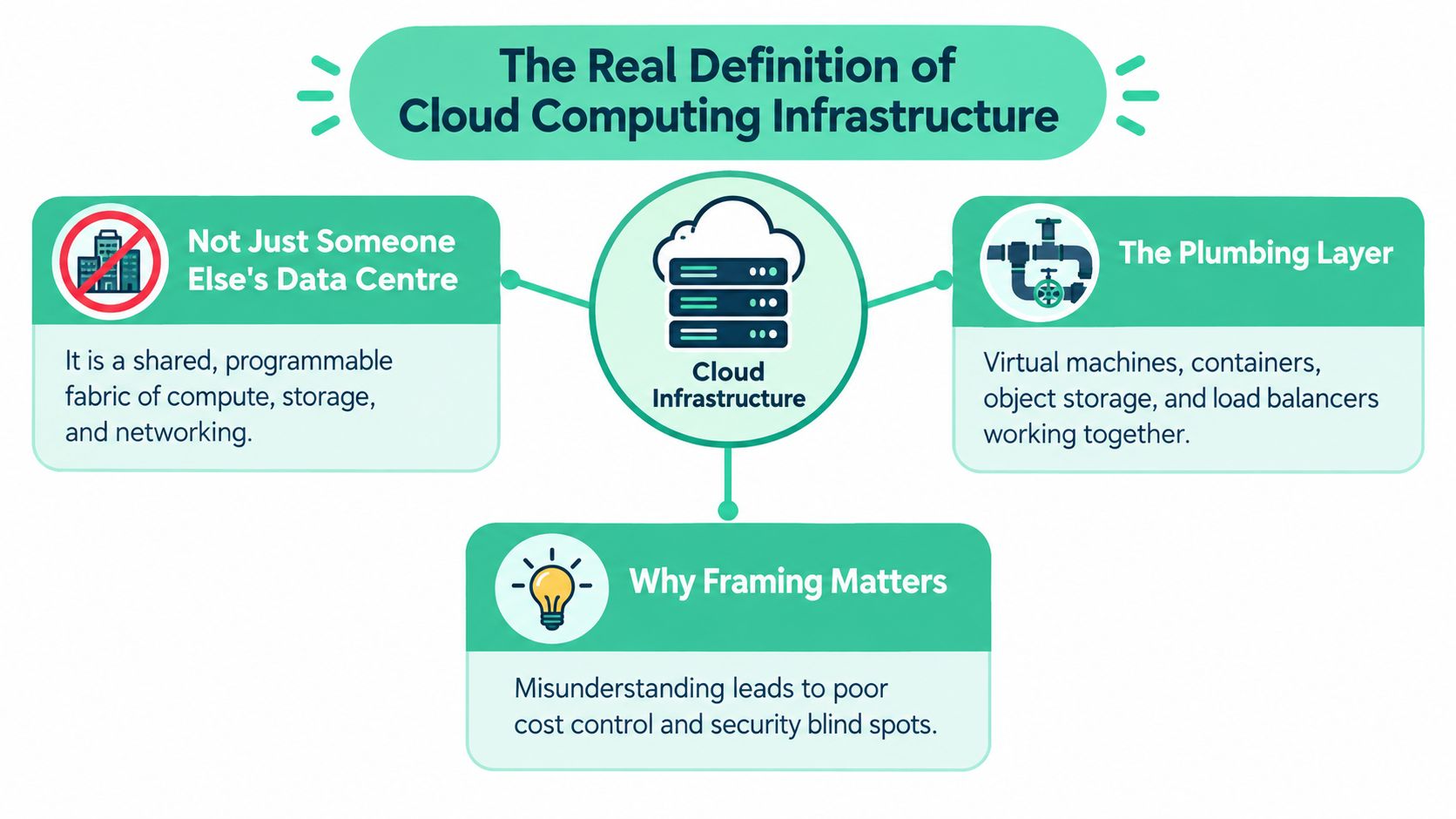
Cloud services support SaaS products, websites, databases, analytics, and AI workloads. Providers supply shared facilities and platforms; your team configures and connects them. For NZ and AU founders assessing identity, security, and regional requirements, enterprise Azure infrastructure planning offers a starting point for vendor questions. Keep responsibility for the answers inside your team.
Before choosing services, ask: Where does the data live? Who can access it? What happens if a region or network route goes offline? Are our cloud processes mature enough for growth? Record the answers as operating requirements. Residency, connectivity, and readiness belong in the architecture decision, before an incident forces you to resolve them.
A cloud stack works when its layers work together. A failure rarely respects the boundaries in a provider's product catalogue. The useful question is what each layer protects you from, and what happens when your design assumes it can't fail.
Compute runs application code. If a host, service, or region fails, workloads can stall or exceed their latency targets. Ask your provider how workloads recover and whether your own design can move traffic when the preferred location is unavailable.
Storage holds databases, files, snapshots, and backups. A write can succeed while data becomes unusable later, so backups need restore tests and critical data needs integrity checks. A backup you've never restored is an unproven hope.
Networking connects users, cloud services, and your own systems. A single fibre cut can isolate a healthy application. That risk is especially relevant in New Zealand: MBIE notes that international subsea cables are located around the top of the North Island, so a hazard affecting those routes could disrupt connectivity across the country. MBIE briefing on data-centre infrastructure and risks
Cloud networking isn't a side detail. It's the route between your customer and the service they're trying to use, so check redundancy, failover, and traffic controls before you focus on instance prices. Cloud networking considerations for NZ organisations
Virtualisation lets a provider divide physical capacity into isolated environments. If one host fails, the goal is to stop that failure from taking other tenants with it. Ask what tenant-isolation controls are in place and what evidence the provider can share.
Orchestration replaces or coordinates services when something breaks. A failed instance should not require someone to log in, diagnose it, and rebuild everything by hand. Automation can shorten recovery, but only if deployment settings and dependencies are documented.
Identity and access determine who can administer your cloud resources. A compromised account or excess permission can turn a small problem into a broad one. Log authentication events and changes to permissions, and alert on actions that shouldn't happen.
Observability gives your team the evidence to diagnose the incident. The National Cyber Security Centre recommends prioritising logs for critical systems, internet-facing services, cloud tenant accounts, and permission changes, including authentication activity involving third-party services. NCSC guidance on cloud event logging and threat detection
Practical rule: Ask which failure each control is meant to contain. If nobody can answer, the control may be decoration.
Service models decide how much of the stack your team still owns. Deployment models decide where it runs and how many environments you must manage. Don't confuse the two. A team can use a managed platform and still have hard choices about data location and recovery.
| Model | Best For | Watch Out For | Typical ANZ Use |
|---|---|---|---|
| IaaS | Teams needing control over virtual machines, networks, and operating systems | Your team still patches and configures much of the stack | Custom application hosting |
| PaaS | Product teams that want to focus on code and data | Provider-specific features can complicate a later move | Managed app and database services |
| SaaS | Organisations that need a finished application | Less control over underlying infrastructure and data handling | Business software |
| Public cloud | Variable workloads and managed services | Residency, configuration, and service dependencies need review | A public-facing product |
| Private cloud | Workloads needing tighter control over their environment | More operational work and cost responsibility | Specific regulated or legacy workloads |
| Hybrid cloud | Workloads split across public services and controlled environments | More moving parts and more links to monitor | Core records kept separate from front-end services |
| Multi-cloud | A clear portability, resilience, or regulatory need | Extra skills, monitoring, and duplicated operations | Deliberate portability or provider separation |
With IaaS, you get more control and more responsibility. PaaS removes some infrastructure work, but ties parts of your application to a provider's services. SaaS leaves the provider in charge of the application stack, which is convenient until you need a particular data-handling or integration arrangement.
Public cloud can suit a marketing site; it doesn't automatically settle the residency question for a fintech product. A hybrid design may keep core records in a controlled environment while serving less sensitive components elsewhere. Multi-cloud isn't a strategy by itself. It makes sense when portability, exit planning, or regulatory needs justify the extra complexity. For a separate perspective on choosing among public, private, and hybrid cloud, IT Cloud Global's guidance for Houston companies offers a useful comparison framework.
Choose the service and deployment models together. A SaaS product built on managed platform services across a hybrid setup asks more of its operators than a straightforward application running in one public region. Start with the product and customer requirements, not the provider's menu.
A New Zealand cloud region still depends on power, buildings, and reachable network paths. MBIE projects data-centre electricity demand rising from 104 megawatts in 2025 to more than 400 megawatts by 2035, and reports more than 80 operating data centres, with most co-location facilities in Auckland and Wellington and only 12 in Christchurch. MBIE's briefing on data centres, options, benefits, and risks
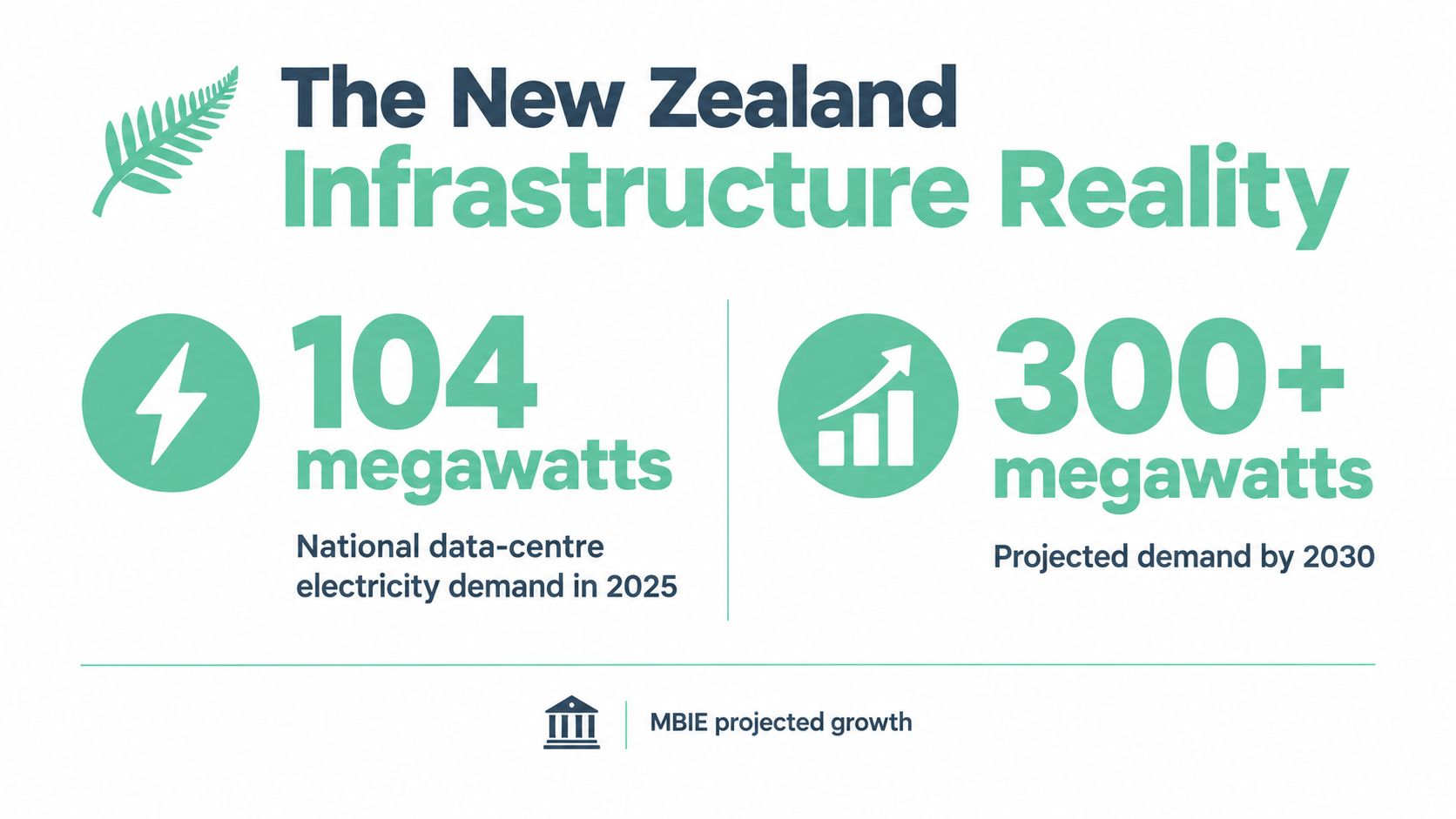
Treat that physical footprint as a recovery constraint. Ask where the production and recovery facilities sit, how traffic reaches them, and which dependencies they share. A recovery site that relies on the same failed local infrastructure leaves you with another unreachable deployment.
The cable concentration described earlier makes network independence worth checking. A healthy virtual machine cannot serve customers through a broken route. Ask providers to explain path diversity before paying for a backup connection. Different suppliers alone do not establish independent paths. For NZ and AU products, check the routes customers need to reach both the primary service and its recovery location.
Choose redundancy against a named failure, rather than a provider's availability pitch.
Government guidance permits public-cloud storage for information classified RESTRICTED or below, recommends an onshore data centre for RESTRICTED information when suitable services exist, and requires agencies to assess storage, processing, backups, lawful access, and end-of-contract deletion; NZEO-endorsed information must not use offshore-hosted cloud services under the NZISM. New Zealand guidance on cloud jurisdictional risk
Map backups, logs, telemetry, managed AI services, support access, and disaster-recovery copies before calling a deployment “in-country”. Use Datacom's 2025 Australasia cloud report for business context, but use the government guidance and your actual service arrangements to assess jurisdictional exposure.
An onshore database with an offshore recovery copy creates a decision you must resolve before an outage. Record which data can cross borders, who can access it, and what happens when recovery is invoked. Select infrastructure that remains reachable during a connectivity failure and defensible when a customer asks where their data went.
Buying cloud services leaves the hardest operational work with your team. The New Zealand State of Cloud report captures the readiness gap: 70% of businesses in recent NZ research consider cloud critical to future strategy, but only 34% report well-established cloud processes and infrastructure, while 67% believe their infrastructure could be better used and 49% say leadership doesn't treat cloud optimisation as a priority.

Judge capability by what happens during a failure. When an administrator leaves, can you revoke their access? When a restore fails, who owns the next attempt? When spending jumps, can you identify the product responsible? A provider's availability claim answers none of those questions.
Assign owners for access reviews, recovery tests, cost allocation, and data-flow records. Document shared-responsibility boundaries so an incident doesn't become an argument about whose job it is. Test recovery against your stated objectives, and link spending to a product or environment.
Provision infrastructure through code and use policy guardrails to block unsafe configurations. Manual changes make the running system drift from the version your team expects to recover. Before adding AI workloads, check whether the underlying data and services can support them. A small team can do this work, provided someone has the authority and time to own it.
Untested backups leave recovery to chance.
The immature setup lets accounts multiply, accepts undocumented changes, and leaves the bill unassigned. Cloud makes that disorder easier to scale. Security was also the leading cloud challenge in the same Datacom's 2025 Australasia cloud report research cited earlier, reinforcing the need for operational ownership.
For a NZ SaaS founder selling into NZ and AU, evidence of residency decisions, tested recovery targets, and cost per customer gives enterprise buyers something concrete to assess. Bring that evidence to the sales conversation.
Cloud maturity is the ability to explain what you run, who can access it, what it costs, and how you recover it.
A typical SaaS product and an AI inference service both run in the cloud, but their pressure points differ. The first usually needs dependable application hosting and transaction handling. The second may need specialised compute, close cost tracking, and a clear map of what data reaches a model.
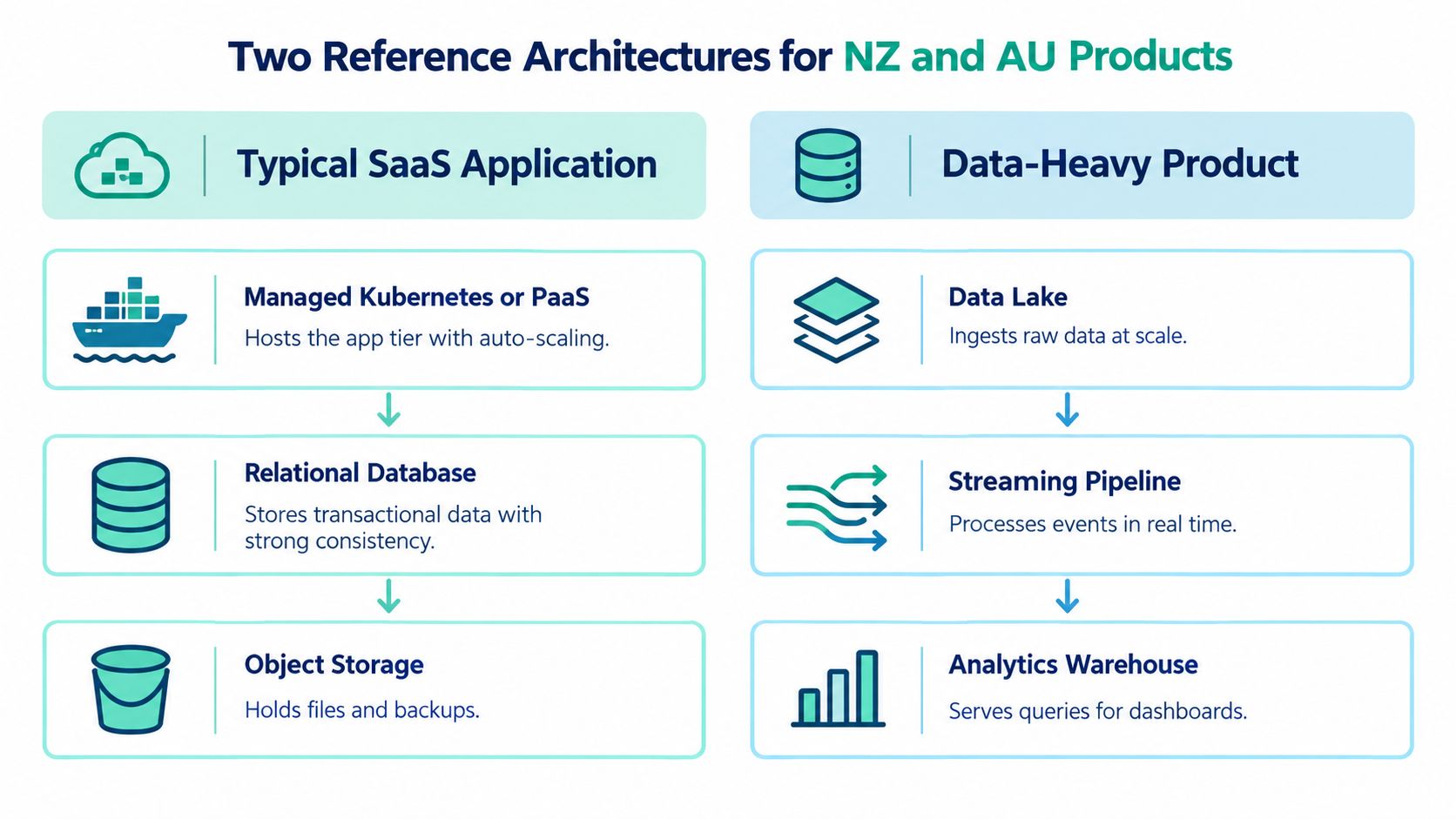
For a conventional SaaS product, put the application tier on managed Kubernetes or a PaaS equivalent. Keep transactional records in a relational database in a suitable onshore region, then decide whether a read replica in another region is worth the added cost and complexity. Use object storage for files and backups, and a CDN to serve static assets closer to customers.
Customer identity may flow through their own SSO, while your team centralises logs and tests restoration from automated backups. The key decision isn't whether to use Kubernetes because it sounds impressive. It's whether your team can operate it. If a PaaS service handles the same job with fewer moving parts, that can be the more reliable choice.
An AI inference or analytics product can need GPU-backed compute, a vector database, model artefacts in object storage, and a streaming layer for telemetry. It also needs observability that can show which services are consuming resources and where data flows. Before choosing a managed AI service, check its region availability and how it handles prompts, outputs, logs, and support access.
The contrast is practical. The SaaS product may put residency and transaction recovery first. The AI workload may need to balance data location against access to specialised services, then keep tighter watch on usage and cost. Both need identity controls, useful logs, tested backups, and a documented exit plan. Skip any one of those and the architecture can look tidy while the recovery story falls apart.
A cloud migration plan needs to say who owns each control, where the data goes, and how the service recovers. The NZISM expects cloud adoption plans to document deployment models, shared-responsibility boundaries, security strategy, resilience and recovery, and data recovery when a contract ends. New Zealand Information Security Manual guidance for cloud services
Start with a short checklist your team can complete before it commits to a provider:
Infrastructure-as-code can make environments easier to review and rebuild, but it won't choose the right security rules for you. For a practical starting point, see NZ Apps' guide to infrastructure as code.
Score providers against your actual failure scenarios. Ask about certified onshore regions, latency to your customer base, lawful-access notifications, evidence of deletion at contract end, Kubernetes and container support, logging integrations, workload-level pricing, and whether they'll support a genuine exit test.
Use a simple rating such as meets, needs evidence, or fails for each item. Don't let a polished sales deck count as evidence. Modernisation programmes can carry execution risk, but broad claims about failure rates aren't a substitute for checking a provider's specific capabilities. Software Modernization Intelligence's discussion of cloud modernisation risks is useful context, not a replacement for your own review.
Ask for proof before production. A clear answer about recovery and data deletion beats a promise that the platform is resilient.
Cloud design is a series of trade-offs, not a contest to find one perfect provider. Cost predictability versus flexibility matters when an always-on pricing model meets a workload that peaks at night. Residency versus capability gets awkward when a managed AI service your product needs is available only overseas. Lock-in versus time-to-market shows up when a provider's deep SDK saves work now but would make a future move take serious engineering effort.
Then there's automation versus short-term feature shipping. A small team can spend time building repeatable deployments, or ship the feature waiting on the roadmap. Skip automation for too long and each change becomes harder to review and repeat. Build too much platform too early and you can end up maintaining machinery your product doesn't need.
There isn't one answer that fits every NZ or AU startup. The job of an infrastructure plan is to make these choices deliberate rather than accidental. A disaster and recovery planning guide can help your team turn a vague recovery promise into a documented test.
For the next 30 days, map every data flow, including backups and logs. Document one recovery test, run one latency check from a customer's network, and score your current providers against the checklist above. That's enough to expose the gaps that matter. Start there.
NZ Apps covers app and technology companies across New Zealand and Australia, with practical resources for founders evaluating software and infrastructure choices. Visit NZ Apps to explore its regional tech directory and guides.
Add your NZ or Australian app or tech company to the NZ Apps directory and get discovered by founders and operators across the region.
Get ListedReach tech decision-makers across New Zealand and Australia. Sponsored and dofollow editorial links, permanent featured listings, and sponsored articles on a DA30+ .co.nz domain.
See Options