
You've got a customer waiting for a signed agreement, a supplier renewal buried in someone's inbox, and an employment contract sitting in a folder called “Final Final 2”. Finance has one spreadsheet, sales has another, and nobody can say which version is current. This is a familiar Tuesday for many NZ and AU founders.
Contract management software won't fix a weak process by itself. It can, however, give your team one controlled place to store agreements, track dates, route approvals, record decisions, and prove what happened later. The hard part is choosing a system that fits local employment workflows, privacy duties, procurement expectations, and the way your people work.
A shared drive looks harmless until something important goes missing. A founder asks for the signed version of a customer agreement, and the operations lead starts searching folders with names like “Old Contracts”, “Customers 2024”, and “To File”. Ten minutes becomes an hour. Then someone finds a PDF, but nobody knows whether it includes the latest pricing amendment.
That's not a storage problem. It's a control problem.
A folder can hold a document, but it doesn't know that a renewal notice is due, that an insurance certificate has expired, or that a supplier still owes a report. A spreadsheet can list dates, but it won't reliably update itself when a contract changes. Email can show a conversation, but it's a poor place to establish ownership or preserve a clear approval history.
Teams often add another storage tool and call the problem solved. A review of cloud storage options for New Zealand businesses can help with document access, but cloud storage alone isn't contract management software. The difference is the layer of structured information around each agreement.
A useful contract platform connects each document to practical fields such as:
That structure matters during a funding round or customer audit. Nobody wants to explain that the company's most important commercial records depend on one operations manager remembering which folder to search.
The right platform also helps prevent revenue leakage. A missed price review, an unclaimed service credit, or an unnoticed notice period can cost money without producing a dramatic warning. The loss arrives discreetly, often after the person who negotiated the contract has moved roles.
Practical rule: If a deadline matters to cash flow, compliance, service delivery, or customer trust, it shouldn't live only in someone's memory.
A spreadsheet can remain useful for a small, disciplined team with few agreements and clear ownership. It becomes fragile when several departments create, approve, sign, and manage contracts. At that point, the goal isn't to buy the most impressive platform. It's to create a dependable operating record before the next messy request lands.
Procurement rules aren't limited to giant government departments. Their expectations often shape the questions private buyers ask suppliers, especially when a startup sells software, handles sensitive information, or works with a public-sector customer.
New Zealand's Government Procurement Rules' 5th edition requires agencies to use a structured contract management system and have contract management plans in place. The guidance describes contract management as tracking delivery and costs, managing risks and relationships, carrying out reviews, and keeping records of contract management activity. It also points to a formal shift toward structured governance by 2017, with explicit requirements for identifying contracts and documenting management plans by 2025. The government's contract management guidance sets the tone clearly.
That doesn't mean every startup needs to copy a central government system. It does mean a shared drive and an informal spreadsheet can look thin when a buyer asks how you monitor supplier performance, who owns a contract, or where the review record sits.
The Government Procurement Business Survey reported that only 34% of respondents rated government contract management as good or very good in both 2024 and 2025. In the 2025 report, 26% rated it poor or very poor, while only 41% of businesses said all or some agencies they worked with held regular contract review meetings. About 33% rated government digital procurement tools highly. These figures appear in the 2024 Government Procurement Business Survey and the 2025 Government Procurement Business Survey.
The lesson isn't that software magically creates good contract management. It's that visible ownership, regular reviews, reliable records, and clear workflows remain difficult even in organisations with formal procurement teams.
Private buyers increasingly ask similar questions:
A startup that can answer those questions quickly looks easier to trust. A startup that needs three people to search email threads looks risky, even if its product is excellent.
Tools that automate compliance for SaaS can reduce repetitive checking and help teams organise evidence. Contract management software plays a related role by turning commitments into owners, dates, approvals, and records.
MBIE's procurement policy offers a particularly practical signal. It requires executed contracts, procurement plans, and contract management plans where required to be recorded in Ci-Anywhere before a supplier begins delivering goods, services, or construction work. The MBIE procurement policy shows why contract records can't be treated as paperwork to tidy up later.
For founders, the point is simple. Build the record before delivery begins, not after a customer asks for it. That habit protects tenders, enterprise sales, supplier relationships, and audits alike.
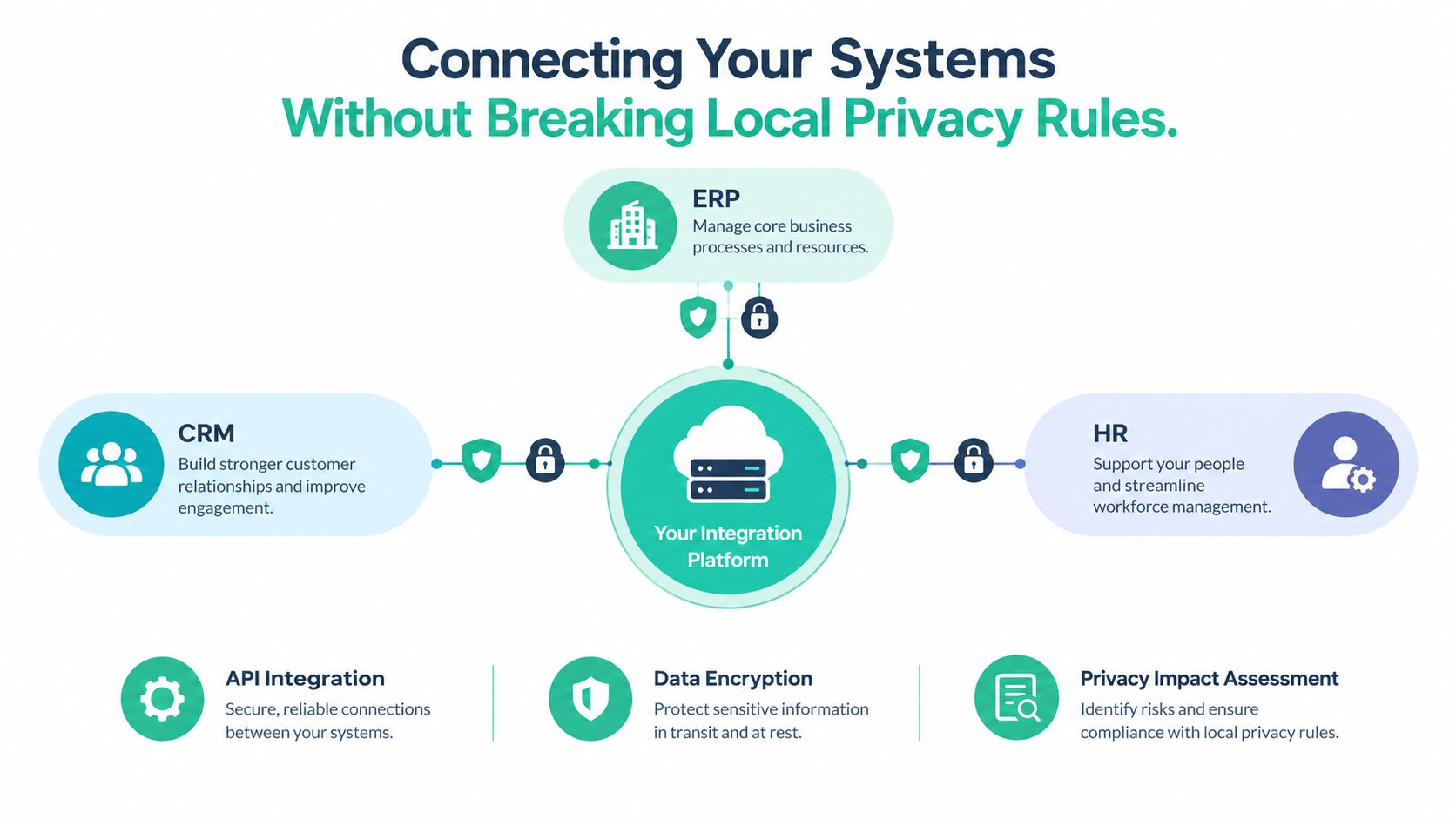
A standalone repository is a better filing cabinet, but it can still become an isolated filing cabinet. The value appears when contract data moves safely between the systems your team already uses.
Start with the workflow, not the integration catalogue. Trace one agreement from request to signature and then through delivery. A customer contract might begin in HubSpot or Salesforce, move through legal review, reach DocuSign or Adobe Sign, feed payment terms into finance, and create delivery tasks in a project system. An employment agreement may need controlled connections to HR and payroll.
The integration should remove duplicate entry without spreading sensitive information everywhere.
For an NZ or AU startup, the most useful connections often include:
NZ-focused guidance also highlights local employment templates, payroll and HR integration, role-based access, two-factor authentication, and audit logs as practical requirements. Its discussion of system integration for NZ businesses is a useful reminder that the plumbing matters as much as the interface.
The New Zealand Privacy Act 2020 requires organisations to use reasonable security safeguards to protect personal information from unauthorised access, loss, or disclosure. The National Cyber Security Centre guidance for organisations and suppliers says suppliers should be assessed against those expectations during procurement and throughout the contract.
Ask vendors where data is stored, which regions are available, who can access support records, and how information is deleted or exported. Data residency isn't the only question, but it's an important one for founders serving government, health, education, or regulated customers.
Then test the permissions. Can an HR manager see an employment agreement without seeing a sensitive customer dispute? Can finance view payment terms without editing legal clauses? Can an auditor receive read-only access to a defined set of records? A useful audit log should show who viewed, changed, approved, or exported information.
That level of detail may feel fussy during a product demo. It feels less fussy after an access mistake.
A young software company doesn't need a giant enterprise suite just because the demo includes every possible workflow. It needs a system that solves its current bottleneck without creating a second job for operations.
Start by separating three categories. Repository-first tools focus on finding signed documents and tracking important dates. Mid-market platforms add templates, approvals, supplier workflows, and reporting. Enterprise suites support deep configuration across legal, procurement, finance, and risk teams, but usually require more administration and implementation work.
Pricing follows a similar split. Per-user plans can look attractive while access is limited to legal and operations. Flat-fee plans may make broader adoption easier. Contract-volume pricing can suit a company with stable records but become harder to predict when the business adds suppliers, customers, or acquired entities.
A practical review of SaaS pricing models helps frame the commercial question. Don't ask only, “What's the monthly licence?” Ask what the system costs when sales, finance, HR, and external reviewers all need access.
| Evaluation Criteria | Global Enterprise Tools | Local / Mid-Market Tools |
|---|---|---|
| Local employment templates | May require your legal team or an adviser to maintain NZ and AU variants | More likely to discuss local templates directly, but confirm who updates them |
| Workflow depth | Strong conditional routing, procurement controls, and complex approval paths | Simpler flows that are often easier for non-legal users |
| Data residency | May offer several regions, but availability can vary by plan | Regional hosting may be easier to discuss, though it still needs verification |
| Implementation | Often needs formal configuration, migration, and technical support | Usually quicker to configure, with fewer process layers |
| Integrations | Broad integration catalogues, sometimes with paid connectors | Fewer connectors, but the important local workflow may be easier to tailor |
| Pricing | Commonly quote-based, with separate services or support costs | More likely to publish or explain a clearer entry model |
| Ideal fit | Complex procurement, large legal teams, and heavily controlled operations | Startups and mid-market teams that need adoption without heavy administration |
The local label alone doesn't make a product suitable. Ask for proof. Give the vendor a real employment agreement, a supplier contract with an amendment, and a customer agreement containing a renewal clause. Watch how the system extracts fields, handles attachments, records approvals, and restricts access.
If your contractors send invoices through a separate process, you may also want to compare contractor billing software options. That isn't a replacement for contract management. It's a useful adjacent check because payment workflows often reveal whether your contract data is connected to the work happening after signature.
Ask whether legal template updates are included, who manages them, and how the vendor handles differences between New Zealand and Australian employment law. Ask whether a connector is native, paid, or dependent on an external automation service. Ask for implementation costs in writing, including data cleaning and migration.
Then ask about exit. Can you export the original files, metadata, audit history, and relationships between agreements and amendments in a usable format? A vendor that answers clearly is easier to trust than one that treats your own contract data like a hostage negotiation.
Buying software is the easy part. Migration is where old habits, duplicate files, missing fields, and questionable naming conventions come back to collect their debt.
Don't move every document on the first day. Start with a clear inventory, decide what needs active management, and preserve the rest in a controlled archive. The team should keep closing deals while operations builds the new record behind the scenes.
Gather shared-drive folders, personal storage locations, email attachments, spreadsheets, and signed documents held by advisers. Mark each file as active, expired, superseded, duplicate, or unclear. Don't delete uncertain records until someone with authority reviews them.
For active agreements, capture the facts that will drive action. New Zealand central government procurement specifies a minimum set of contract-management information, including the supplier name, NZBN or another unique identifier, contract location, senior responsible officer, commercial support contact, supplier contact details, start and end dates, and a way to ascertain actual spend. The NZ government data and reporting guidance also allows agencies to meet the requirement through a dedicated system, financial-system output, or a contract register or spreadsheet.
That flexibility is useful. It shows that clean, traceable data matters more than buying one mandated product.
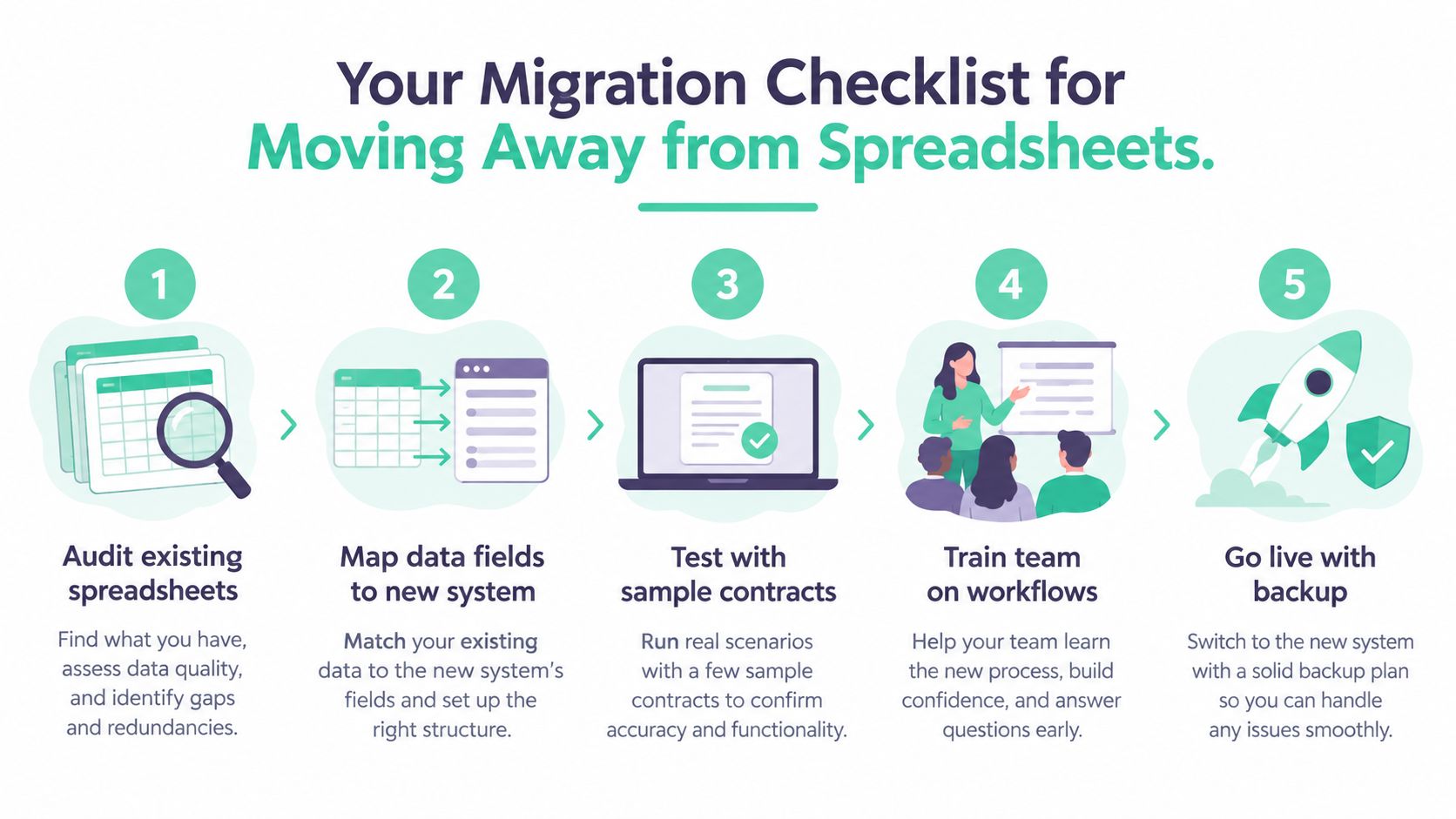
The first migration pass won't be perfect. That's fine. A visible “needs review” status is safer than pretending incomplete data is accurate.
Most adoption failures come from human friction, not broken code. If a sales rep must complete a long form before sending a standard agreement, they'll email a Word document. If legal receives alerts with no context, they'll mute them. If finance can't find the payment term quickly, they'll build another spreadsheet.
The platform needs to make the approved path easier than the shortcut.

Sales wants speed and approved language. Legal wants control over exceptions and redlines. Finance wants reliable payment terms and renewal visibility. HR wants local employment templates and privacy controls. Start with the problem each group already feels.
Make the intake form short. Pre-fill information from the CRM where possible. Let sales request a standard agreement without asking them to understand legal taxonomy. Give legal a clear queue for exceptions instead of forcing them to inspect every routine document.
Reminders need the same treatment. Send a useful alert with the contract name, the clause or date involved, the owner, and the next action. A message that says “renewal approaching” is noise. A message that says “review supplier agreement before the notice period closes, owner is procurement” is work.
People don't resist software because they dislike technology. They resist extra steps that don't help them finish today's work.
Measure behaviour, not logins. Check whether agreements enter through the approved workflow, whether signed copies return to the repository, whether owners close tasks, and whether teams still use side spreadsheets. Ask sceptics what they bypassed and why. Their answer usually identifies the next process fix.
A small internal champion can help here, but don't turn adoption into a popularity contest. Make the system useful, make the default path clear, and remove old shortcuts once the new workflow works.
The NZ and AU market is fragmented, which is both good news and a nuisance. You can find global platforms with deep workflow engines, regional tools built around local business needs, and lighter repositories that focus on search, dates, and controlled access. The right choice depends less on the logo and more on the work your team must control.
For a small founder-led company, a well-maintained register may be enough while contract volume remains modest and one person owns every agreement. But once several departments sign documents, supplier reviews disappear into inboxes, or customers ask for evidence of security and governance, a dedicated platform becomes easier to justify.
A growing SaaS company should usually prioritise searchable records, renewal alerts, role-based access, audit logs, HR and payroll connections, local employment templates, and clean exports. Deep clause automation is useful only if your team will maintain it. A beautiful drafting tool won't help if third-party contracts still arrive by email and never enter the system.
Choose a lighter repository when the main pain is finding signed agreements and tracking important dates. Choose a mid-market platform when sales, finance, HR, procurement, and operations need shared workflows without a long technical project. Consider an enterprise suite when your approval paths require extensive conditions, procurement controls, reporting, and dedicated administration.
Test renewal handling carefully. A focused contract renewal automation overview can help you compare reminder logic and ownership controls, but ask every vendor to show the workflow using your own notice periods and amendments.
Government buying pathways matter too. New Zealand digital procurement guidance says all-of-government contracts and frameworks can simplify procurement and security assurance for software, telecommunications, and identity services. The government's digital procurement programme also includes an RFx and contract builder, a procurement catalogue for participating agencies, and work exploring tools for tender evaluation, contract management, and supplier relationships. The digital procurement guidance and digital procurement programme update are useful places to understand that wider setting.
The verdict is practical. Don't build a home-made system forever, and don't buy an enterprise monster to solve a filing problem. Map your contracts, identify the operational risk, test local templates and data controls, then choose the smallest platform that can manage the next stage of the business without forcing everyone back to email.
NZ Apps covers software and technology companies across New Zealand and Australia, including tools relevant to founders comparing contract workflows, integrations, and local business systems. Visit NZ Apps to explore the regional tech directory and practical guides before you shortlist your next platform.
Add your NZ or Australian app or tech company to the NZ Apps directory and get discovered by founders and operators across the region.
Get ListedReach tech decision-makers across New Zealand and Australia. Sponsored and dofollow editorial links, permanent featured listings, and sponsored articles on a DA30+ .co.nz domain.
See Options