
Look, before you even start thinking about colours, fonts, or fancy animations, we need to talk. Building a website for your small business starts with a solid plan. It's all about figuring out what you want the site to do, who you're building it for, and then creating something that actually meets their needs.
Getting this foundation right is the single most important thing you can do to make sure your investment pays off.
Jumping into a website project can feel a bit overwhelming, can't it? It’s not just about picking a nice-looking template. Honestly, that stuff comes much, much later. The real work—the part that actually gets you customers—happens long before you write a line of code or drag a single element onto a page.
Here’s the thing: your website needs a job. What is its main role in your business?
Is it a 24/7 salesperson, selling your products while you sleep? A digital receptionist, booking appointments and answering common questions? Or is it more of a portfolio, there to build trust and show off the quality of your work?
If you don't have a clear answer, you risk building a pretty but ultimately useless online ornament.
Before getting lost in the details, let's nail down the fundamentals. What are you trying to achieve? Who are you trying to reach? A website for a local plumber in Christchurch will need to function very differently from one for an online clothing boutique based in Auckland. Getting this right from day one saves a world of headaches down the track.
This simple flow chart breaks down those first three crucial planning stages.
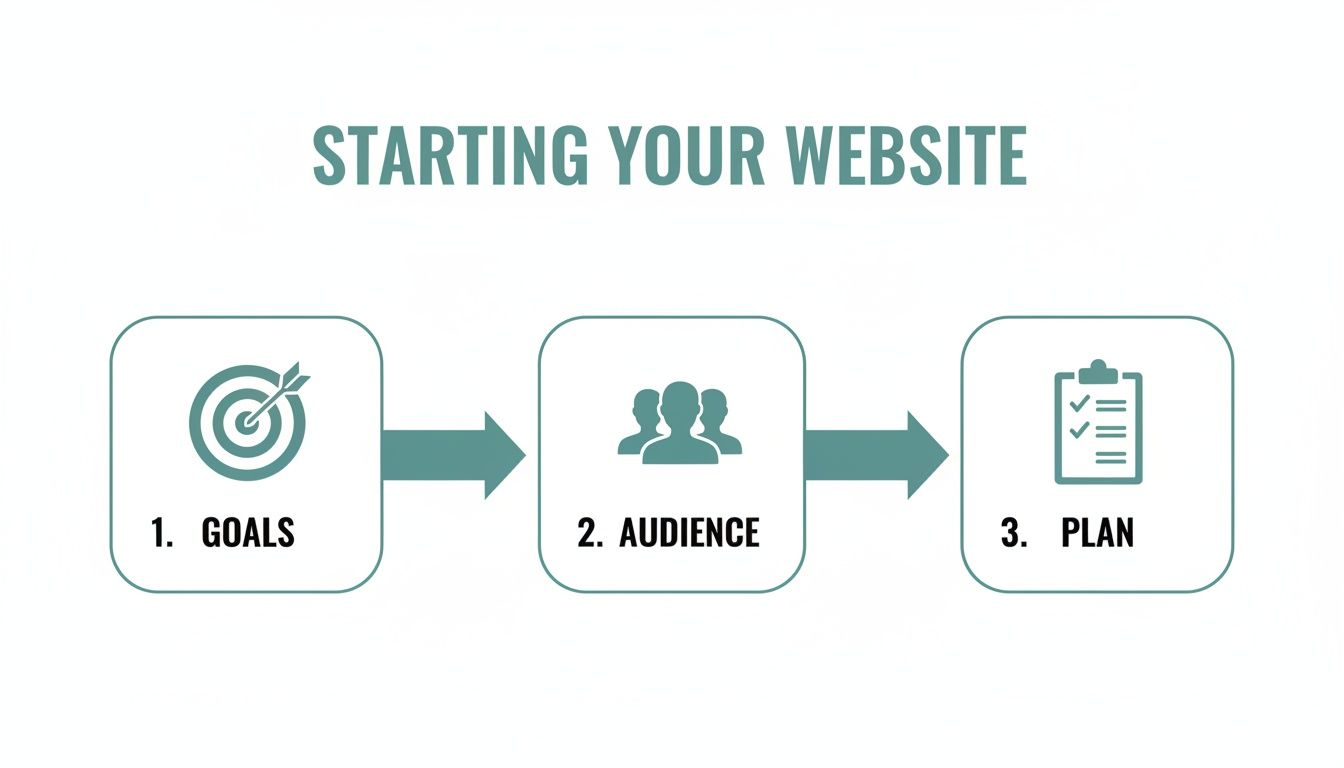
As you can see, your website's purpose, your audience's needs, and your overall plan are all completely interconnected. They're the three pillars holding up a successful online presence.
And having a strong foundation has never been more important. The entrepreneurial spirit in New Zealand is absolutely booming. Between 2021 and 2024, new business registrations were already high, sitting at around 4,500 per month. But by 2025, that number jumped to an average of 5,160 per month—a clear sign that more Kiwis are giving it a go. This means more competition, and a sharp website is your best tool to stand out from the crowd.
Let's get practical. What does a "successful" website actually do? It really comes down to a few key jobs that directly help your business. You should be able to say, in one sentence, what you want a visitor to do when they land on your site.
Here are a few common objectives I see with small businesses:
This table gives a quick overview to help you focus.
| Primary Business Goal | Essential Website Features | Example Business Type |
|---|---|---|
| Generate Leads | Prominent contact forms, clear call-to-action buttons, phone numbers, a page for services offered. | Plumber, Electrician, Consultant |
| Sell Products Online | E-commerce functionality, secure payment gateway, product pages with high-quality images, customer reviews. | Clothing brand, Artisan craft store |
| Build Credibility | Portfolio/gallery of work, client testimonials, "About Us" page, case studies, list of qualifications. | Photographer, Builder, Designer |
| Provide Key Info | Contact page with a map, clear display of opening hours, FAQ section, online booking/menu. | Restaurant, Local Clinic, Hair Salon |
By picking one primary goal, you give your website a clear direction and make every design decision easier.
You know what? It’s completely fine to have more than one goal, but you absolutely must have a primary one. Trying to be everything to everyone is a recipe for a confusing, ineffective website. Focus is your friend here.
If you’re still in the early stages of fleshing out your business idea, it's a good idea to map out your entire strategy from the beginning. For a wider view, check out our guide on how to start a small business in NZ for a look at the whole journey.
Okay, you've got your plan scribbled on a whiteboard or tucked away in a document. Brilliant. Now comes the part that often trips people up: how do you actually build this thing? It feels like you suddenly need a degree in computer science, doesn't it?
Relax. Choosing the right tools is less about being a tech wizard and more about knowing what job you need the tool to do. Think of it like this: you wouldn't use a sledgehammer to hang a picture frame. The same logic applies here.
We’re talking about your Content Management System (CMS), which is just a fancy term for the platform you’ll use to build and manage your website. This is the engine under the bonnet.
You’ve probably heard the names WordPress, Shopify, and Squarespace thrown around. They're all excellent, but they're built for very different purposes. Let's break them down in plain English, so you can see which one fits your Kiwi business.
WordPress: This is the undisputed king of flexibility. It powers a massive chunk of the internet (over 43% of all websites, in fact) for a reason. With WordPress, you can build literally anything—from a simple blog to a complex booking system or a massive online store. It's like a set of professional power tools; it can do anything, but you need to learn how to use it properly. It's perfect for a business that expects to grow and needs custom features down the line.
Shopify: If your main goal is to sell products online, Shopify is your workhorse. It’s an e-commerce machine, built from the ground up to handle inventory, payments, and shipping with incredible ease. For a local retailer in Wellington selling handmade goods, Shopify is a lifesaver. It’s less of a general-purpose website builder and more of a specialised tool for getting your online shop running, fast.
Squarespace (and its cousin, Wix): These are the all-in-one, "what you see is what you get" builders. They are famously user-friendly with beautiful, professionally designed templates. They’re fantastic for service-based businesses—think photographers, consultants, or cafes in Queenstown—who need a stunning portfolio or a simple, elegant online presence without the fuss. The trade-off? You sacrifice some of the deep customisation that WordPress offers.
Here's the thing: There's no single "best" platform. The best one is the one that aligns with your business goals, your budget, and—honestly—your patience for learning new tech.
Choosing between the two most popular options can be particularly tough. If you're weighing the pros and cons, our deep dive comparing Shopify vs WordPress in NZ can help you make a more informed decision based on local needs.
Once you've picked a platform, you need a place for your website to live. This is called website hosting. Imagine you’ve built a beautiful house (your website); hosting is the plot of land it sits on.
And not all plots of land are created equal.
Choosing cheap, unreliable hosting is one of the most common mistakes small businesses make. A slow-loading website is a customer-repellent; a one-second delay in page load time can reduce conversions by 7%. It sounds small, but that adds up fast.
Good hosting isn't just about speed. It's also about security and support. When something inevitably goes wrong (and it will), you want a provider you can actually talk to, who will help you sort it out quickly. Many Kiwi businesses find value in local NZ-based hosting companies because the support is in the same time zone.
So, when you're budgeting for your website, don't skimp on hosting. It’s the foundation of everything else. A wobbly foundation makes for a very shaky house, no matter how beautifully it’s decorated. Your choice here directly impacts how your customers experience your brand online.
Alright, you’ve got your plan sorted and your tools picked out. Now we get to the fun part—and honestly, the part that can make or break your entire project. How do you design a website that people actually like using? It’s one thing to have a site that looks good, but it's another thing entirely to have one that feels good to use.
This is where we get into User Experience (UX) and User Interface (UI). Don't let the jargon scare you off. It's really just about making things easy and obvious for your visitors.
Think of it like this: UI is how the car looks—the shiny paint, the leather seats. UX is how it feels to drive—is the steering smooth? Can you reach the radio easily? You need both. A stunning website that’s confusing to navigate is just as useless as a clunky, ugly one.
Ever landed on a website and felt completely lost? You click around, getting more and more frustrated, and then just give up. That's a navigation failure, and it's a customer-killer.
Your website’s navigation should be so simple a five-year-old could figure it out. Visitors need to know exactly where they are, where they've been, and where they can go next. The golden rule I always stick to is that anyone should be able to find what they're looking for within three clicks.
Here are a few things to keep dead simple:
Every single page on your website needs a purpose. It should gently nudge the visitor to take the next logical step. We do this with a Call-to-Action (CTA), which is just a fancy marketing term for a button or link that tells people what to do next.
Think "Request a Quote," "Buy Now," or "Learn More." These are the signposts that turn a passive browser into an active customer.
You know what? The most effective CTAs are action-oriented and create a sense of urgency without being pushy. Using a contrasting colour for your CTA buttons can make them pop, drawing the eye and encouraging that all-important click. It’s a tiny detail that makes a huge difference.
Here’s a hard truth: more people are probably looking at your website on their phone than on a desktop. In fact, mobile devices generate about 60% of website traffic worldwide. If your site looks squished, broken, or impossible to read on a smartphone, you're losing customers. Period.
This is why responsive design is completely non-negotiable.
Responsive design simply means your website automatically adjusts its layout to fit whatever screen it's being viewed on. Text becomes readable, buttons are easy to tap with a thumb, and images resize gracefully.
It's not just about looks, either. Google prioritises mobile-friendly websites in its search results. So, a site that isn't responsive won't just frustrate users—it'll also be harder for them to find in the first place. This is a fundamental part of designing a website for a small business that actually works.
You've built a beautiful website. Fantastic! But... what's the point if nobody can find it? This is where Search Engine Optimisation (SEO) becomes your best friend, and honestly, it's not as scary as it sounds.
We’re going to zero in on local SEO. Why? Because for a small Kiwi business, that's what truly moves the needle. When someone in your town searches for a 'plumber near me' or 'best coffee in Christchurch,' you absolutely have to be the one that pops up.
It’s all about creating a steady stream of the right kind of traffic to your site—real, local customers—not just a one-time spike from a random ad.
First things first, you need to get inside your customers' heads and figure out the exact words and phrases they're typing into Google. These are your keywords. This isn't about stuffing your site with robotic terms; it's about understanding real human language.
Think about it. Someone looking for a builder in Auckland probably isn't searching for "residential construction solutions." They're far more likely to type "builder for house extension Auckland" or "local builder reviews." See the difference? One is corporate jargon, the other is how real people actually talk.
You can use free tools like Google Keyword Planner to get ideas, but often the best starting point is just common sense. What questions do your customers ask you on the phone? Write them down. That's your goldmine.
If you do only one thing for your local SEO, please make it this: set up and fully optimise your Google Business Profile (GBP). It's that info box with a map that appears on the right side of a Google search.
It’s completely free, and it is arguably the most powerful local marketing tool on the planet.
A complete and active Google Business Profile gets, on average, 7 times more clicks than an incomplete one. It’s your digital front door, displaying your hours, phone number, address, and—most importantly—customer reviews.
Make sure every single section is filled out accurately. Upload high-quality photos of your work, your team, and your premises. And don't be shy about encouraging happy customers to leave reviews. It's non-negotiable for getting found locally.
Now, let's talk about the content on your actual website. You need to send clear signals to Google about what each page is about. The two most important places to do this are your page titles and meta descriptions.
Getting these basic elements right is a huge step forward. For a deeper dive into the strategy, you might find our dedicated guide to local SEO for small business in NZ really helpful.
Okay, let’s tie all of this together. Remember those customer questions we talked about? Turn them into helpful content on your website, perhaps in a blog or an FAQ section. When you create content that solves specific local problems, Google starts to see you as a relevant local authority.
A blog post titled "How to Prepare Your Roof for an Auckland Winter" is incredibly useful for a local audience and naturally positions a roofing company as the expert.
Website design for New Zealand small businesses has to bake in these SEO trends to thrive. Search engines now reward this kind of local intent and authenticity over old-school keyword stuffing. Success here really hinges on a hyperlocal focus. For instance, businesses in Auckland and Christchurch need content tailored to Kiwi search behaviours—like using natural phrasing such as 'best plumber Auckland'—to outrank their competitors.
This approach builds trust over time and steadily brings in people who are actively looking for the help you provide.
The moment is almost here. Your new website is built, the design looks sharp, and you’re itching to hit that big, shiny 'launch' button. But hang on just a moment. Pushing a website live without a final check is like leaving for a road trip without checking if you have petrol in the tank. A few last-minute checks can save you a world of headaches down the track.
Launching isn't the finish line; it’s really just the starting pistol. The real work of getting results from your website begins now. Think of it as a living, breathing part of your business—it needs regular care to keep performing at its best.
Before you announce your new site to the world, it's absolutely crucial to run through a quick pre-flight checklist. I get it, the temptation to skip this part is strong, but trust me, spending an hour on this now can prevent a lot of embarrassing "oops" moments later.
Let’s get this sorted. Here are the absolute must-dos:
Think of launching a website like opening a new physical store. You wouldn't open the doors without making sure the lights work, the shelves are stocked, and the EFTPOS machine is running. Your website deserves the same careful attention to detail.
Before you go live, a simple checklist can be a lifesaver. It keeps things organised and ensures you haven’t missed any of the small but critical details.
| Check Item | Why It Matters | Status (Done / Needs Review) |
|---|---|---|
| Proofread all content | Typos and grammar errors look unprofessional and can erode trust. | |
| Test all internal/external links | Broken links frustrate users and harm your SEO. | |
| Submit all forms | Ensures you receive customer enquiries and leads without a hitch. | |
| Check responsive design | Your site must look and function perfectly on mobiles, tablets, and desktops. | |
| Optimise images | Fast-loading images are key for site speed and a good user experience. | |
| Confirm analytics tracking | Without data, you're flying blind. You need to know who is visiting and what they're doing. | |
| Set up 301 redirects | If replacing an old site, this tells Google where to find your new pages, preserving SEO value. | |
| Check title tags & meta descriptions | These are crucial for how you appear in Google search results. |
Running through this list gives you the confidence that when you do finally launch, everything will work exactly as it should.
Congratulations! Your website is out there for the world to see. But the job isn’t done. Now, we shift from building to maintaining and improving. Your website isn’t a brochure you print once and forget about; it’s a dynamic tool that needs ongoing attention to deliver real results for your business.
This is where the real value comes from.
Regular maintenance is non-negotiable for a few key reasons:
As your website goes live and you start handling transactions, professional documentation becomes essential. It's a good idea to explore a variety of editable sample business receipt templates to keep your financial records organised right from the start.
Remember those analytics we set up? Now it's time to actually look at them. You don’t need to be a data scientist to get valuable insights from your website's performance.
Start by looking at a few simple metrics each month:
By keeping an eye on these simple numbers, you can start making informed decisions. Building an effective website for your small business is an ongoing process of listening to what your data is telling you and making small, consistent improvements over time.
Alright, we’ve been through a lot. We've talked strategy, design, SEO, and all the nuts and bolts of getting a website up and running for your business. It's a fair bit to chew on, and even with the best roadmap, a few questions are probably still bouncing around in your head.
That’s perfectly normal. In fact, most business owners I chat with have the same handful of practical concerns. So, let’s clear the air and tackle them right now—no jargon, just straight-up answers.
This is usually the first question on everyone's lips. The honest answer? It really depends. I know that’s not what you want to hear, but building a website is a lot like building a house—a simple one-bedroom unit has a very different price tag than a five-bedroom architectural marvel.
For a Kiwi business, your options generally fall into one of three buckets:
The DIY Route (Squarespace, Wix, etc.): You’re looking at a few hundred dollars a year for the platform subscription and your domain name. This is by far the cheapest option, but what you save in money, you pay for in time. Be brutally honest with yourself: do you really have the hours to learn the platform and build something you're proud of?
Hiring a Freelancer or a Small Studio: This is the sweet spot for many small businesses. A professional, well-designed site with a handful of key pages will likely cost anywhere from $3,000 to $10,000. The price shifts based on complexity—if you need online shopping, booking systems, or other custom features, that will push it towards the higher end of the range.
Working with a Digital Agency: If you're planning a larger, more complex project with custom-built features and need ongoing marketing support, you'll be looking at a bigger budget, often starting in the five-figure range.
Here's how I think about it: don't get fixated on the upfront cost. Focus on the value. A cheap website that brings in zero customers isn't a bargain; it's a wasted expense. A slightly more expensive site that generates consistent leads is an investment that pays for itself many times over.
Time is money, and you need to know when your new site will be ready to go live. Just like cost, the timeline can vary quite a bit, but here are some realistic benchmarks.
A simple "brochure" style website, where you provide all the text and images upfront, can often be turned around by a professional in as little as 2-4 weeks.
For a more standard small business website—think more pages, custom design work, and perhaps setting up a small online store—you're typically looking at a 6-12 week timeframe. This isn't just build time; it includes the whole process: strategy sessions, design mockups, feedback rounds, and content gathering. It’s a collaborative effort.
And if you’re going the DIY route? The timeline is entirely up to you. You might knock it out in a dedicated weekend, or it could drag on for months. It all comes down to your tech skills and how much time you can carve out.
I get this one a lot. You’re busy running your business, and the idea of becoming a part-time writer probably sounds like a massive chore. But a blog is genuinely one of the most powerful, low-cost marketing tools at your disposal.
Why? Because your customers aren't searching for your business name—they're searching for solutions to their problems.
Imagine a local electrician in Tauranga. They could write a simple article titled, "3 Signs Your Switchboard Needs an Upgrade." When someone in the area searches for that exact problem, they find the article. The electrician instantly becomes a trusted expert, and who do you think they’re going to call for a quote?
A blog does three critical things:
You don’t have to write a masterpiece every week. One genuinely helpful article a month is enough to make a real difference.
It’s the nightmare scenario, right? You wake up, check your site, and it’s down or showing a strange error message. This is where your choice of platform and your relationship with your developer become critical.
If you’re on a managed platform like Shopify or Squarespace, they handle all the technical upkeep. It’s part of what you pay for. If something goes wrong, you contact their support team.
If you have a WordPress site, that responsibility generally falls on you or whoever built it for you. This is precisely why a website care plan is non-negotiable. It's a small monthly fee that ensures a professional is keeping your software updated, running security checks, and is on call to fix things if they go sideways. Think of it like insurance for your website—you hope you never need it, but you'll be incredibly relieved it’s there if you do.
Feeling ready to turn these ideas into a real, hardworking website for your business? At NZ Apps, we specialise in designing professional, SEO-friendly websites for Kiwi businesses just like yours. Let's have a chat about your project. Get in touch for a free consultation today.