
Let's be real, running a small business in New Zealand is more than a full-time gig. You're probably wrestling with the thought, 'Is my Facebook page enough, or do I really need a website?' Here’s the thing: a proper website is your digital storefront—it’s always open, always working for you, and gives you a level of control over your brand that social media just can’t touch.
Thinking of a website as an optional extra is a bit like opening a brilliant café down a quiet side street with no sign. You might have the best flat whites in town, but if no one can find you, what's the point?
Your website is your main signpost, your digital headquarters. Honestly, it's often the very first impression a potential customer has of your business. It's the one piece of online real estate you truly own. Unlike a social media page, where algorithms can change overnight and your reach vanishes, your website is your ship. You're the captain, steering its direction and building a direct line to your customers.
You know what? There's a massive gap between where Kiwi customers are looking and where many local businesses are showing up. Research shows that a staggering 90 percent of New Zealand consumers look up a business online before buying anything. Yet, a surprising number of local businesses still don't have a proper online home.
This isn't just a hunch; the numbers are pretty stark. A study by InternetNZ found that only 53 percent of New Zealand businesses actually have a website, even though most agree it's their most vital digital tool. That's a huge disconnect. It’s a risk for some and a massive opportunity for others.
A crucial part of making sure your website provides real value is to constantly optimize the user experience, making every interaction easy and enjoyable.
Put yourself in a customer's shoes for a moment. When you're looking for a local plumber, a caterer, or a new hairdresser, what's the first thing you do? You pull out your phone and search.
A professional, easy-to-use website immediately signals credibility. It says, "We're serious about what we do, and we're here to stay."
This trust factor gets even bigger locally. The same research shows that Kiwi consumers are increasingly putting their faith in local domains—in fact, 74 percent of businesses believe a .nz domain is more trustworthy. Having that local digital address builds an immediate sense of connection and reliability with your community. It's the digital equivalent of a firm handshake.
Okay, so you've decided your small business needs a website. Brilliant! But now you're at a classic fork in the road, the one every Kiwi business owner faces: do you roll up your sleeves with a DIY tool, or do you call in a professional web designer?
This isn't just about saving a few dollars; it's a fundamental trade-off. You're balancing your time, your budget, and what you actually want this website to do in the long run.
Think of it like building a deck for the bach. You could pop down to Mitre 10, grab the timber, and give it a good crack yourself. You might even do a fantastic job. Or, you could hire a builder who knows exactly where every joist should go, has all the right gear, and can get it done in a fraction of the time. Both paths get you a deck, but the journey, the cost, and the final quality will be worlds apart.
Let me explain what each path really means for your business.
This little decision tree can help you picture whether a website is a nice-to-have or an absolute must-have for finding customers and telling your own story.
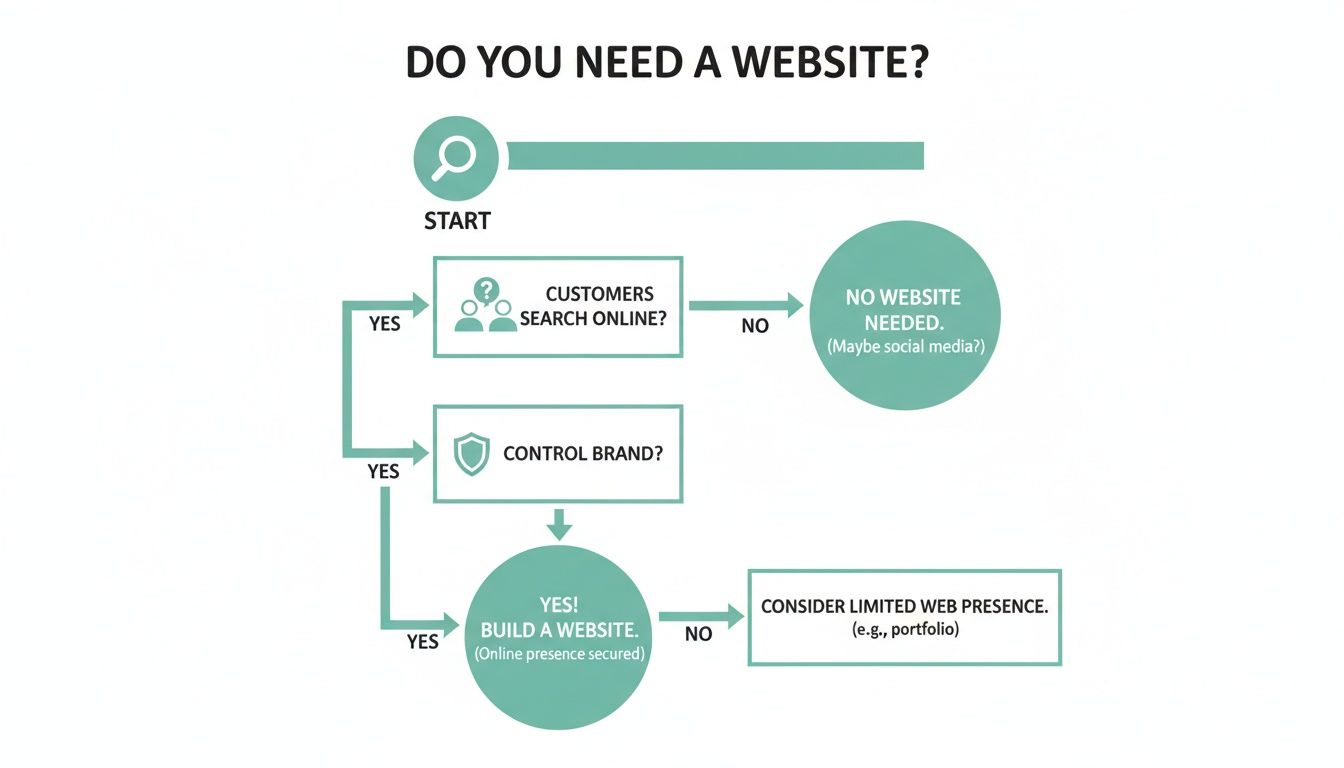
The bottom line? If Kiwis are online searching for what you do, a website stops being an option and becomes a necessity for survival.
Let's start with the DIY path. Platforms like Squarespace, Wix, and Shopify have totally changed the game, making it possible for anyone to build a website. They're incredibly powerful tools.
The biggest drawcard is undoubtedly the cost. You can get a sharp-looking site live for a pretty reasonable monthly fee. You also get total control — you can tweak things whenever you want, without needing to email a developer and wait. For businesses just starting out or running on a shoestring budget, this is a massive advantage.
But there's always a "but," isn't there? That low upfront cost is paid for with your time. And I don't mean just an hour here or there. You’ll be sinking hours into learning the platform, picking a template, writing every single word, sourcing images, and battling with settings you never knew existed. It's a real learning curve.
You'll find that some people will use DIY tools and create a great simple brand, and others will realise it’s too much work and just book a professional service then and there. In either case, it's about finding the right fit for your current situation.
So, what about hiring a web designer or an agency? The most obvious perk is their expertise. You aren't just paying someone to click buttons; you're investing in years of experience in design, how users actually behave on a website, and all the technical stuff that makes a site work properly.
A pro will build a site that not only looks great but is strategically designed to hit your specific business goals, whether that’s getting more quote requests or selling products directly. They take care of all the fiddly, complex bits — making sure the site is fast, secure, and set up correctly for Google right from the get-go. This frees you up to do what you do best: run your business.
The main hurdle, of course, is the upfront investment. A custom-built website is a significant financial commitment. But it helps to reframe it: a well-designed site is an asset that works for you 24/7, attracting and converting customers while you sleep. A good website isn't an expense; it's an investment in your business's growth.
To put it all in perspective, here’s a straightforward look at the key differences between building your own site and hiring a professional, focusing on cost, time, and customisation.
| Factor | DIY Website Builder (e.g., Squarespace) | Professional Web Designer/Agency |
|---|---|---|
| Upfront Cost | Low (typically a monthly subscription) | High (project-based fee, often in the thousands) |
| Time Investment | Very High (your time for learning, building, and troubleshooting) | Low (your time is for feedback and providing content) |
| Customisation | Limited to platform templates and features | Virtually unlimited; tailored to your exact needs |
| Expertise | Relies entirely on your own skills and research | Access to specialists in design, SEO, and development |
| Ongoing Maintenance | Your responsibility (updates, security, backups) | Usually handled by them or offered in a care plan |
| Speed to Launch | Can be quick for simple sites, but slow if you get stuck | Generally faster due to experience and dedicated time |
| Support | Platform-based help guides and community forums | Direct, personal support from your designer/agency |
So, choosing between DIY and a professional comes down to your unique situation. If you have more time than money and are comfortable with technology, a DIY platform can be a fantastic starting point. But if your time is your most valuable asset and you want a strategic, high-performing website from day one, investing in a professional is almost always the smarter long-term move.
Let's talk money. It's often the first question on everyone's mind, but honestly, it's one of the trickiest to answer. Asking, "How much does a website cost?" is a bit like asking, "How much is a car?"
Are we talking about a trusty Toyota Corolla to get you from A to B, or a brand-new Ford Ranger with all the bells and whistles? Both are great vehicles, but they're built for different jobs and have wildly different price tags. The world of web design for a small business is exactly the same.
The cost of a website isn't just a number pulled from thin air. It’s a direct reflection of the time, skill, and sheer complexity involved in bringing it to life.
A simple, beautiful "brochure" website that introduces your business is one thing. A full-blown e-commerce machine handling hundreds of products, secure payments, and customer accounts? That's a completely different beast. You’re paying for the design, the development (the actual coding), content creation, and the strategy—the crucial thinking that makes sure your website actually works for your business.
Let's cut to the chase. In New Zealand, the investment for a small business website can vary dramatically based on the path you take. Local market guides suggest a basic template-based "brochure" site might start around NZ$1,000. On the other end of the scale, a custom, agency-built site typically ranges from NZ$5,000 up to NZ$35,000, and sometimes even more for really complex projects.
But here’s the thing—that's just the initial build. The one-off cost to get your site live is only part of the story.
This is the part that often catches people by surprise. A website isn't a one-and-done purchase; it’s more like owning that car. You have to keep paying for registration, insurance, and fuel to keep it on the road. For a website, these ongoing costs are just as vital.
yourbusiness.co.nz). You’ll need to renew it every year, which is usually a small but essential fee.For a small business, these recurring costs can easily add several hundred to a few thousand dollars per year to the total cost of ownership. Budgeting for them from day one means no nasty surprises down the track.
The key takeaway? Your budget needs to cover both the initial build and the ongoing care. A cheap website that constantly breaks or gets hacked isn't a bargain; it’s a liability. Investing wisely upfront—in a site that’s secure, well-built, and designed to grow with you—will always pay for itself in the long run. If you're still curious, you might be interested in our deeper analysis of website costs in New Zealand.
Here’s a simple truth: most of your customers will first meet you on their phone. They’re scrolling while waiting for their flat white, looking you up on the go, or browsing from the couch after putting the kids to bed.
If your website is a clunky, pinching-and-zooming, slow-loading disaster on a mobile screen, you’ve likely lost them. Honestly, it's that simple. In the world of web design for a small business, "mobile-friendly" is old news. Today, "mobile-first" is the only game in town.
For years, we built websites for big desktop monitors and then tried to squish them down to fit a phone. That approach just doesn't cut it anymore. Mobile-first design flips that idea on its head.
It means we start by designing for the smallest screen—the phone—and then expand the design for larger screens like tablets and desktops. Why? Because it forces us to focus on what’s absolutely essential. It makes us prioritise speed, clarity, and ease of use, which, it turns out, makes for a better website on every device.
This isn't just some fussy design trend; it's a direct response to how people actually live their lives. Local agency reports show that over 70 percent of traffic to New Zealand business-to-consumer websites now comes from mobile devices. With national internet access hitting around 96.2 percent in early 2025, a massive majority of Kiwis expect a flawless mobile experience and will check you out on their phone first. It’s a huge shift in behaviour, and your website has to keep up. You can read more about these digital marketing priorities from Adhesion.
So, what does this mean in practical terms? It’s not just about things looking nice. It’s about function and feel.
Google takes this so seriously that it now uses the mobile version of your website for indexing and ranking. They call it mobile-first indexing.
The key insight here is simple: if your site works poorly on mobile, your visibility in search results will suffer. Google is actively rewarding sites that provide a great mobile experience.
A fantastic mobile experience builds trust. When a potential customer lands on your site from their phone and everything just works—it's fast, intuitive, and easy to navigate—it sends a powerful message. It says you're professional, you care about their experience, and you're easy to do business with.
That seamless first interaction can be the difference between a curious visitor and a loyal customer. It connects the dots between a great mobile experience, happy users, and showing up when Kiwis are searching for a business just like yours. A proper web design for your small business must start with the mobile phone.
Having a beautiful website that no one ever sees is a bit like setting up a fantastic café down a hidden alleyway with no sign. You might have the best flat whites in the country, but if nobody knows you're there, what's the point? This is exactly where Search Engine Optimisation (SEO) steps in.

Don't worry, we're not about to bury you in technical jargon. Think of SEO as sending the right signals to Google so it understands precisely who you are, what you do, and where you do it. The goal is simple: when someone in your town searches for a 'plumber in Tauranga' or 'cafe near me' in Wellington, your business is the one that pops up.
Honestly, if you do only one thing for your local SEO, make it this. Your Google Business Profile (what used to be called Google My Business) is that handy box that appears on the right of a search page or at the top of the map results. It’s a snapshot of your business, showing your address, hours, photos, and reviews.
Claiming and properly setting this up is non-negotiable for any local business. It’s completely free and is arguably the single most impactful tool at your disposal.
This profile is often the very first interaction a potential customer has with your business. A complete, active profile with great reviews instantly builds trust—often before they even click through to your website.
Here’s what you absolutely must do:
This single profile can drive phone calls and foot traffic all on its own. It's that important.
So, what are keywords? They're simply the words and phrases people type into Google. The trick is to get inside your customer's head. What would they search for?
You're not just a "builder"; you're a "builder in Christchurch" or maybe you specialise in "villa renovations Auckland." You're not just a "restaurant"; you're a "Thai restaurant Petone" or an "Italian restaurant with waterfront views."
The key is to be specific and local. Your website content—from your homepage to your services pages and blog posts—needs to naturally include these phrases. This tells Google exactly what you offer and where. For small businesses, getting the local side of SEO right is often the biggest needle-mover. You can learn more about how to put this into action in our guide on local SEO for small businesses in NZ.
Beyond your Google Business Profile and keywords, your website itself needs to be set up correctly. This is where good web design for a small business really proves its value.
A few basic on-page SEO elements send clear signals to search engines:
It might sound a bit technical, but these are straightforward, powerful steps that make a real-world difference. SEO isn't about tricking Google; it's about making it incredibly easy for Google to understand who you are and recommend you to the right local customers.
Popping the bubbly on launch day is a fantastic feeling, but it’s really just the beginning, not the finish line. A website is a lot more like a garden than a statue; it needs regular care to stay healthy, secure, and actually useful for your business. Think of it as a living, breathing part of your operations.
What happens if it gets hacked? What do you do when a critical piece of software becomes outdated and vulnerable? Ignoring these questions is like leaving the back door of your shop unlocked overnight. You just wouldn't do it.
Here's the thing: after your website is live, keeping it running smoothly and securely with dedicated web maintenance and support is just as vital as the initial design and build. This isn't about adding flashy new features; it’s about protecting your investment and your reputation.
At its core, regular maintenance boils down to a few essential tasks. You can think of it as your website's Warrant of Fitness (WOF) – absolutely crucial for any Kiwi small business.
These are the fundamentals you can't skip:
Good website care also leans heavily on solid hosting. The quality of your hosting provider makes a world of difference to your site's speed, security, and how often it's actually online for customers. You can dive deeper into this with our guide on choosing the right website hosting in New Zealand.
Now for the interesting part. Maintenance isn't just about defence; it's also about making your website smarter and work harder for you. This is where you get to see if all that effort you put into the design is actually paying off.
Simple, free tools like Google Analytics can give you incredible insights into who is visiting your site. And you absolutely don't need to be a data wizard to get real value from it.
It’s not about drowning in data; it’s about finding simple, actionable insights. Understanding how people use your site helps you make smarter business decisions, from where you spend your marketing dollars to which products you feature on the homepage.
You can easily see things like:
By keeping a casual eye on these simple numbers, you turn your website from a static online brochure into a dynamic tool that actively informs your business strategy. It helps you understand your customers on a deeper level and shows you exactly where to focus your efforts for real growth.
We get it. This is a lot to take in. When you're busy running your business, thinking about websites can feel like one more thing on an already overflowing plate. To help, we’ve put together some straight-up answers to the questions we hear most often from Kiwi small business owners.
It’s completely normal to have a few worries swirling around. Is now the right time? How long is this all going to take? Let's clear up a few of those common concerns right now.
Ah, the classic "how long is a piece of string?" question. Honestly, it varies hugely. A simple, clean website using a great template could be up and running in a few weeks. But a more complex, custom-built site with full e-commerce functionality? That could take anywhere from three to six months, sometimes even longer.
The biggest factor that speeds up or slows down the timeline isn't the designer or developer; it's you. Getting your content ready—the words, the photos, the product details—is often the part of the process that takes the longest. If you have all of that organised from the get-go, things move so much faster.
A good designer will give you a clear project timeline upfront, but remember that it's a partnership. Your prompt feedback and having your content ready are just as crucial to keeping everything on schedule.
You might think a blog is just for influencers or massive companies, but for a small business, it's a secret weapon. A blog is hands-down one of the most effective ways to improve your SEO and get found on Google.
Every time you publish a post answering a common customer question, you're creating a new doorway for Google to find your site. You’re showing you know your stuff, building trust, and giving people a genuine reason to visit your website—and keep coming back.
This is a great question! Your business is going to evolve, and your website absolutely should evolve with it. If you’ve gone the DIY route with a platform like Squarespace, you can log in and make tweaks yourself whenever you like.
If you’ve hired a designer, they will typically build your site on a Content Management System (CMS) like WordPress. Think of it as a user-friendly dashboard for your website. You'll be able to easily update text, add new photos, or publish a blog post without needing to touch a single line of code. For bigger structural changes, you’d simply get back in touch with your designer.
Your website isn't set in stone. It's a living, breathing tool that should grow and adapt right alongside your business.
Ready to build a website that works as hard as you do? NZ Apps specialises in professional web design for Kiwi businesses, creating beautiful, functional sites that get real results. Start with a free consultation to discuss your vision.