
Staring at the blank canvas of a new ecommerce website can feel pretty overwhelming, can't it? You know where you want to end up—a booming online store—but figuring out that very first step can be a real head-scratcher. It’s so tempting to jump straight into the fun stuff, like picking a gorgeous theme or imagining your products on a stunning homepage.
But let’s just pump the brakes for a moment.
Before we even think about things like color palettes or fonts, we need to lay some solid groundwork. This initial planning is what separates a pretty website from a profitable one. Honestly, it’s the part that makes every single decision down the line so much easier.
First things first, let's get real about who you're trying to reach. A vague target like "everyone in New Zealand" isn't a strategy; it's a recipe for getting lost in the noise. You have to be specific. Who is your ideal customer, really?
Knowing this level of detail informs everything else. It shapes your brand's tone of voice, the kind of photography you use, and even the payment methods you offer at checkout. You simply wouldn't design a website for a 20-year-old the same way you would for a 65-year-old. Makes sense, right?
Okay, you’ve nailed down who you're selling to. Now for the million-dollar question: why should they buy from you and not from the next person? What makes your business and your products genuinely special? This is what the pros call your unique selling proposition (USP), and it needs to be crystal clear.
Maybe you offer exceptional handcrafted quality, lightning-fast local shipping, or expert advice that no one else in your niche can match. Whatever your "secret sauce" is, it needs to be front and centre on your website. It's the hook that will grab a potential customer's attention in a very crowded market. A solid founder's guide on how to start an ecommerce business can be a great resource for taking your initial idea and turning it into a profitable reality.
And the market is definitely growing. The New Zealand ecommerce scene was valued at around USD 3 billion in 2024 and is projected to climb to USD 5.47 billion by 2032. That’s a huge amount of online spending, which means there's plenty of opportunity—but also plenty of competition.
Finally, it’s time to do a little recon. Take a good, honest look at what your main competitors are doing online. What do you love about their websites? What frustrates you or makes you want to click away? By analyzing their strengths and weaknesses, you can spot the gaps they've missed—and that’s exactly where you can step in and do better.
A great competitor analysis isn't about copying what works. It's about understanding the current standard so you can thoughtfully exceed it and serve your customers better.
Putting in this strategic work upfront gives you a clear roadmap for the journey ahead. With a defined plan and a deep understanding of your customer, you’ll have the confidence to start building a site that doesn’t just look good, but actually brings in the sales.
Alright, let's get into one of the biggest decisions you'll make: the platform. This is where many business owners get stuck in a bit of analysis paralysis, and who can blame them? You've probably heard names like Shopify and WooCommerce thrown around, but what do they actually mean for a Kiwi business trying to get things off the ground?
Think of it like setting up a physical shop.
Shopify is like leasing a premium, move-in-ready retail space in a bustling mall. It’s fast, secure, and everything just works straight out of the box. The lights are on, the security is handled, and there’s a steady stream of foot traffic. The catch? You have to play by the mall's rules and pay that monthly rent.
WooCommerce, on the other hand, is like owning the building itself. You have total, unadulterated freedom. You can build whatever you want, paint the walls any color, and even knock a few down if you feel like it. But here’s the thing—you're also the one responsible for the plumbing, fixing the leaky roof, and hiring your own security.
The platform landscape in New Zealand tells an interesting story. Data shows that for many small to medium businesses, Shopify is the clear favourite, hosting a massive 42.85% of the country's online stores. WooCommerce comes in a strong second with 23.66%.
But—and this is a big but—when you look at total sales volume, enterprise-level systems like Salesforce Commerce Cloud blow them out of the water. It just goes to show that bigger, more established companies often need a completely different set of tools.
This decision tree can help you visualise the thought process for picking the right path for your specific goals, audience, and budget.
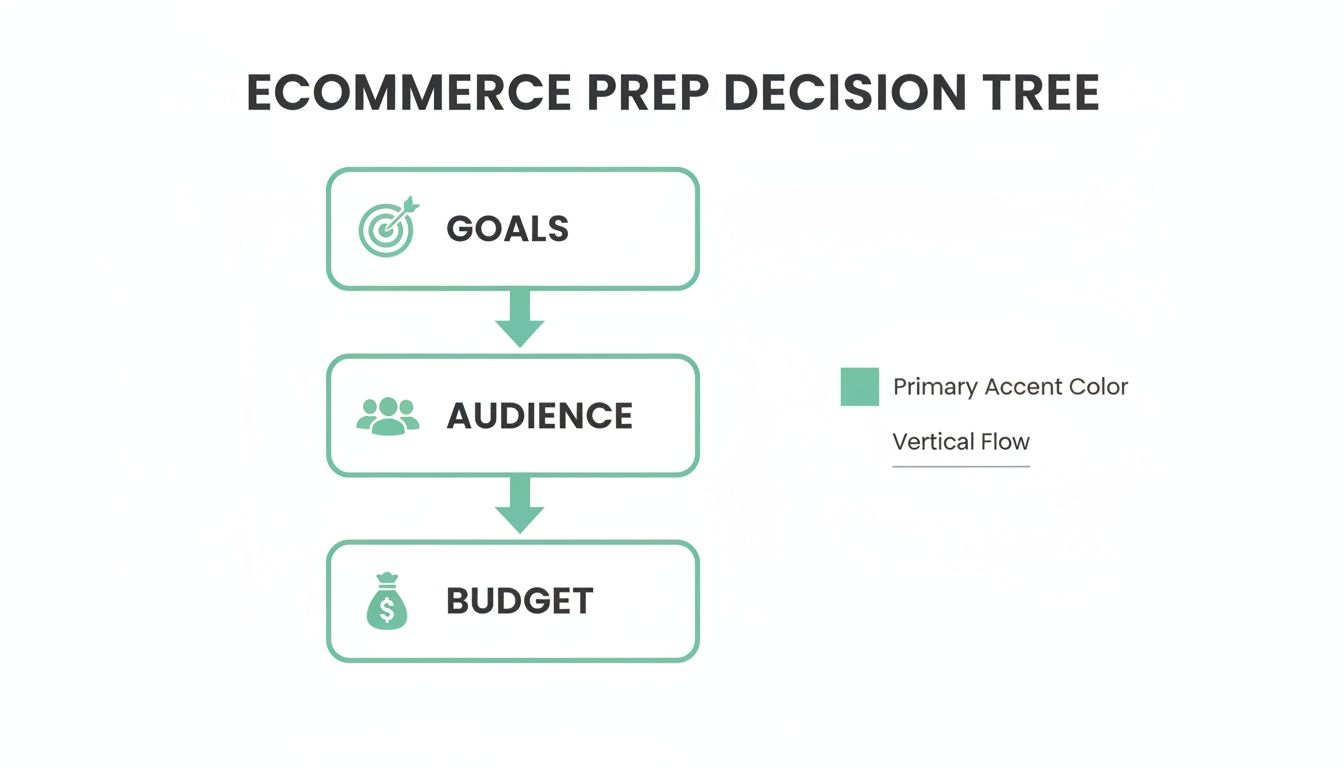
Here's the thing: your choice isn't just about a list of features; it's a strategic decision that needs to be rooted in your core business objectives.
For most startups and small businesses in New Zealand, a platform like Shopify offers the quickest and most reliable path to getting online and making sales. It handles all the tricky bits—like payment processing and security—so you can focus on what you do best. If you're weighing up these two options, we've got a much more detailed breakdown in our comparison of Shopify vs WordPress for NZ businesses.
Then there's the third option: a fully custom build. This is the equivalent of designing and constructing your flagship store from the ground up, with an architect and a full construction crew. It's expensive, it's time-consuming, and it is definitely not for everyone.
So, why would anyone go down this path?
A custom build becomes the right move when your business has truly unique needs that an off-the-shelf solution simply can’t handle. Maybe you have a complex subscription model, a one-of-a-kind product customization tool, or need to integrate with a bespoke inventory system that no one else uses.
A custom solution isn't about looking different; it's about functioning differently. It's for when your business model is so unique that a pre-built box simply won't fit.
Here are a few scenarios where a custom build might be the only way forward:
To make things a bit clearer, here’s a quick-fire comparison to help you see where your business might fit.
| Feature | Shopify | WooCommerce | Custom Build |
|---|---|---|---|
| Ease of Use | Very high (plug-and-play) | Moderate (needs some tech skill) | Very low (requires a dev team) |
| Upfront Cost | Low (monthly subscription) | Low (free plugin, but host/dev costs) | Very high (major investment) |
| Time to Launch | Fast (days to weeks) | Medium (weeks to months) | Slow (months to years) |
| Customisation | Good (themes & apps) | Excellent (full control) | Unlimited (built from scratch) |
| Maintenance | Low (handled by Shopify) | High (you're responsible for everything) | Very high (ongoing dev work needed) |
| Best For | Startups, SMEs, direct-to-consumer brands | Tech-savvy owners, content-heavy sites | Unique business models, enterprises |
Choosing your tech stack is less about finding the single "best" platform and more about finding the right one for your business, right now. Let your budget, your technical comfort level, and—most importantly—your long-term business goals be your guide.
Alright, now we’re getting to the fun stuff—designing what your customers will actually see and interact with. But let's be clear: a great design is about so much more than just looking pretty. It's about psychology.
Honestly, a brilliant e-commerce experience is like a silent salesperson. It smoothly guides a visitor from 'just browsing' to 'just bought' without them even realizing it.
So, how do you pull that off? It all comes down to User Experience (UX), which is really just a fancy way of describing how a person feels when they use your site. Is it easy? Is it frustrating? Crucially, do they trust you enough to pull out their credit card?
Think of your homepage as your digital front door. A visitor lands there and, in about three seconds, makes a snap judgment. They're asking: "Am I in the right place? Do I trust this brand? What should I do next?" If the answers aren't immediate and obvious, they’re gone. Just like that.
Your homepage has to work incredibly hard. It's not just a welcome mat; it's a quick summary of your site's best content, designed to get someone interested enough to click deeper.
What does that look like in practice? It means putting your most important stuff "above the fold"—another bit of jargon that simply means what people see without having to scroll. This is your prime real estate, so use it wisely.
A common mistake I see is businesses hiding what they actually sell. Your navigation should scream "shop here!" Make it painfully clear what you offer from the second someone arrives.
For example, instead of a top menu with links like "Our Story," make your main navigation your product categories. Think "Dresses," "Shoes," or "Outdoor Gear." A visitor should know exactly what you sell without a single click. You can get deeper insights on crafting these effective digital storefronts from an expert user experience designer.
If the homepage is the front door, the product page is the fitting room. This is where the real decision to buy happens, and a lazy page will absolutely kill your sales.
So what separates a product page that converts from one that just sits there? It's a combination of a few key things:
And now, we have to talk about mobile. It’s not an afterthought anymore; it’s the main event. Here in New Zealand, smartphone ownership is at a massive 95%, and two-thirds of Kiwi shoppers browse online before they even step into a physical store. That behavior alone shows just how vital it is that your website performs flawlessly on a small screen.
Designing for mobile first forces you to be ruthless with your design. It makes you cut out the clutter and focus only on what’s essential. A site that’s a dream to use on a phone will almost certainly be great on a desktop, but the reverse is rarely true.
Designing an e-commerce website that sells isn’t about flashy animations or trendy layouts. It’s about empathy. It's about putting yourself in your customer's shoes and making their journey as simple, clear, and enjoyable as possible. Get that right, and your design won't just look good—it'll work hard for your business.
So, we've got the design sorted. Your site looks incredible. But here's the honest truth: a beautiful storefront is completely useless if customers can't actually buy anything.
Now we're heading into the engine room. This is the stuff that happens behind the scenes, but without it, your business is just an online catalog. Let's make sure your store is ready to handle money and get products into customers' hands.
Have you ever gotten to a checkout, ready to buy, only to find they don't accept your preferred payment method? It’s an instant sale killer. In New Zealand, people expect options. They want to see the familiar logos they know and trust.
This isn’t just about having a credit card field; it’s about making the payment process feel seamless and secure. Remember, this is the moment a customer is trusting you with their money.
So, which gateways should a Kiwi business really consider? Here are the heavy hitters we see used most effectively:
Don't make the mistake of choosing just one. The goal is to remove every possible barrier to purchase. Offering a mix of credit card, direct bank transfer, and BNPL options covers nearly every customer preference.
To help you decide, here's a quick rundown of popular payment options for NZ businesses.
| Payment Gateway | Best For | Key Feature |
|---|---|---|
| Stripe | Universal acceptance | Simple, developer-friendly integration for all major credit/debit cards. |
| POLi | Customers without credit cards | Allows direct payment from a customer's online banking account. |
| Afterpay/Laybuy | Increasing average order value | Splits payments into interest-free instalments for the customer. |
| Windcave | Businesses needing robust, integrated solutions | NZ-based gateway with strong in-person (EFTPOS) and online integration. |
| PayPal | Shoppers who prioritise security & speed | A trusted global name that allows payment without entering card details. |
Choosing the right mix from this list will ensure your checkout is as welcoming and frictionless as possible for the widest range of Kiwi shoppers.
Okay, they've paid. Fantastic! Now comes the next challenge: actually getting the product to them. Shipping can feel like a logistical nightmare, but it doesn't have to be. Your customers expect transparency and reliability.
The worst thing you can do is surprise them with a huge shipping fee at the very end of the checkout process. In fact, unexpected costs are the number one reason people abandon their shopping carts. It feels like a bait-and-switch.
So, how do you get it right?
First, you need a reliable partner. For most NZ businesses, integrating directly with NZ Post is a no-brainer. Their tools can calculate accurate, real-time shipping rates based on the customer's address and the weight of the items in their cart. No more guesswork.
Next, give people choices. Not everyone needs their order tomorrow.
Getting this part right isn't just about logistics; it’s a core part of your customer service. For a deeper look into this area, you can learn more about how efficient supply chain solutions in NZ can really set your business apart.
Finally, let's talk about security. This topic might make some people's eyes glaze over, but it's non-negotiable. It’s the digital equivalent of having strong locks on your doors and a good security system.
The most fundamental piece of the puzzle is an SSL certificate. You've seen it before—it's what puts the little padlock icon and "https" in the browser's address bar. It encrypts the connection between your customer's computer and your website, protecting their personal and payment information from anyone trying to snoop.
Honestly, without one, most modern browsers will flag your site as "Not Secure." That's a massive red flag for any potential customer.
Thankfully, most quality ecommerce platforms like Shopify include a free SSL certificate as standard. But it's your job to ensure it's always active and configured correctly. It’s the foundation of trust for your entire online operation.
You've built it. The digital doors are open. So… now what? Are customers just going to show up?
Probably not without a little help. This is where we pull back the curtain on Search Engine Optimisation (SEO) for online stores. It's not a dark art; it's about making it ridiculously easy for search engines like Google to understand what you sell and show it to the right people.
Think of it like this: your website is a beautiful new shop, but it's currently located down a hidden alleyway. SEO is the process of putting up big, clear signs on the main road, pointing everyone directly to your front door. It’s about being found when someone in New Zealand types "wool blankets" or "handmade ceramic mugs" into their search bar.
Let’s be honest, SEO can feel like a massive, complicated beast. But for a brand-new ecommerce store, you really only need to focus on a few key things that make the biggest difference. The goal is to get the fundamentals right from day one.
This all starts with finding the right keywords—the actual search terms your ideal customers are using. Are they searching for "running shoes" or "trail runners"? Small differences in wording can have a huge impact. Once you’ve got a handle on these terms, you can start weaving them into the places Google looks first:
Your website’s speed is another massive factor. A slow-loading site isn't just frustrating for users; Google actively penalises slow sites in its search rankings. Every second counts.
For a business serious about visibility, it's worth understanding the full scope of what's involved. To ensure your online store is easily discoverable and ranks high, considering dedicated SEO services for ecommerce can provide a structured approach that covers all the bases, from technical fixes to content strategy.
This brings us to analytics. SEO is the effort; analytics is the report card that tells you how you did. Without data, you’re just guessing.
Setting up an analytics tool is non-negotiable. Google Analytics 4 (GA4) is the industry standard, it's free, and it provides an almost overwhelming amount of information about your website's visitors. Don’t panic, you only need to watch a few key metrics to start.
Once it's installed, you can start asking some really important questions:
This data is pure gold. It tells you exactly what’s resonating with your audience and, more importantly, what isn't. Seeing that a specific blog post drives a ton of traffic to a product category tells you to write more posts like that one. Noticing that everyone drops off at the shipping page tells you there's a problem there you need to fix.
This feedback loop—making a change, measuring the result, and then iterating—is the heartbeat of a growing online business. It turns designing an ecommerce website from a one-time project into an ongoing process of improvement.
Hitting the 'publish' button isn't the finish line—if anything, it’s the starting pistol. The real work often begins the moment your ecommerce site goes live. So, what happens after you finally push your creation out into the world?
You begin the ongoing journey of running a successful online store, and it all starts with a rock-solid pre-launch checklist. It's tempting to rush this part, I know, but trust me, you'll regret it later. You need to test everything, and I mean everything.
Before a single real customer lays eyes on your site, you’ve got to put it through its paces. Does the checkout flow work flawlessly? Have you tried it with a test credit card number? And what about how the site looks on your mate's ancient, cracked-screen smartphone? These are the real-world tests that actually matter.
Your pre-launch checklist should look something like this:
An ecommerce website is a living, breathing thing. Think of it less like a finished painting and more like a garden that needs constant tending to flourish.
Once you're live, the job shifts from building to maintaining and iterating. This is where the real magic happens. Your website isn't set in stone; it's a dynamic tool that needs regular care and attention. Things like regular updates, security scans, and daily backups are your new best friends. They're the non-negotiable tasks that keep your digital shop safe and running smoothly.
This is also the time to listen. What are your first customers saying? Are they getting confused at a certain step? Use tools to gather real user feedback, like post-purchase surveys or even just paying close attention to customer service emails. Those little complaints and questions are actually nuggets of gold—they're telling you exactly what you need to improve. Building an ecommerce site is never really 'done'. It's a continuous loop of launching, listening, and refining.
Alright, let's round things out by tackling a few of the most common questions we hear from Kiwi businesses when they start thinking seriously about building an ecommerce website. These are the practical, rubber-meets-the-road queries that pop up once the initial brainstorming buzz wears off.
Honestly, that’s a bit like asking "how much does a car cost?"—the answer really depends on what you need it to do.
You can get started with a simple Shopify or WooCommerce site using a quality theme for a few thousand dollars, which covers a professional setup.
If you’re after a more custom-designed site on one of those platforms, you’re likely looking at a range of $10,000 to $25,000+. For a fully bespoke, from-the-ground-up ecommerce platform, that's a major investment, often starting at $50,000 and climbing from there. The key is to match your budget to your business goals and what you can realistically expect in return.
Again, this comes down to scope. A basic, theme-based store can often be up and running in a brisk 4-8 weeks, but that assumes you have all your ducks in a row.
Your own preparation is the single biggest factor affecting the timeline. Having your product photography, descriptions, and a clear strategy ready before you start will speed things up considerably.
A more customised design with specific features might take closer to 3-5 months. If you're venturing into a complex, from-scratch build, that could easily be six months or even longer.
Not always! Let’s be perfectly clear: for many new and growing businesses, a well-chosen and thoughtfully customised premium theme is more than enough to get the job done, and done well. You don't need to reinvent the wheel just for the sake of it.
You start needing a custom design when your brand has a unique story that a theme just can't tell visually, or when you have very specific functional needs that an off-the-shelf solution can't handle. It's about finding that tipping point where a template is holding your business back, not helping it grow.
Ready to stop wondering and start building? The team at NZ Apps specialises in creating high-performing ecommerce websites for New Zealand businesses. Let's have a chat about your vision. Get in touch for a free consultation.