
The buying habit is already set. The 2024 Australian and New Zealand Ecommerce Report found that 77% of New Zealand shoppers purchased online every month, based on research involving 1,000 New Zealand online shoppers conducted in July 2024. So why do so many digital sellers pick a platform by its monthly price, then lose money on fees, refunds and failed renewals? You know what? The better question is simple. Which setup keeps the most net revenue in your bank account?
Say you sell a template pack on a Friday night. The buyer pays, gets a link in seconds and starts work before you've even seen the order email. No courier. No warehouse shelf. That instant handover is lovely, and it's also the trap, because your platform now does every job the courier and warehouse used to share.
That shift matters in a busy market. NZ Post Business IQ reports consumers spent more than NZ$6.09 billion online in 2024, completing more than 64.1 million online transactions while the average basket fell 7.5% to NZ$95. More orders, smaller baskets. That pattern suits digital goods well, since a licence or course can be sold and delivered fast.

When nothing ships, ecommerce platforms for digital products have to handle file delivery, access control, tax maths and refunds without you touching a box. That covers software, apps, ebooks, templates, courses, memberships and downloadable media. It sounds like admin. It's the whole product.
If you're still sorting the offer itself, a plain walkthrough of how to sell digital products online helps you pin down the product, price and delivery promise before you judge tools.
Start here: Write down your product type, your expected monthly orders, and whether you sell to NZ buyers only. Those three answers decide which rows matter next.
From there, I judge every platform on three things. How does it control files and access? Which NZ payment and tax rules bite? And what's left after costs at real volumes? Keep those in mind, and the sales pages get a lot less persuasive.
Let's put the shortlist side by side first, because shiny home pages all start to sound the same after an hour. Hosted, self-hosted, built in, add-on. What do those words cost you in time?
| Platform | Hosting | Digital product types | Subscription support | Setup effort |
|---|---|---|---|---|
| Shopify | Fully hosted | Physical and digital via apps | Through apps | Medium, many apps to vet |
| WooCommerce | Self-hosted on WordPress | Downloadable products and bundles | Through an extension | High, you run hosting and updates |
| Easy Digital Downloads | Self-hosted on WordPress | Files, software and licences | Through an extension | Medium, built for digital sales |
| Gumroad | Fully hosted | Files, memberships and courses | Built in | Low, live in an afternoon |
| Lemon Squeezy | Fully hosted | Software, files and licence keys | Built in | Low, minimal setup |
| Kajabi | Fully hosted | Courses, communities and files | Built in | Medium, plan a launch week |
A fully hosted platform looks after servers, updates and security for you. You log in, add products and sell. That's a real relief if tech maintenance makes your eyes glaze over.
A self-hosted setup on WordPress flips the job. You choose the host, you run updates, you sort backups, and you pay the hosting bill. In return you control the data, the checkout flow and the add-ons. Freedom, yes. Free, not quite.
Shopify handles mixed physical and digital stores well, and its checkout is polished. Its native digital support is narrower than its app store, though, so the true cost often sits in the apps you stack on top. Each app is one more monthly charge and one more setting to test.
WooCommerce and Easy Digital Downloads, usually called EDD, have a free core. That sounds like a bargain until you need subscriptions or licence keys and start buying extensions. EDD is built only for digital sales, so its defaults feel closer to home. WooCommerce suits a wider store that also ships physical goods.
Gumroad, Lemon Squeezy and Kajabi bundle subscriptions and memberships into the base product. Setup stays light because file delivery, billing and access sit in one place. The trade-off is shape. You can't bend the checkout as far, and your store lives inside their frame.
If you want a wider net before you settle, AmaJova's comparison of ten selling platforms is handy for spotting names you may have missed, then you can bring those names back to this matrix and test them the same way.
Before you fall for a row, ask three plain questions:
Those answers cut the list fast. A solo template seller with two spare evenings doesn't need Kajabi. A course creator with live cohorts will outgrow a bare download link in weeks.
Delivery is where digital selling gets serious. A file isn't a parcel. Once it's copied, you can't call it back like a misaddressed box. So the platform needs ways to control who gets in, for how long, and what happens when they stop paying.
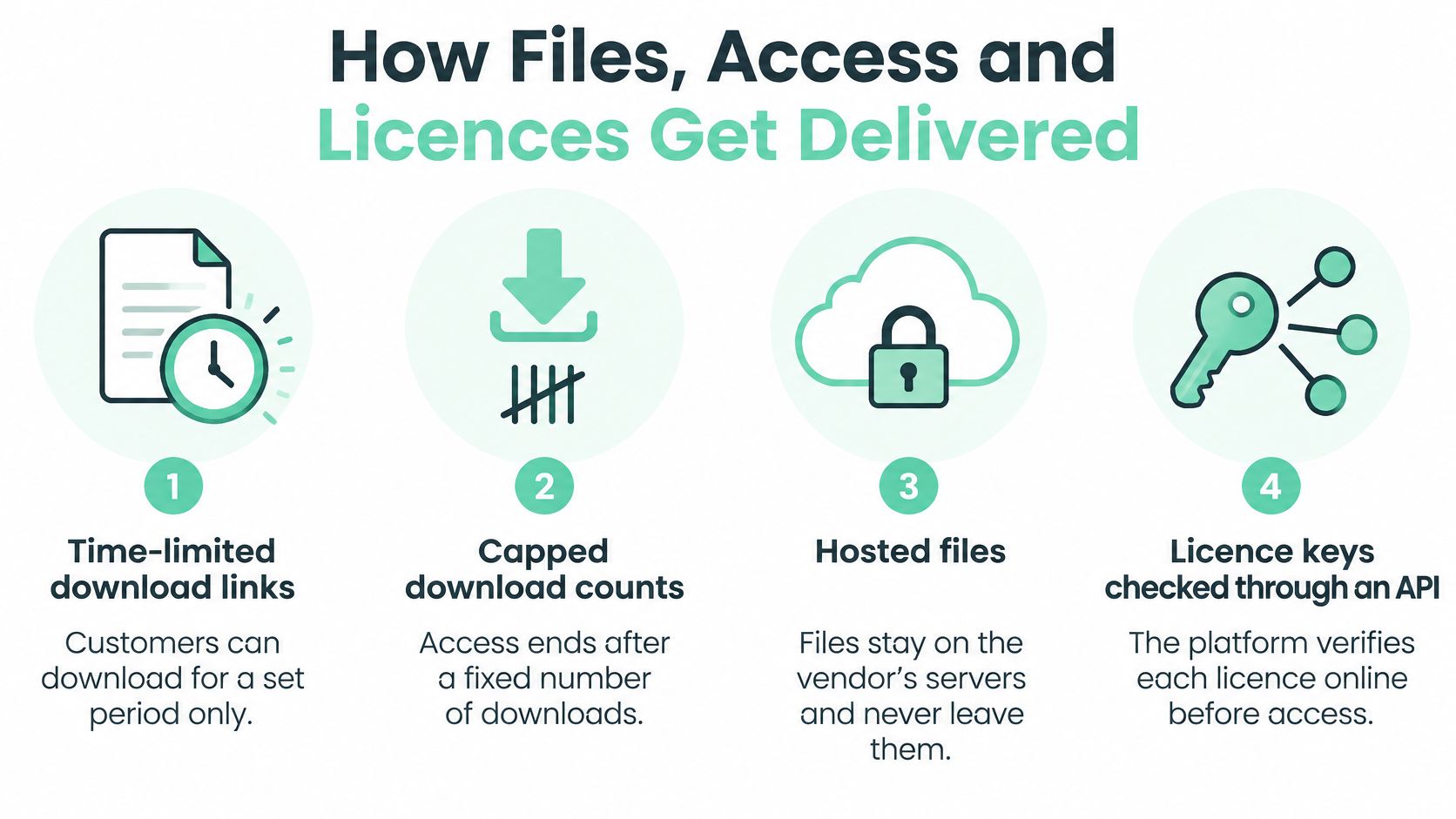
Time-limited download links expire after a set period. They stop casual sharing, since a link passed to a mate next week is dead. They're simple, and buyers get them at once.
Capped download counts end access after a fixed number of tries. That curbs repeated sharing while still letting a buyer grab the file on a laptop and a desktop. Set the cap too low, though, and honest buyers email you in a huff.
Hosted files never leave the vendor's servers. Course video and membership lessons work this way, sitting behind a login. The buyer watches or reads inside your walls, so you can update material and everyone sees the new version.
Licence keys checked through an API, which just means your software phones home to confirm a key is valid, let you enforce seat limits. One key, two machines, that sort of rule. EDD and Lemon Squeezy speak this language well. If you need the store, licence checks and renewals talking to each other cleanly, practical ecommerce integration software guidance shows what those connections should cover before you build.
Here's the test that matters. After a refund or a failed renewal, does access switch off on its own? Or does the buyer keep the file forever while you keep none of the money?
Who controls the file once it has left the store? If you can't answer that in one sentence, the setup isn't ready.
Rights have a hard edge here too. Standards New Zealand states that standards content used in digital tools, software or AI systems requires a licence. Buying a standard doesn't grant permission to reuse its content in your product. Your store can't clear rights for you, so the product page, licence terms and delivery system must all say the same thing.
Run this test on any platform you shortlist:
Five steps, one afternoon. Cheap insurance.
Fees are where the advertised price and the actual cost differ. Let's do the maths properly, then talk about the expense nobody puts on the pricing page.
The payment mix comes first. IT Brief reporting on New Zealand payment data says digital wallets represented 29% of New Zealand ecommerce transaction value in 2025, while cards accounted for 46% and buy-now-pay-later represented 13%. So your checkout should carry Apple Pay, Google Pay, cards and BNPL without sending buyers away from your domain.
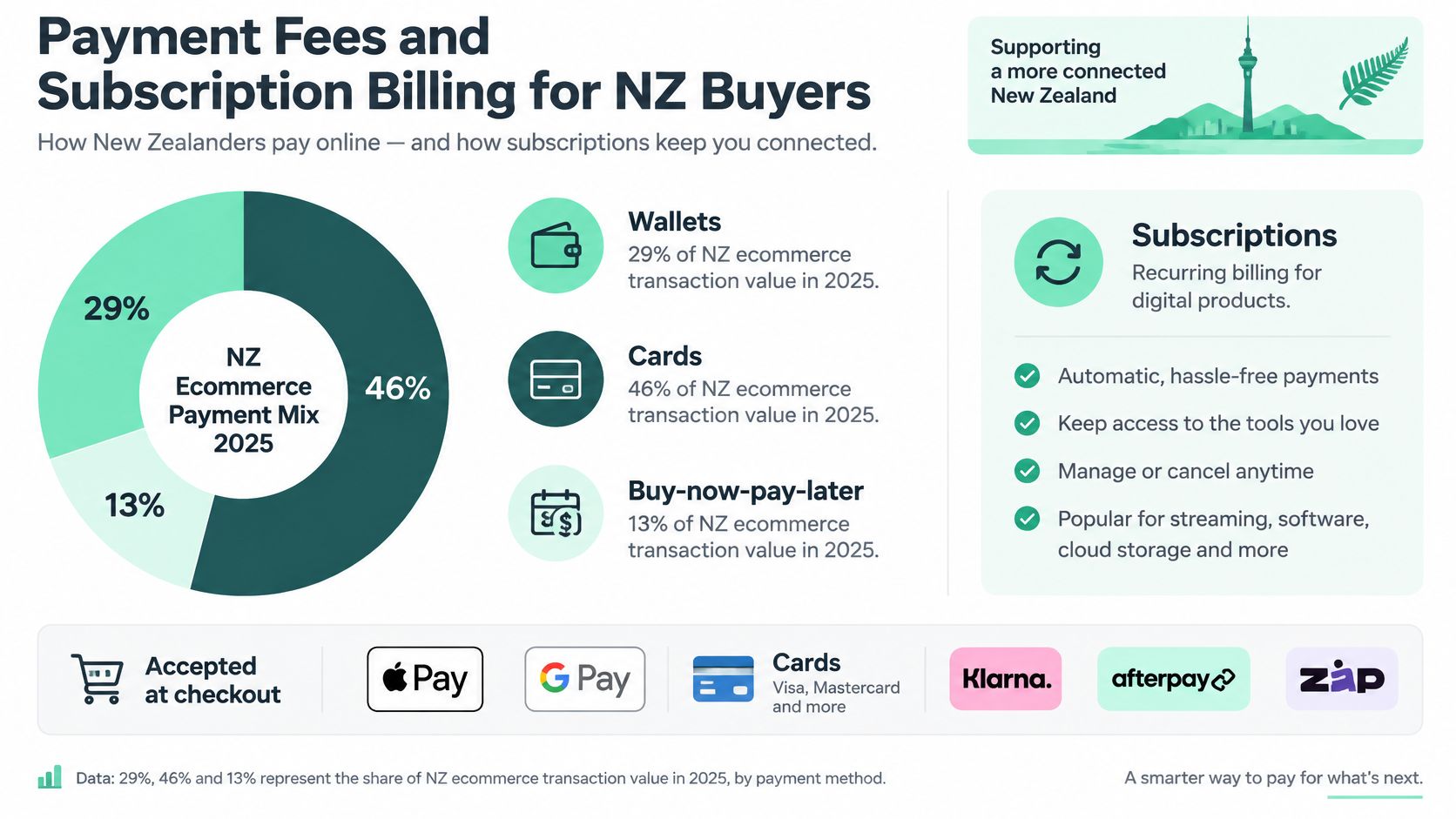
Subscriptions raise the bar further. A renewal needs stored payment credentials, which just means permission to charge the saved card again, plus automatic retries when a charge fails. Cards expire. Accounts run dry before payday. A platform that retries smartly and emails the buyer at the right moment saves revenue a pretty checkout never will. That is why gateway support, not checkout looks, is the decisive filter. For the plumbing behind that, an overview of ecommerce payment platforms helps you compare what sits between the buy button and your bank.
| Platform | Monthly cost | Fee per sale | Tax handling |
|---|---|---|---|
| Shopify | From US$39 a month plus apps | Card processing fee set by chosen plan | Seller sets up tax settings or a tax app |
| WooCommerce | Free plugin, plus hosting | Gateway fees only | Seller handles tax with a plugin or accountant |
| Easy Digital Downloads | Free core, paid extensions | Gateway fees only | Seller handles tax in plugin settings |
| Gumroad | Free to start | 10% plus 50c | Collects and remits many sales taxes; confirm NZ GST |
| Lemon Squeezy | Free to start | 5% plus 50c | Acts as merchant of record; confirm NZ GST coverage |
| Kajabi | Paid monthly plans | Card processing through Kajabi Payments or a third-party provider | Seller confirms tax setup |
Say you sell a US$29 download. On Gumroad at 10% plus 50c, the platform fee is US$3.40. On Lemon Squeezy at 5% plus 50c, it's US$1.95. Both figures sit before card processing, and the gap repeats on every single order.
Now the wrinkle. A cheaper headline fee can still lose money if refund handling is clumsy or failed-payment recovery is weak. Losing a subscriber over an expired card costs far more than a small fee gap. Fees change too, so check live rates before you commit.
Gateway choice matters locally. Windcave is a familiar NZ name, while Stripe and PayPal are the global defaults. Ask one blunt question of each: do you settle in NZD, straight to my NZ bank, without a currency conversion nibbling at every payout?
Then track your failed-charge recovery rate every month. That single number tells you whether a low fee is cheap, or just cheap looking.
Plenty of sellers assume digital goods sit outside tax because there's no parcel to weigh. That assumption gets expensive fast, and it lands straight on the number that matters: what you keep after fees, refunds and tax. Start with the threshold.
Inland Revenue states that GST registration is generally required when total taxable supplies were more than NZ$60,000 in the previous 12 months, or are expected to exceed NZ$60,000 in the next 12 months. The rule covers e-books, software downloads, streamed music and movies. It also catches overseas sellers supplying remote services to NZ consumers, which is the part sellers misread. Those remote-services rules exist to bring offshore sellers into the NZ GST net. They are not a general exemption for a local business that happens to invoice other GST-registered businesses. If you sell downloads to NZ consumers, plan as though the threshold will arrive.
A merchant of record platform becomes the seller of record for the transaction. Its name sits on the sale, and it handles tax collection in covered places. Lemon Squeezy and Gumroad operate this way. That moves real work off your desk, but confirm two things before you commit: does the coverage include NZ GST, and what sales records reach you for your own returns? A merchant of record that reports cleanly is worth more than one with a lower headline fee and murky paperwork.
Consumer law applies with full force. Consumer Protection confirms the Consumer Guarantees Act covers digital products, including software and internet downloads or streaming. Products must be fit for their normal purpose, free from faults or defects, safe, and of acceptable quality and durability. Where a fix isn't possible, the customer may ask for a replacement or a full refund.
For that law in plain business language, a guide to the Consumer Guarantees Act in NZ sets out what buyers can request and what you must do next.
So the platform needs a remedy workflow, not just a slick checkout. Refunds, replacements, support records and access revocation should run from one place. Digging through email threads at midnight is how sellers lose both the sale and the margin.
Accountant test: Can it issue GST-ready tax invoices, export NZD sales reports, process partial refunds, and keep records long enough?
Talk to an accountant before launch, not after. That NZ$60,000 line has a habit of arriving sooner than founders expect, especially after one good launch week.
Feature counts are a poor way to pick. A platform with forty toggles you'll never touch isn't better than one with ten you'll use daily. Stage matters more, and so does where your buyers live.
Local trust carries weight. NZ Post reports New Zealand-based retailers accounted for 79.6% of online spending in 2025, and domestic average basket values were more than NZD 50 higher than international baskets. NZD pricing and familiar payment methods can make a global tool feel local, and that feeling converts.
Revenue kept beats feature count. Judge each platform by what's left after fees, refunds, failed payments and tax.

| Business stage | Typical setup | Recommended platform | Why it fits |
|---|---|---|---|
| Side project with one product | One or two downloads, few sales | Gumroad or Lemon Squeezy | Fast launch and low fixed cost |
| Growing course or membership | Courses, memberships, recurring access | Kajabi or Lemon Squeezy | Access control and billing built in |
| Established store adding digital goods | Physical and digital items, marketing needs | Shopify with a digital download app | Full store control and integrations |
| Developer or template seller | Software, templates, custom licence rules | Easy Digital Downloads on WordPress | Owns customer data and licence logic |
| SaaS team with recurring licences | Seats, plans, renewals | Lemon Squeezy or a Stripe-based build | Subscription events and licence checks |
A side project needs speed, not architecture. A SaaS team needs renewal events it can trust. If you want to sanity check the stage fit against a fresh shortlist, you can find digital product platforms for 2026 and map any new name onto the same five rows.
The hosting trade-off runs underneath every row. Self-hosted setups give you customer data and control, but they cost you evenings on updates and backups. Hosted setups trade flexibility for speed, and for many sellers that trade is worth it. Neither is morally better. It's a time versus control call, and your diary gets a vote.
Growth is the question that bites a year later. A store that suits one download can creak once you run dozens of products, several currencies or a shelf of subscription plans. Ask about bulk product uploads, several price points per product, and clean exports of subscriber data. Moving a full catalogue later, with live subscribers attached, costs far more than choosing well now.
Aim for a shortlist of two, not a single universal winner. There isn't one.
Two platforms made your list. Good. Now stop reading sales pages and run the same live trial on both, before you pay for any plan. Demos are theatre. Real money tells the truth.
Run three purchase checks on each. Make a one-off NZD purchase with a New Zealand card. Make a second purchase with an overseas card. Then confirm the payout, whether it settles in NZD, and how many days it takes to reach your bank. Add the delivery and refund steps from your file testing so both platforms face identical jobs.
Record four numbers for each:
Put those numbers beside your fee maths. A platform that looks cheap on paper can cost more in admin hours than its rival charges in fees, and your hours are not free. Use a small live product rather than a sandbox, since a setup that feels fine in a demo can still fall over on the first real refund. Start this week while the shortlist is fresh, then decide and write down why. Future you will be grateful.
If you'd like a second set of eyes on platform choice, payments and GST-ready setup before you build, we offer a free, no-obligation consultation for website projects, and we build websites and digital solutions for Kiwi businesses. Start the chat with NZ Apps and bring your two-platform shortlist, and we'll help you pick the one that keeps more of every sale.
Add your NZ or Australian app or tech company to the NZ Apps directory and get discovered by founders and operators across the region.
Get ListedReach tech decision-makers across New Zealand and Australia. Sponsored and dofollow editorial links, permanent featured listings, and sponsored articles on a DA30+ .co.nz domain.
See Options