
When you're running a small business, your website needs to be more than just a digital brochure. It has to be an online hub that works as hard as you do—your 24/7 salesperson, your number one tool for building trust, and the central point for all your marketing.
Let’s be honest, you’ve probably wondered if your Facebook page is enough. Is a professional website really worth the investment for a Kiwi business?
The answer is a resounding yes. Actually, it's non-negotiable. Think of it this way: your website is the one employee who never sleeps, never takes a holiday, and is always ready to greet a potential customer. It’s the one corner of the internet where you control the entire narrative. No distracting ads, no weird algorithm changes messing with your reach. Just you and your customer.
This isn't just a hunch; the need for a strong digital presence is felt right across the country. In New Zealand, a significant 52% of all businesses believe they would benefit from becoming more digital. That’s a massive opportunity, and a professional website is the first, most important step you can take. You can see the full picture in the latest MBIE business research.
It’s tempting to go the DIY route or just pick the cheapest quote you can find. We get it. But here's the thing: a cheap, poorly made site can actively harm your brand. First impressions are everything, and a clunky, outdated website tells customers you might not care about quality. It creates friction and doubt right when you need to build confidence.
A professional website doesn't just represent your business; it validates it. In a world of fleeting social media posts, a solid website signals stability, credibility, and professionalism.
A well-designed site is an asset that pays for itself. It captures leads while you're busy running the business, answers common questions on autopilot, and builds a foundation of trust that turns casual visitors into loyal customers.
Every single marketing effort you make—every dollar spent on Google Ads, every post on Instagram, every networking event—should point back to your website. It's the central hub where you convert all that interest into actual business. Without that solid foundation, your marketing spend is like pouring water into a leaky bucket.
A great website also streamlines your operations, making your business more efficient. By automating inquiries and providing information upfront, it frees up your time—something every business owner needs more of. If you're looking for other ways to get more done, you can also explore strategies for how to improve business productivity.
Investing in smart small business web design isn’t just an expense; it’s a foundational investment in your growth.
Jumping straight into designing a website without a solid plan is a classic recipe for disaster. It's a bit like deciding to build a house without any blueprints – you’ll end up with a messy, expensive project that probably doesn't even feel like home.
So, let's pump the brakes and do the important thinking upfront. This planning stage is where you save time, money, and a whole lot of headaches down the track. It's the foundational work that makes the entire small business web design process smoother and far more effective.
First things first, what is the absolute, number one goal for your site? If it could only do one thing perfectly, what would that be? This isn't a trick question; it's the most important one you'll answer.
Your website needs a primary objective. Is it to…
Everything else is secondary. Pinpointing this primary goal gives your entire project a clear direction, and it helps every future decision fall neatly into place. Consider it your project's north star.
Once you know what you want your site to do, you need to figure out who you’re doing it for. Who is your target audience? And no, "everyone" is not a valid answer.
Think about your ideal customer. A builder in Christchurch speaks a completely different language than a boutique fashion store owner in Ponsonby. Getting specific here is absolutely key.
A website that tries to speak to everyone ends up connecting with no one. Your goal is to create an experience that feels like it was made just for your ideal customer.
Are they tech-savvy, or do they need things kept super simple? What are their biggest frustrations or problems that you can solve? Understanding their world helps you choose the right words, the right images, and the right overall tone for your website.
To help you get started, we've put together a simple checklist to walk you through these initial, but critical, planning steps.
| Planning Step | Key Question to Answer | Why It Matters |
|---|---|---|
| Primary Goal | What is the single most important action you want a visitor to take? | This focuses your design and content on achieving one clear outcome. |
| Ideal Customer | Who are you trying to reach? (e.g., age, location, needs, tech skills) | Your design, language, and features must resonate with this specific group. |
| Key Message | In one sentence, what do you do and why should they choose you? | This is your elevator pitch. It needs to be clear on your homepage. |
| Core Pages | What are the absolute essential pages needed? (e.g., Home, About, Services) | This creates the basic structure, or sitemap, for your website. |
| Call to Action | What do you want people to do next? (e.g., "Call Now," "Buy Now," "Get a Quote") | Every page should guide the user towards your primary goal. |
Working through these questions provides a solid foundation before a single design element is even considered.
Now we can start thinking about the actual structure. This is where you create a sitemap – a simple map of all the pages on your website and how they link together. It doesn’t need to be fancy; a quick sketch on a piece of paper or a whiteboard works perfectly.
At a minimum, most small business sites in NZ will need these key pages:
This structure ensures your visitors can find what they’re looking for without getting lost or frustrated. And speaking of what goes on these pages, don't forget the content. The words and images aren't an afterthought; they're the main event. What story do you want to tell? Start thinking about it now.
This planning also helps clarify your budget, which is a crucial step before diving in. To get a better handle on potential costs, check out our detailed guide on how much a website costs in NZ.
Alright, let’s get into the good stuff. What’s the real difference between a website you love using and one that makes you want to throw your phone across the room? It isn’t some dark art; it comes down to a few core principles of good small business web design.
Ever landed on a site, tried to find one simple thing, and just given up? That feeling of frustration is what we’re trying to avoid. It all boils down to two ideas that sound complicated but are actually pretty simple: User Experience (UX) and User Interface (UI).
Think of it like building a house.
User Experience (UX) is the blueprint. It’s the overall structure and flow—how you move from the front door to the kitchen, whether the light switches are in logical places, and if the whole layout just makes sense. A house with good UX feels comfortable and intuitive to live in. Bad UX is when you have to walk through a bathroom to get to the only bedroom. It’s just awkward.
User Interface (UI), on the other hand, is the interior decorating. It’s the colour of the walls, the style of the taps, and the texture of the carpet. It’s all the visual stuff that makes the house look and feel appealing.
You need both. A beautifully decorated house with a terrible layout is still a pain to live in. And a perfectly laid-out house that’s just plain ugly isn’t very inviting. Your website is exactly the same.
A great site has a clean, intuitive layout (good UX) combined with a professional, attractive design (good UI). When you get these two things right, visitors don't have to think. They just know where to click. Learning how to optimize website conversions is fundamental here, as it connects good design directly to business results.
This visual process flow shows how simple the initial steps should be, focusing on the goal, the audience, and the structure.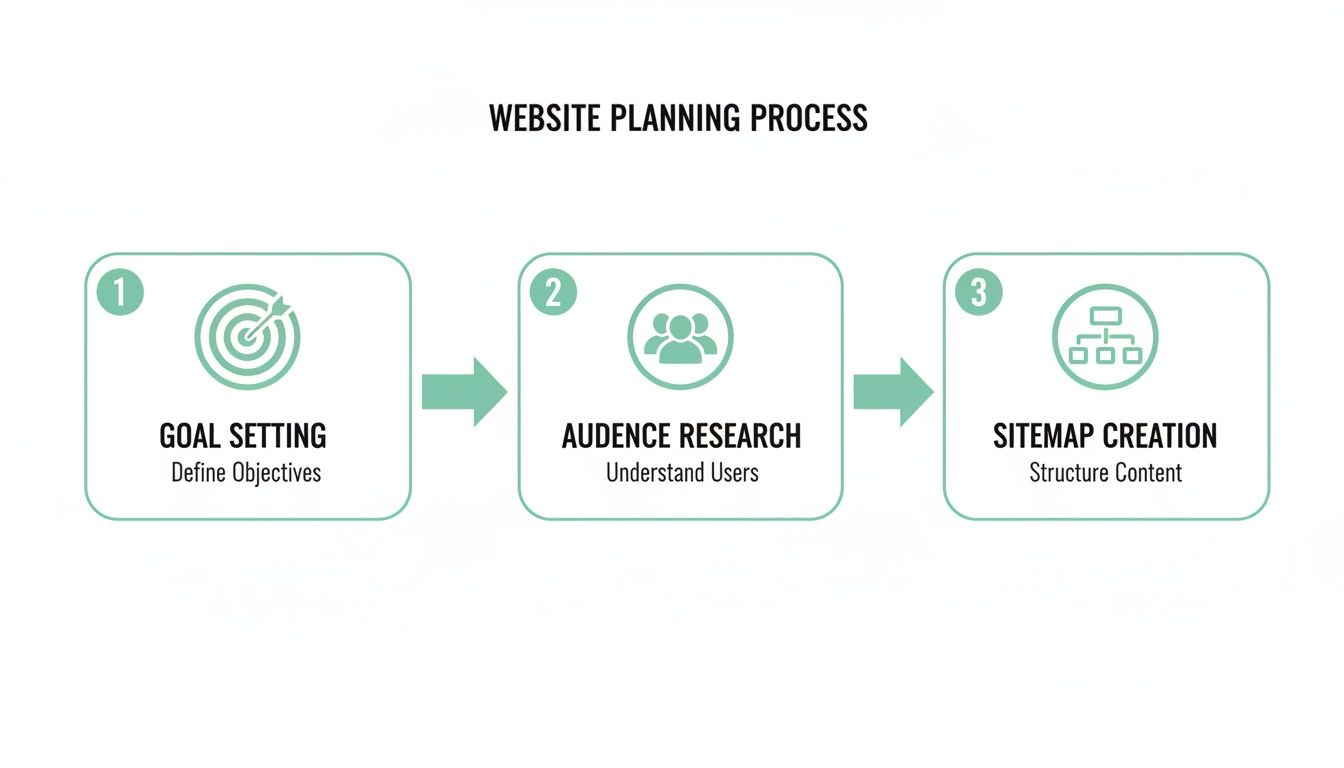
By keeping these core elements at the forefront, you ensure the design process is always guided by your user's needs.
Here’s a hard truth: more Kiwis are browsing on their phones than on their desktops. This isn’t a trend anymore; it’s just the way it is. If your website doesn't look and work flawlessly on a small screen, you're losing customers. Period.
This is why we talk about responsive design.
Responsive design means your website automatically adjusts and reshapes itself to fit perfectly on any screen, from a massive desktop monitor to a tiny smartphone. It’s not a fancy add-on; it’s a non-negotiable standard for modern web design.
Imagine trying to read a newspaper through a keyhole. That's what a non-responsive website feels like on a phone—you’re pinching, zooming, and scrolling sideways just to read a sentence. It’s a terrible experience, and nearly 60% of users say they won't recommend a business with a poorly designed mobile site.
Designing for mobile first flips the traditional process on its head. Instead of designing for a big screen and then trying to cram everything onto a small one, you start with the most constrained view—the phone. This forces you to focus on what’s truly essential.
This approach is a core part of what’s known as human-centred design, where the focus is always on creating an experience that works for real people in the real world. By prioritising the mobile experience, you ensure your site is accessible and easy to use for the majority of your visitors. It’s about creating a seamless journey that builds trust and gently guides people toward taking action, no matter what device they’re using.
A great website is more than just a pretty online brochure. Let's be honest, it needs to be a hard-working tool that makes your life easier and helps your business grow. Think of it as your best salesperson, working around the clock to bring in leads.
So, what’s actually under the bonnet? Let's break down the essential features every small business website in New Zealand absolutely needs.
Have you ever needed to change your opening hours for a public holiday, only to email a developer, wait for days, and then get a bill for a five-minute job? It's a common frustration and a massive bottleneck. This is exactly why a Content Management System (CMS) is a non-negotiable feature.
A CMS is simply a user-friendly system on the back end of your website that lets you, the business owner, make your own updates. Platforms like WordPress, Shopify, or Squarespace are great examples. They empower you to log in and change text, upload new photos, or publish a blog post without needing to know a single line of code.
It puts you in control, saving you both time and money. That’s the whole point, right?
Every page on your website should have a job to do, guiding visitors towards a specific goal. This is where a clear Call-to-Action (CTA) is crucial. A CTA is exactly what it sounds like—it’s a button or link that tells your visitors what to do next.
Don't be subtle about it. You need clear, action-focused language, such as:
Without a strong CTA, visitors are left wondering, "Okay, what now?" A confused visitor is one who quickly clicks away. Alongside this, a secure and simple contact form is essential. It should be easy to find and only ask for what you truly need—name, email, phone, and a message is usually plenty.
If you're selling products, your ecommerce setup can genuinely make or break your business. We've all been there: a clunky, confusing checkout process is the number one reason people abandon their online shopping carts. Your store needs to provide a smooth, secure experience from the moment someone adds an item to their cart to the second they get that order confirmation email.
A seamless ecommerce experience isn't just about making sales; it's about building trust. Customers need to feel confident that their payment information is secure and that their order will be handled professionally.
Features like high-quality product images, straightforward shipping options (especially for NZ addresses), and secure payment gateways like Stripe or PayPal are non-negotiable. These elements transform your site from a simple catalogue into a reliable, revenue-generating storefront.
Your business probably already relies on a bunch of different digital tools. Maybe you use Xero for accounting, Mailchimp for email newsletters, or a specific system for booking appointments. Your website shouldn't live on an island; it needs to connect with these other tools.
This is where integrations come in. For example, your contact form could automatically add new leads to your email marketing list, or your online sales could sync directly with your accounting software. These connections automate tedious tasks and eliminate hours of mind-numbing manual data entry.
It's a huge efficiency gain that lets your technology do the heavy lifting for you. The good news for Kiwi businesses is that finding the right expertise is becoming easier. The web design industry in New Zealand is growing, with employment for developers projected to increase by 8% by 2033. This growth, particularly in hubs like Auckland and Christchurch, means there's a growing pool of local talent ready to build these crucial features. You can learn more about the demand for web design in Christchurch and what it means for your business.
You could pour your heart and soul into building the most beautiful website in New Zealand, but what’s the point if your customers can’t find it? It’s a bit of a scary thought, isn’t it? This is exactly where Search Engine Optimisation (SEO) comes into play.
More specifically, we need to talk about local SEO. This is the art of making sure your business pops up when people right in your area search on Google. For a plumber in Auckland, showing up for a "plumber near me" search is pure gold. It’s the 21st-century version of having the biggest ad in the Yellow Pages.
This isn't about trying to trick Google with some secret digital handshake. It’s simply about making it incredibly clear what you do, where you do it, and why you’re the best choice in the neighbourhood. A little bit of focused effort here can lead to a steady stream of free, high-quality leads from people who are literally searching for your services right now.
The absolute foundation of getting found is understanding the words your potential customers are actually typing into that Google search bar. We call these keywords, but really, it’s just your customer’s language.
Think about it. Are people in Christchurch searching for “cafe with wifi” or is it “best flat white Christchurch”? Those small differences matter immensely. A great place to start is just to put yourself in their shoes. If you needed your own product or service, what would you search for?
Once you have a good idea, you simply weave these phrases naturally into your website’s pages, especially your homepage and service pages. The goal is to match the language on your site to the language your customers use. It sounds simple, but you’d be surprised how many businesses get this wrong.
When your website speaks the same language as your local customer, Google sees a perfect match. This is the core of local search: connecting a local need with a local solution. Your website is that solution.
Tailoring your online presence is critical for smaller operations, and you can dig deeper into SEO specifically for small businesses to get a fuller picture.
Honestly, your Google Business Profile (GBP) is one of the most powerful free marketing tools you have at your disposal. It’s that info box you see on the right side of Google search or in Google Maps, showing off your hours, phone number, photos, and all-important reviews.
Getting this profile right is a massive win for local SEO. Here’s what to focus on:
Think of your Google Business Profile as the digital front door to your business. Neglecting it is like boarding up the windows on your actual shop.
To get you started, here are a few high-impact tasks any small business in Auckland or Christchurch can tackle right away.
| Task | Impact Level | Estimated Time |
|---|---|---|
| Claim & fully complete your Google Business Profile | High | 1-2 hours |
| Add 5-10 recent, high-quality photos to your GBP | Medium | 30 minutes |
| Get listed in 2-3 key NZ business directories | Medium | 1-2 hours |
| Ask 5 happy customers for a Google review | High | Ongoing |
| Add your suburb/city to your website's page titles | Medium | 30-60 minutes |
| Check your Name/Address/Phone is consistent online | High | 1 hour |
Even knocking off one or two of these tasks this week can start moving the needle in the right direction.
Beyond what’s on your own website, Google is always looking for other clues that you’re a real, active part of the local community. These are digital signals that confirm your business's name, address, and phone number (what we call NAP) are consistent across the internet.
This means getting your business listed in relevant Kiwi business directories and making sure every single detail is identical everywhere. It also loops back to those crucial customer reviews. Taking the time to respond to both glowing and critical reviews shows everyone that you’re engaged and genuinely care about your customers.
For any business in a competitive market like Auckland, these local signals can be the one thing that pushes you ahead of your competitors in search results. It’s all about building trust, and every consistent mention of your business online is another vote in your favour.
Alright, you’re ready to get a professional website built. This is a big decision—maybe one of the most important you'll make for your business's online presence. How do you find a partner who actually gets what you’re trying to do, can deliver real results, and won't vanish into thin air after the final invoice is paid?
Picking someone to build your small business web design is about far more than just technical skill. It’s about finding a genuine partner who feels like an extension of your own team. You want someone who is as invested in your success as you are. A good partner doesn't just build a website; they build a long-term asset for your business.
When you start browsing portfolios, it's incredibly easy to get wowed by flashy designs and slick animations. But you need to dig a little deeper than that.
Does their work actually solve business problems? Look for case studies or project descriptions that explain the why behind the design. Even more importantly, do they have experience in your industry, or with Kiwi businesses like yours? A designer who specialises in ecommerce for fashion brands might not be the best fit for a local tradie in Christchurch. Look for proof that they understand your world and your customers.
A great portfolio doesn’t just show what a designer can do; it shows how they think. It should demonstrate a clear process for turning a business's goals into a functional, beautiful website.
When you first chat with a potential partner, don't be shy. This is your chance to see if you're a good fit. Think of it less like a formal interrogation and more like a first date—you're both trying to figure out if you're compatible.
Here are a few essential questions to ask:
The right partner will have clear, confident answers. When a partnership is solid, it lasts. For instance, top Auckland web design providers find that 98% of their customers stick with them year after year. The tiny 2% churn rate is mostly due to businesses closing down, not unhappiness. You can dive into the details about the long-term value of a strong web design partner in Auckland to see why that retention is so high.
Finally, trust your gut. If something feels off during your conversations, it probably is.
Watch out for promises that sound way too good to be true, like "We'll get you to #1 on Google in a week!". Be wary of pricing that's mysteriously vague or hard to pin down. A true professional will be transparent about their process and their costs from the very beginning.
Your goal is a partnership built on trust and clear communication, one that leads to a website that genuinely works for your business.
So, you're thinking about a new website. It’s a big step, and it’s completely normal to have a heap of questions swirling around. Let’s tackle a few of the most common ones we hear from Kiwi business owners just like you.
Honestly, getting clarity on these things from the start makes the whole process feel less daunting. It’s about turning a big, vague idea into a manageable, exciting project.
This is the big one, isn't it? It's a bit like asking "how much does a car cost?" – the answer really depends on what you need it to do. A simple, professional five-page site for a local service business will be in a completely different ballpark than a custom ecommerce store with hundreds of products.
Think of it this way:
The key is to get a detailed quote that breaks down exactly what you're paying for. Avoid anyone offering a price that sounds too good to be true – it almost always is.
Patience is a virtue, but you also need a timeline you can plan around. Just like the cost, the timeframe for a small business web design project depends heavily on its complexity. A straightforward site can often be designed and launched in 4 to 6 weeks.
However, a more complex ecommerce site or a project with custom functionality could take 8 to 12 weeks or even longer. One of the biggest factors influencing the timeline is you! Having your content—the text and images for your site—ready to go from the start can massively speed things up. Waiting on content is the most common reason for project delays.
Feeling a bit unprepared? Don't worry, a good web design partner will guide you. But if you want a head start, having a few things sorted out makes a world of difference.
Having a clear vision for your brand and your goals before you begin is the single best way to ensure a smooth, successful project. It's the foundation everything else is built on.
Before you kick things off, try to have a think about:
Having these assets ready doesn't just speed up the process; it ensures the final product truly reflects your business's unique identity.
Ready to turn those questions into a plan? At NZ Apps, we specialise in creating professional websites that get real results for Kiwi businesses. Get in touch for a free, no-obligation consultation and let's build something great together.