
Let's cut right to the chase. You want to know what a new website is going to cost your business here in New Zealand. The short answer? A professional website for a Kiwi small business will typically set you back anywhere between $3,000 and $20,000 NZD.
But that's a huge range, isn't it?
Think of it like buying a car. You can get a reliable, pre-owned runabout to get you from A to B, or you can invest in a brand-new, high-performance machine with all the bells and whistles. Both are cars, sure, but they serve different purposes and come with very different price tags. Your website is exactly the same.
Trying to pin down the cost of a new website can feel a bit like guessing the length of a piece of string. It's frustrating when you just want a straight number. I get it. The thing is, that final number is shaped entirely by what you want your website to do for you—your goals, your business needs, and the complexity of the digital 'engine' you want humming under the hood.
A simple, beautiful online brochure—basically a digital front door for your business—is one thing. An all-singing, all-dancing e-commerce platform that needs to process hundreds of orders is another beast entirely.
To give you some real-world context, a basic one-pager in New Zealand often starts at around $3,000 NZD. If you need something more complex, like custom design work or a booking system, you’re more likely looking at the $8,000–$15,000 range. And honestly, this is where most serious small businesses land. For a deeper dive into these pricing tiers, industry experts like White Rabbit NZ offer some great insights.
To help you budget, it's useful to see what you get at different investment levels. Let's look at a few common project types. This isn't gospel, but it's a solid starting point for any Kiwi business owner wondering where they fit.
Here's a quick summary to get you started:
This table breaks down typical website project costs in New Zealand based on common business needs and complexity.
| Website Type | Typical NZD Cost Range | Best For |
|---|---|---|
| Brochure Website | $3,000 - $8,000+ | Service businesses (plumbers, consultants, cafes) needing a professional online presence to showcase work and build trust. |
| Lead Generation Website | $8,000 - $15,000+ | Businesses focused on growth, needing optimised forms, strong calls-to-action, and content (like a blog) to attract and capture leads. |
| E-commerce Store | $10,000 - $30,000+ | Retail businesses needing a full online shop with product catalogues, secure payment gateways, inventory management, and customer accounts. |
As you can see, it's all about matching the investment to the expected return.
And that brings us to the next point. The choice of who builds your site—a local agency, a freelancer, or an offshore team—also plays a huge role in the final cost. To get a better feel for how different hiring models can impact your budget, this guide on outsourcing web development is really insightful. It helps frame the conversation around value, not just the initial price tag.
So, the cost of a website is a direct reflection of the time, skill, and technology required to bring your vision to life. Let's dig into that a little more.
Ever received a quote for a new website and just stared at the final number, wondering how on earth they came up with it? It can feel a bit like a mystery, but a professional quote isn't just a number plucked from thin air. It’s more like getting a quote from a builder for a home extension—the final price depends entirely on the blueprints.
A website's cost is a direct reflection of the time, skill, and resources needed to bring it to life. Two businesses might say they want a "new website," but what that actually means under the hood can be worlds apart. So let's pull back the curtain and look at the real ingredients that shape the final price tag.
This quick hierarchy gives you a visual on how the costs stack up, from a basic online brochure to a more advanced digital tool for your business.
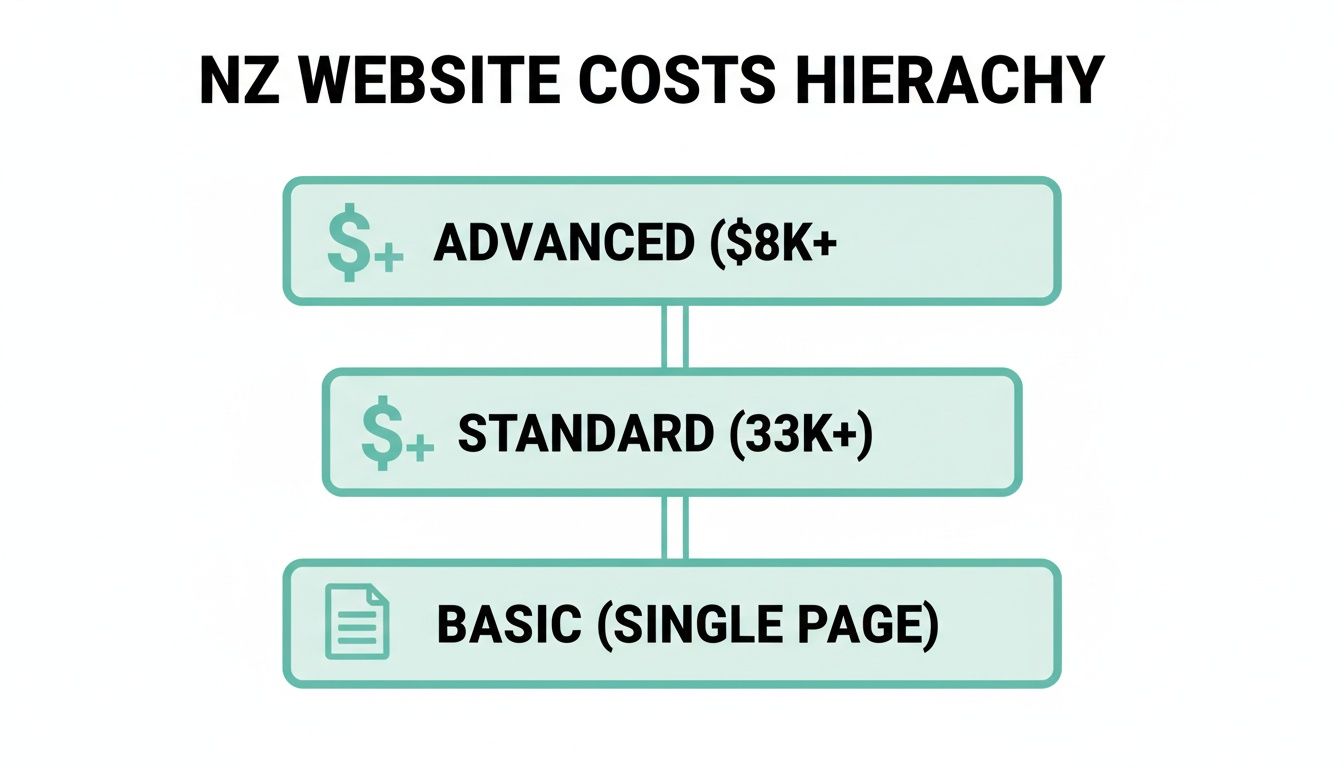
As you can see, the jump from a simple page to a feature-rich site involves a huge leap in complexity, and that's directly reflected in the cost.
This is probably one of the biggest forks in the road you'll face, and it has a massive impact on your budget. Using a pre-made template (think Squarespace or a theme from ThemeForest) is like buying a suit off the rack. It’s faster, much cheaper, and can look pretty sharp. The catch? It was designed for everyone, not specifically for you.
A custom design, on the other hand, is the bespoke, tailor-made suit. It's built from the ground up to perfectly fit your brand, your specific customers, and your unique business goals. Naturally, this process involves a whole lot more strategy, creativity, and time—and the price tag reflects that expertise.
A custom design isn't just about looking unique; it's about solving your specific business problems. If your customer journey is complex or you need to stand out, a template might just not cut it.
So, which path is for you? If you're a startup on a shoestring budget, a template is a perfectly respectable way to get online. But if you're an established business fighting to make an impact in a crowded market, a custom design is a powerful investment in your brand's future.
Once the design is signed off, someone has to actually build the thing. This is the "development" phase—all the behind-the-scenes coding that makes the website actually function. The more complex the features you need, the more hours a developer has to spend writing, testing, and perfecting the code.
Here’s a simple way to think about it:
Every layer of functionality adds to the development time and, as a result, the cost. That slick little animation might look simple on the screen, but it could easily take a developer a full day to get it working perfectly across all devices.
A CMS, or Content Management System, is the engine room of your website. It's the software that lets you update content—like adding a new blog post or changing a photo on the homepage—without having to call a developer every time. Popular choices here in New Zealand include WordPress, Shopify (for e-commerce), and Squarespace.
Your choice of CMS affects both the initial build cost and your ongoing freedom. A platform like WordPress is incredibly flexible and powerful, but it often requires more technical expertise to set up correctly. A site builder like Squarespace is simpler for the end-user but gives you less room for customisation down the track.
Finally, there are a few crucial elements that often get overlooked in the initial budget but can make or break a website's success. If you're not prepared for them, they can sneakily add to the overall cost.
Understanding these factors puts you in the driver's seat. You can walk into a meeting with a web agency or freelancer knowing exactly what questions to ask, ready to commission a website that truly works for your business.
Right, you’ve got a handle on the key ingredients that make up your website’s cost. Now comes the big question: who’s actually going to build it? This is a genuine fork in the road, and the path you choose—freelancer or agency—will have a massive impact on your budget, the process, and the final outcome.
It’s not just about chasing the cheapest quote. Are you after a one-on-one relationship with a single expert, or do you need the firepower and safety net of a full team? Let’s break it down.
Hiring a freelancer is like working directly with a skilled artisan. You get one person, one point of contact, which can make communication feel incredibly direct and personal. They’re often more flexible with their time and can be a cost-effective choice, especially for smaller, well-defined projects.
But what does that look like in terms of cost? Honestly, it varies wildly. A freelancer’s hourly rate is a direct reflection of their experience, their location, and how in-demand their skills are.
Here in New Zealand, you’ll find freelance web designers typically charge an average hourly rate of around $100 NZD. That can dip lower for someone just starting out, or climb as high as $250 NZD for a seasoned professional, especially in a competitive market like Auckland. For a basic website, you could be looking at 10-30 hours of work, putting the total cost anywhere from $1,000 to $5,000 NZD.
The catch? A freelancer is just one person. If they get sick, go on holiday, or are swamped with other client work, your project might hit a speed bump. They might be a brilliant designer but less experienced on the technical development side, or vice versa. You’re banking on one person’s specific skill set to get the job done.
Now, let’s talk about agencies. Partnering with a digital agency is like hiring a general contractor to build your house. You don’t just get one person; you get a project manager, a designer, a developer, a copywriter, and maybe even an SEO specialist—all under one roof. It’s a comprehensive, all-in-one service.
Agencies almost always work on a fixed project price rather than an hourly rate. They’ll scope out the entire project from start to finish and give you a single figure. This provides budget certainty, which is a huge relief for many business owners. No one likes surprise invoices.
An agency’s value isn’t just in the final website; it's in the collective expertise and streamlined process. You're paying for reliability, a broader skill set, and a safety net.
Of course, that all-inclusive service comes at a higher price. Agencies have more overheads—office space, full-time salaries, software subscriptions—and that’s factored into their quotes. But what you get in return is a team of specialists dedicated to your project's success. There’s always someone available to answer a question, and the combined brainpower can often solve complex problems far more effectively.
If you’re leaning towards an agency, it's worth exploring guides that list proven web design companies in Auckland to see the kind of work they produce.
Honestly, there’s no single right answer here. It all comes down to your budget, the complexity of your project, and how hands-on you want to be.
For a deeper look into how different providers structure their services, comparing different website building approaches can offer some valuable perspective on how project scope influences cost across the board. Ultimately, the best choice is the one that gives you confidence that your investment is in safe hands.
Thinking of launching an online store? Great move. But let’s be honest for a moment—e-commerce is a whole different ball game compared to a standard brochure website. The second you start taking payments, managing inventory, and dealing with shipping, the complexity (and the cost) naturally jumps up.
The price tag for an e-commerce site isn't just about making it look sharp. It's about building a secure, reliable engine that works for you around the clock. It has to handle customer data safely, process payments without a single hiccup, and make the whole shopping journey feel completely effortless for your customers.
One of the first big decisions you'll face is whether to use a ready-made e-commerce platform or go for a fully custom-built solution.
Platforms like Shopify or BigCommerce are popular for good reason. Think of them like renting a retail space in a premium shopping centre; the core infrastructure is already built, secure, and ready for you to move in. You pay a monthly fee, which makes your budgeting nice and predictable. For many Kiwi startups, this is the perfect way to get into online sales.
A custom-built e-commerce site, on the other hand, is like building your own flagship store from the ground up. You get total control over every last detail, from the user experience to unique backend systems. This freedom is amazing, but it comes with a much larger upfront investment in design and development.
A custom build really makes sense when you have unique business needs that an off-the-shelf platform just can't accommodate. For most businesses just starting out, a platform like Shopify has more than enough firepower to get you selling.
In New Zealand, the budget for an online store can vary wildly. You could get started for as little as $29 NZD a month on a basic Shopify plan, but a custom project could easily run from $2,000 to over $20,000 NZD, all depending on its complexity.
To give you a clearer picture, here’s a sample budget showing the kinds of one-off and ongoing costs you might encounter when launching an online store in NZ.
| Cost Item | One-Off Cost (NZD) | Ongoing Monthly Cost (NZD) |
|---|---|---|
| Platform/Development | $0 - $15,000+ | $45 - $450 |
| Theme/Design | $0 - $5,000 | $0 |
| Payment Gateway Setup | $0 | Transaction Fees (~2.7% + 30c) |
| Domain Name | $30 (Annual) | $0 |
| Premium Apps/Plugins | $0 - $1,000 | $20 - $200 |
| Hosting (for custom builds) | $0 | $30 - $150 |
| SSL Certificate | Often Included | $0 - $20 |
| Initial Content/Product Entry | $500 - $4,000 | $0 |
This table shows how quickly costs can add up, but also highlights that a platform-based approach can keep those initial expenses much lower. It's all about balancing your immediate budget with your long-term goals.
Here’s the thing—the platform subscription or the initial development quote is rarely the final number. E-commerce comes with a handful of ongoing costs that can catch you by surprise if you’re not ready for them.
Let’s call them the "hidden" essentials.
Understanding these variables from the get-go helps you build a much more realistic financial plan. For a deeper look into what goes into a successful online store, you might be interested in our guide to e-commerce website design and how we approach it. Getting these details right is the key to launching a store that not only looks great but is built for real, long-term growth.
Nothing kills a project faster than a budget that blows out. It’s a story I’ve seen play out time and time again: you kick things off with a clear, exciting plan, and then, a few weeks in, someone says, “Hey, you know what would be cool? Can we just add this one little feature?”
That’s it. That’s scope creep. It’s the quiet, sneaky enemy of your budget and the number one reason a project’s cost spirals out of control.
Think of it like renovating your kitchen. You’ve budgeted for new benchtops and a splashback. Then you think, "While we're at it, let's get a new oven." And soon enough, "The flooring looks a bit dated now, doesn't it?" Each "little" addition feels reasonable at the time, but together, they completely torpedo your original financial plan.
This section is your survival guide. It's all about putting a few simple, smart guardrails in place to keep your website costs firmly on track. A bit of planning upfront will save you a world of financial pain down the road.
Honestly, this is the single most important document you’ll create. A vague brief is just an open invitation for misunderstandings and, you guessed it, scope creep. Your project brief becomes the 'source of truth' that you and your designer or agency will come back to again and again.
Don't just write "I want a modern-looking website." What does 'modern' even mean to you? It’s time to get specific.
A detailed brief doesn't stifle creativity; it focuses it. It gives your design team a clear target to aim for, ensuring the solution they build is the one you actually need.
Going through this process forces you to think critically about what really matters. Is that fancy animated header a 'must-have', or is it a 'nice-to-have' that could easily eat up 10% of your total budget?
Once the project is rolling, new ideas will pop up. It’s only natural. The trick is how you handle them. Instead of an immediate "yes," the magic phrase is, "That's a great idea. Let's add it to the list for Phase Two."
This simple habit achieves two things. First, it validates the idea without derailing the current momentum. Second, it keeps the project focused on launching the core, essential version of your site—what we call the Minimum Viable Product (MVP).
Getting your website live and in front of actual customers is far more valuable than delaying the launch for another six weeks to perfect a minor feature. You can always improve and expand later based on real user feedback, not just guesswork.
Never be afraid to ask questions. If your designer suggests a new feature, ask them, "How does this help us achieve our main goal?" and "What's the time and cost involved in adding this?" Clear, consistent communication is the ultimate antidote to assumptions.
Regular check-ins—even a quick 15-minute call each week—can keep everyone on the same page and stop small misunderstandings from turning into expensive problems. Remember, your web team can't read your mind. The more you communicate your vision and your constraints, the smoother the whole process will be.
By defining your scope with military precision, prioritising ruthlessly, and communicating openly, you take control of the process. It’s the best way to ensure you get the website your business needs, delivered on time and, most importantly, on budget.
We get asked about website costs all the time, and chances are, you've got a few of your own rattling around. It’s a big investment, and you absolutely should feel confident before you commit. So, let’s tackle some of the most common queries we hear from Kiwi businesses.
We’ll give it to you straight, with no fluff, so you have the clarity you need.
Ah, the classic. You've budgeted for the build, but what about keeping the lights on? Launching a website is just the beginning; it's not a 'set and forget' asset. Think of it like a car—you don’t just buy it and then never get it serviced.
Ongoing maintenance is essential for security, performance, and your own peace of mind. Here in New Zealand, a typical maintenance plan for a small business website can range from $50 to $200 NZD per month.
So, what does that money actually get you? Usually, it includes:
Ignoring maintenance is a gamble. You might save a few bucks in the short term, but cleaning up a hacked or broken website will cost you far, far more in the long run—not to mention the damage to your reputation.
On the surface, yes, absolutely. A DIY website builder like Squarespace or Wix looks incredibly appealing when you just look at the price tag. You can get a site online for a low monthly fee, often starting from around $30-$50 NZD per month. Seems like a no-brainer, right?
But you have to compare the true cost, not just the sticker price. The biggest cost of a DIY builder is your own time. And let's be honest, your time is valuable. How many hours will you spend learning the platform, wrestling with the design to make it look just right, writing all the content, and figuring out basic SEO?
A professionally designed website isn’t just about making something that looks pretty. It’s about strategy. It's about building something that's engineered to turn visitors into customers.
A website builder gives you a tool, but a professional designer gives you a solution. You're paying for their expertise in user experience, conversion strategy, and SEO—things that directly translate into more business.
So while a DIY builder is definitely cheaper upfront, a professionally built site is often a much better long-term investment because it’s designed from day one to actually grow your business.
This is a fantastic question, and the answer is... it depends on how you approach it. Search Engine Optimisation (SEO) isn't just one single thing; it's an ongoing process. A good way to think about it is in two parts.
First, there's foundational SEO. This should absolutely be part of the initial website build and included in the cost. It covers the technical essentials that help Google understand and rank your site, like mobile-friendliness, fast load times, a logical site structure, and basic keyword research for your main pages. Building a website without this is like building a beautiful shop with no sign out front.
Then, there's ongoing SEO. This is a separate, recurring service focused on actively improving your rankings over time. It involves activities like creating new content (like blog posts), building links from other reputable sites, and analysing performance data. This is almost always a separate monthly retainer, and it’s a crucial investment if you’re serious about getting found online.
So, to be clear: basic, foundational SEO should be baked into your initial website designing cost. A comprehensive, ongoing SEO campaign is a separate, but vital, marketing expense.
Let's be direct about this. For under $2,000 NZD, getting a custom-designed, professionally built website from a reputable Kiwi agency is going to be extremely difficult, if not impossible. The numbers just don't add up when you factor in the hours required for strategy, design, development, and project management.
So, what are your options at this price point?
It’s not to say you can't get online for under $2,000. You certainly can. But it’s important to be realistic about what you're getting. You’ll be trading a bespoke, strategic solution for a more off-the-shelf approach. And for some businesses just starting out, that's a perfectly sensible trade-off to make.
Ready to get a clear, no-surprises quote for a website that truly works for your business? The team at NZ Apps specialises in crafting professional, high-performing websites for Kiwi businesses. Get in touch for a free consultation and let's talk about your project.